populate default value in AEM touch ui dialog fields 6.2 | Community
Skip to main content
Level 3
July 23, 2018
Solved

populate default value in AEM touch ui dialog fields 6.2

  • July 23, 2018
  • 3 replies
  • 6628 views

Hi Team,

There is a property called "value" to populate default values in AEM touch ui dialog fields.

When i insert component for first time, I am able to see the default value populated in field .

But if i delete default value and submit the dialog., next time i open dialog for editing I am not able to see default value.I can see empty space in dialog field.

This happened after we installed CFP14 pack.

AEM (6.2.0.SP10-CFP14)

Please let me know if this a bug or if property name is changed for cfp14 hotfix.

Thanks,

Preetham K.R
This post is no longer active and is closed to new replies. Need help? Start a new post to ask your question.
Best answer by smacdonald2008

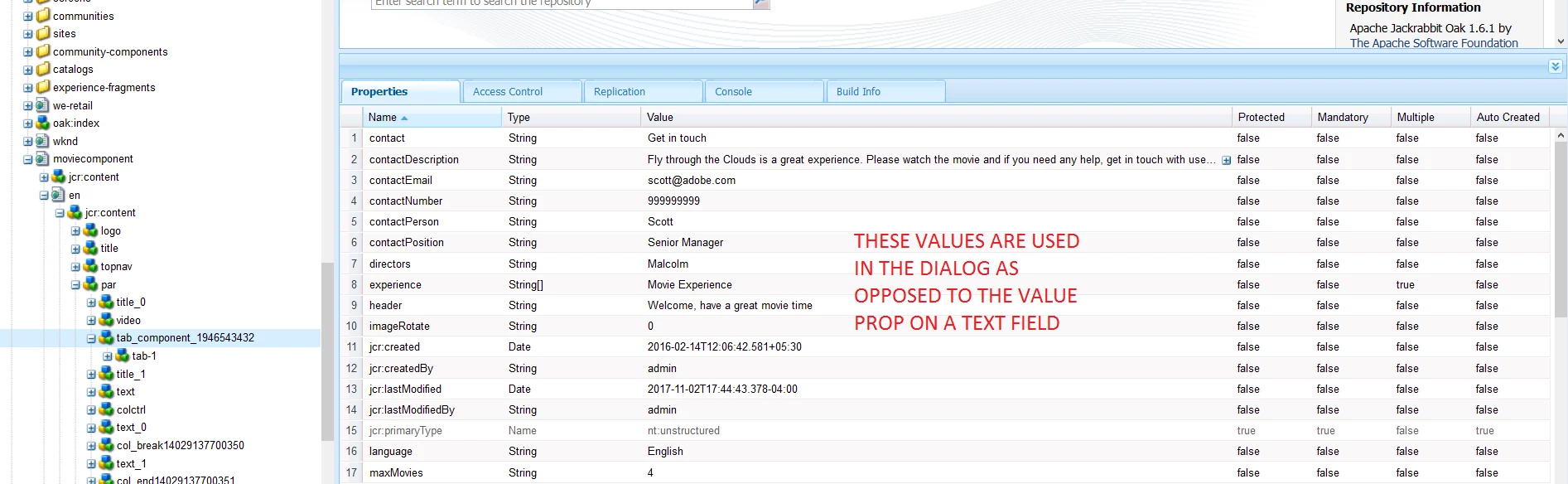
As soon as you set the values in a dialog - it populates the AEM JCR with values under /content. For example: /content/moviecomponent/en/jcr:content/par/tab_component_1946543432

As soon as these values are set - and when you re-open the diaog - the values set for that component are used as opposed to the default values.

If you drag a new instance of the component into the page - you will see the default values.

This makes sense too - you do not want to lose the author values set under /content for default values after the component is set with data.

In your example - you are setting textfield to an empty value - that is why it appears empty when you reopen the dialog.

3 replies

smacdonald2008
Level 10
July 23, 2018

I will test this.

smacdonald2008
smacdonald2008Accepted solution
Level 10
July 23, 2018

As soon as you set the values in a dialog - it populates the AEM JCR with values under /content. For example: /content/moviecomponent/en/jcr:content/par/tab_component_1946543432

As soon as these values are set - and when you re-open the diaog - the values set for that component are used as opposed to the default values.

If you drag a new instance of the component into the page - you will see the default values.

This makes sense too - you do not want to lose the author values set under /content for default values after the component is set with data.

In your example - you are setting textfield to an empty value - that is why it appears empty when you reopen the dialog.

Level 3
July 24, 2018

Hi Scott,

Thanks for the quick Response.

But this was not existing behavior before we installed CFP14 pack.

When we had CFP10 , For one of the fields in dialog , i have configured value property to some default text, Whenever i open existing component and submit the dialog by giving empty space in that corresponding field and i open the dialog, default value will be auto populated.

After installing cfp14 , default value is not populating on submitting that field with empty space.Can you please test by adding value property and check again if default value populates in case if u submit dialog with empty field