Blueprint - roll out button is disabled in the site created using blueprint for its live copies. | Community
Skip to main content
Level 2
August 25, 2018
Solved

Blueprint - roll out button is disabled in the site created using blueprint for its live copies.

  • August 25, 2018
  • 3 replies
  • 2076 views

Hello Everyone, Facing a issue in live copy creation through the blueprint. Following the below steps.

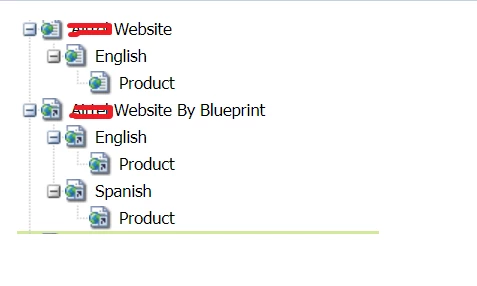
Step 1: Created the below structure in AEM, Containing English(en) site structure.

A*** Website -> English(en) -> Product

Step 2: MSM Control center, created a blueprint of above structure.

Step 3: Create a new 'Site' [Not live copy], using that blueprint created in step-2. [See '** Website by Blueprint' -> English -> Product]

Step 4: Site is created and in sync with the Step-1 site structure. [Working as a live copy of the structure - step-1]

Step 5: Created a live copy from the created site for Spanish(es) from the site created in Step-3.

Rolout button is coming disable in the site which i created in Step-4 i.e. [** Website by Blueprint' -> English -> Product], when i am trying to modify and push the changes into the live copy created in Step-5 i.e. [** Website by Blueprint' -> Spanish -> Product.
Can you please help me in getting the exact issue or if i am missing any thing.

Thanks,

This post is no longer active and is closed to new replies. Need help? Start a new post to ask your question.
Best answer by arunpatidar

Hi,

Please check below if helps

Reusing Content: Multi Site Manager and Live Copy

MSM from the UI

MSM is directly accessible in the UI using various options from the appropriate console. To provide an introduction the following lists the main locations:

  • Create Site (Sites)
    • MSM helps you to manage multiple websites that share common content; for example, websites are often provided for international audiences such that most of the content is common across all countries, with a subset of the content specfic to each individual country. MSM allows you to create live copies that automatically update one or more sites based on your source site. This also helps you to enforce a common base structure, use the common content across the multiple sites, maintain a common look and feel and focus efforts on managing the content that actually differs between the sites.
    • Requires a predefined blueprint configuration to specify the source.
    • Creates a live copy of the (predefined) source.
    • Provides the user with the Rollout button.
  • Create Live Copy (Sites)

https://helpx.adobe.com/experience-manager/6-2/sites/administering/using/msm.html

3 replies

arunpatidar
Community Advisor
arunpatidarCommunity AdvisorAccepted solution
Community Advisor
August 25, 2018

Hi,

Please check below if helps

Reusing Content: Multi Site Manager and Live Copy

MSM from the UI

MSM is directly accessible in the UI using various options from the appropriate console. To provide an introduction the following lists the main locations:

  • Create Site (Sites)
    • MSM helps you to manage multiple websites that share common content; for example, websites are often provided for international audiences such that most of the content is common across all countries, with a subset of the content specfic to each individual country. MSM allows you to create live copies that automatically update one or more sites based on your source site. This also helps you to enforce a common base structure, use the common content across the multiple sites, maintain a common look and feel and focus efforts on managing the content that actually differs between the sites.
    • Requires a predefined blueprint configuration to specify the source.
    • Creates a live copy of the (predefined) source.
    • Provides the user with the Rollout button.
  • Create Live Copy (Sites)

https://helpx.adobe.com/experience-manager/6-2/sites/administering/using/msm.html

Arun Patidar
Level 2
August 26, 2018

Thanks Arun, I went through the documentation of the adobe and several HelpX articles, but i missed the below line

"Requires Synchronize (does not provide the Rollout button)."

I was trying with multiple approaches to create a live copy using site and live copy options. So now the below statement is correct?

If we create a live copy(a) using 'New Site' option and then create another live copy(b) of live copy(a), then it live copy(a) will be having option "Synchronize" instead of Rollout.

arunpatidar
Community Advisor
Community Advisor
August 26, 2018

Indeed.

  • When authoring a blueprint page you can use the Rollout command to push changes to the live copy.The Rollout command is available on a blueprint page that is referenced by a blueprint configuration.

    msm4

  • When authoring a live copy page you can use the Synchronize command to pull changes from the source to the live copy.The Synchronize command is always available on the live copy page (regardless of whether the source/blueprint page is encompassed by a blueprint configuration).

    msm5

    For Nested Live copy you can refer Nested Live Copies section at Reusing Content: Multi Site Manager and Live Copy

Arun Patidar