Invisible AEM 6.2 components post targeting | Community
Skip to main content
michalw51033020
Level 2
January 8, 2020
Solved

Invisible AEM 6.2 components post targeting

  • January 8, 2020
  • 1 reply
  • 2494 views

Hi Guys,


I'm using AEM 6.2 which is integrated with Target thru cloud services for a/b testing and rules based personalization. The logic works properly for both activity types, but there is a bug in the AEM author environment.

After targeting any components they look good unless I leave page. If I leave page or my session expire and I re-visit targeted page, components are invisible. I can see there are some border lines for each component, but the content itself is invisible.
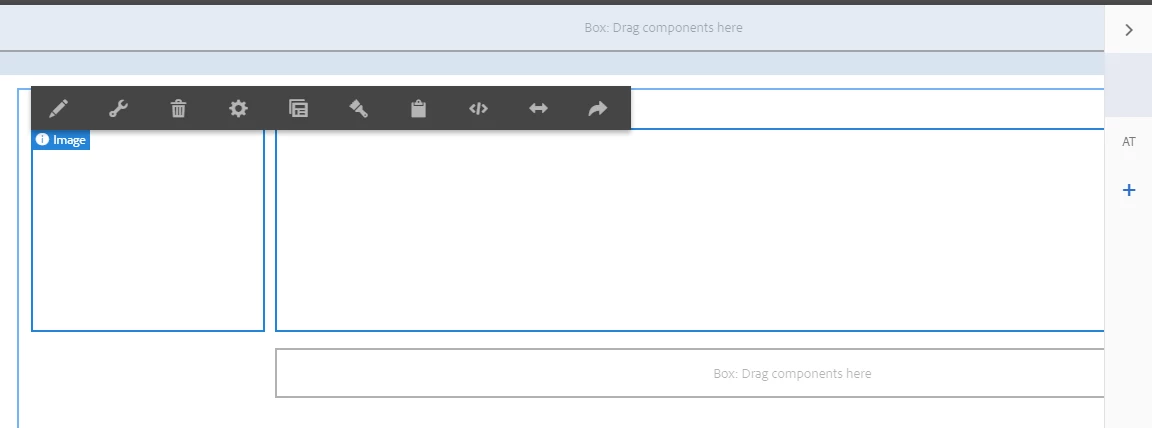


I can normally operate on any component and targeting works properly on publish instance, but it's difficult to work with some components when I can't see them.


I can't see any related errors in the console or AEM error.log

Help? 🤔 🤔

This post is no longer active and is closed to new replies. Need help? Start a new post to ask your question.
Best answer by leoberliant

We are not aware of a known issue with Components in a Targeting Mode. Can you verify that whenever you are back to your test page you are applying a proper audience for the targeted component?

1 reply

leoberliantAdobe EmployeeAccepted solution
Adobe Employee
January 8, 2020

We are not aware of a known issue with Components in a Targeting Mode. Can you verify that whenever you are back to your test page you are applying a proper audience for the targeted component?

michalw51033020
Level 2
January 14, 2020

@leoberliant
I'm setting up A/B test activity which doesn't require any audience to be shared from Target. The activity and its experiences sit in the same AEM instance under "/campaigns" folder. I see the paths are properly selected and content offer is loaded successfully for all page versions but it comes invisible.