Force Sling Mapping to map to https links | Community
Skip to main content
New Member
October 19, 2020
Solved

Force Sling Mapping to map to https links

  • October 19, 2020
  • 1 reply
  • 2423 views

Hi All,


We have 2 sets of sling mapping available in our project.

1 under http folder and other under https folder. Refer to below screenshot:
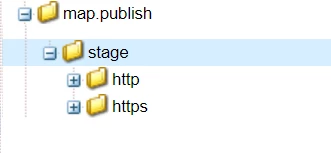
Both contains same set of configuration. 

But when we resolve any relative path in jcrresolver it always points to http variant of the URL.
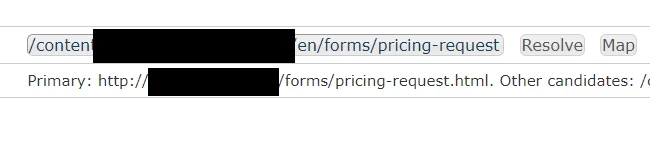
This is resulting in having CTA links from our components pointing to http URLs.


I have also tried enforce https property of "Apache Felix Jetty Based Http Service" configuration but with no success.


I want to set default as https. How can I achieve this?


This post is no longer active and is closed to new replies. Need help? Start a new post to ask your question.
Best answer by vanegi

Hi @atulkumar7,

You need to set up SSL over HTTP for this. Please check our official documentation [0], [1] to enable SSL in AEM.


[0]: https://docs.adobe.com/content/help/en/experience-manager-65/administering/security/ssl-by-default.html

[1]: https://docs.adobe.com/content/help/en/experience-manager-learn/foundation/security/use-the-ssl-wizard.html


After this is done, also put a redirect to route all traffic over HTTPS. Since the SSL settings are done through Granite SSL config com.adobe.granite.jetty.ssl.internal.GraniteSslConnectorFactory. So, the only way to stop the HTTP traffic is to set up redirect as per below and route all http traffic to https.


https://helpx.adobe.com/ca/experience-manager/6-2/sites/deploying/using/config-ssl.html#ForcingtheUseoftheSSLPort


The following example redirects traffic to localhost:4502 to https://localhost:5433. To configure the redirect, create a sling:mapping node. Use a node name that matches requested URL. Add a sling:redirect property to specify the URL for redirection.

  • Click the /etc/map/http folder and click Create > Create Node:

    • Namelocalhost.4502
    • Typesling:mapping
  • Create the following property for this node:

    • Name: sling:redirect
    • Type: String
    • Value: https://localhost:5433
  • Click Save All.

Alternatively, you can specify the text for matching the requested URL as a sling:match property (See Mappings for Resource Resolution in the Apache Sling documentation).


Thanks!!


1 reply

vanegi
Adobe Employee
vanegiAdobe EmployeeAccepted solution
Adobe Employee
October 19, 2020

Hi @atulkumar7,

You need to set up SSL over HTTP for this. Please check our official documentation [0], [1] to enable SSL in AEM.


[0]: https://docs.adobe.com/content/help/en/experience-manager-65/administering/security/ssl-by-default.html

[1]: https://docs.adobe.com/content/help/en/experience-manager-learn/foundation/security/use-the-ssl-wizard.html


After this is done, also put a redirect to route all traffic over HTTPS. Since the SSL settings are done through Granite SSL config com.adobe.granite.jetty.ssl.internal.GraniteSslConnectorFactory. So, the only way to stop the HTTP traffic is to set up redirect as per below and route all http traffic to https.


https://helpx.adobe.com/ca/experience-manager/6-2/sites/deploying/using/config-ssl.html#ForcingtheUseoftheSSLPort


The following example redirects traffic to localhost:4502 to https://localhost:5433. To configure the redirect, create a sling:mapping node. Use a node name that matches requested URL. Add a sling:redirect property to specify the URL for redirection.

  • Click the /etc/map/http folder and click Create > Create Node:

    • Namelocalhost.4502
    • Typesling:mapping
  • Create the following property for this node:

    • Name: sling:redirect
    • Type: String
    • Value: https://localhost:5433
  • Click Save All.

Alternatively, you can specify the text for matching the requested URL as a sling:match property (See Mappings for Resource Resolution in the Apache Sling documentation).


Thanks!!