data sly test to check if dropdown is selected or not | Community
Skip to main content
Level 2
February 10, 2022
Solved

data sly test to check if dropdown is selected or not

  • February 10, 2022
  • 3 replies
  • 1257 views

I have a dropdown with a list of items and I'm trying to show/hide an element only if something is selected from the dropdown.
In this case I'm trying to hide the "hero-icon" class.


<span data-sly-test="${properties.icon}" class="hero-icon"></span>
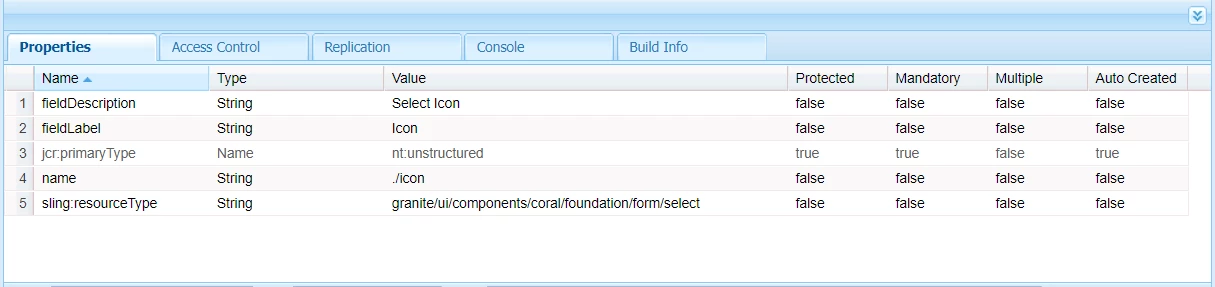
 

How can this be achieved 


This post is no longer active and is closed to new replies. Need help? Start a new post to ask your question.
Best answer by federicov798870

Hi,
If you have defined the select like this:

<icon jcr:primaryType="nt:unstructured"
	sling:resourceType="granite/ui/components/coral/foundation/form/select"
	name="./icon" fieldLabel="Show Icon">
	<items jcr:primaryType="nt:unstructured">
		<hide jcr:primaryType="nt:unstructured" 
text="Hide Icon" value="hide"/>
<show jcr:primaryType="nt:unstructured" text="Show Icon" value="show"/> </items> </icon>


You can wirte something like this by simple adding the equals to the option value that you defined:


<span data-sly-test="${properties.icon=='show'}" class="hero-icon"></span>


3 replies

milind_bachani
Adobe Employee
Adobe Employee
February 10, 2022

Hi @hiteshra3 

I am not sure if I understood the problem statement right, although:

If the value of dropdown is not set there would be NO property set in content with title=icon. 

If the selection has been made there would be a value existing in the content as :


Now, you can simply use data-sly-test as:

<span data-sly-test="${properties.icon}" class="test">some random text</span>

The span (Some random text) will only be displayed if there is something set in content under icon (here, IAMSelected ) property otherwise the span wont be displayed.


Let me know if that answers your question.


Thanks.

federicov798870Accepted solution
Level 2
February 10, 2022

Hi,
If you have defined the select like this:

<icon jcr:primaryType="nt:unstructured"
	sling:resourceType="granite/ui/components/coral/foundation/form/select"
	name="./icon" fieldLabel="Show Icon">
	<items jcr:primaryType="nt:unstructured">
		<hide jcr:primaryType="nt:unstructured" 
text="Hide Icon" value="hide"/>
<show jcr:primaryType="nt:unstructured" text="Show Icon" value="show"/> </items> </icon>


You can wirte something like this by simple adding the equals to the option value that you defined:


<span data-sly-test="${properties.icon=='show'}" class="hero-icon"></span>


Sanjay_Bangar
Community Advisor
Community Advisor
February 11, 2022

Hi @hiteshra3 ,

      In your case do the following

1.On which drop-down  values you wanted to add that class.

2.use below logic 

<Sly data-sly-test="${properties.dropdown=='value1' }">

<div class="hero-icon">

</div>

</sly>