Customizing AEM Forms Workspace | Community
Skip to main content
February 28, 2018
Solved

Customizing AEM Forms Workspace

  • February 28, 2018
  • 14 replies
  • 5567 views

I'm trying to follow the instructions at the following page:

Adobe Experience Manager Help | Generic steps for AEM Forms workspace customization

I executed all the steps, but when I try to navigate to http://[server]:[port]/lc/ws, instead of seeing a login page, I get this:

Not a valid identifier 'index,index.html'

Cannot serve request to /lc/apps/ws/ in org.apache.sling.servlets.get.DefaultGetServlet

Exception:

java.lang.IllegalArgumentException: Not a valid identifier 'index,index.html' at com.google.common.base.Preconditions.checkArgument(Preconditions.java:93) at org.apache.jackrabbit.oak.plugins.identifier.IdentifierManager.getTree(IdentifierManager.java:131) at org.apache.jackrabbit.oak.plugins.identifier.IdentifierManager.getPath(IdentifierManager.java:153) at org.apache.jackrabbit.oak.namepath.NamePathMapperImpl.getOakPath(NamePathMapperImpl.java:97)

I tried tacking on /GET.jsp to the URL, but it tries to download my GET.jsp file instead of compiling/rendering the JSP in the browser.  Why is that?


Any suggestions?

Thanks.
This post is no longer active and is closed to new replies. Need help? Start a new post to ask your question.
Best answer by kdenso01

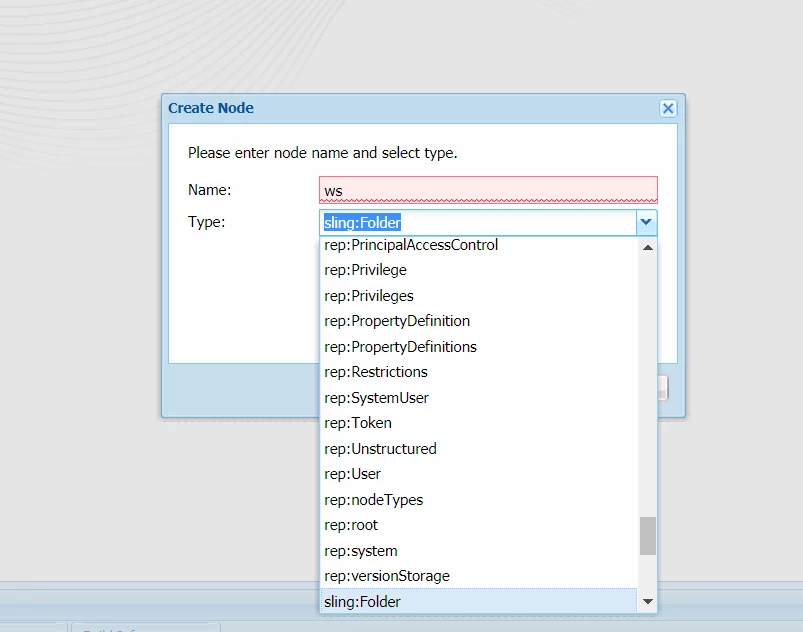
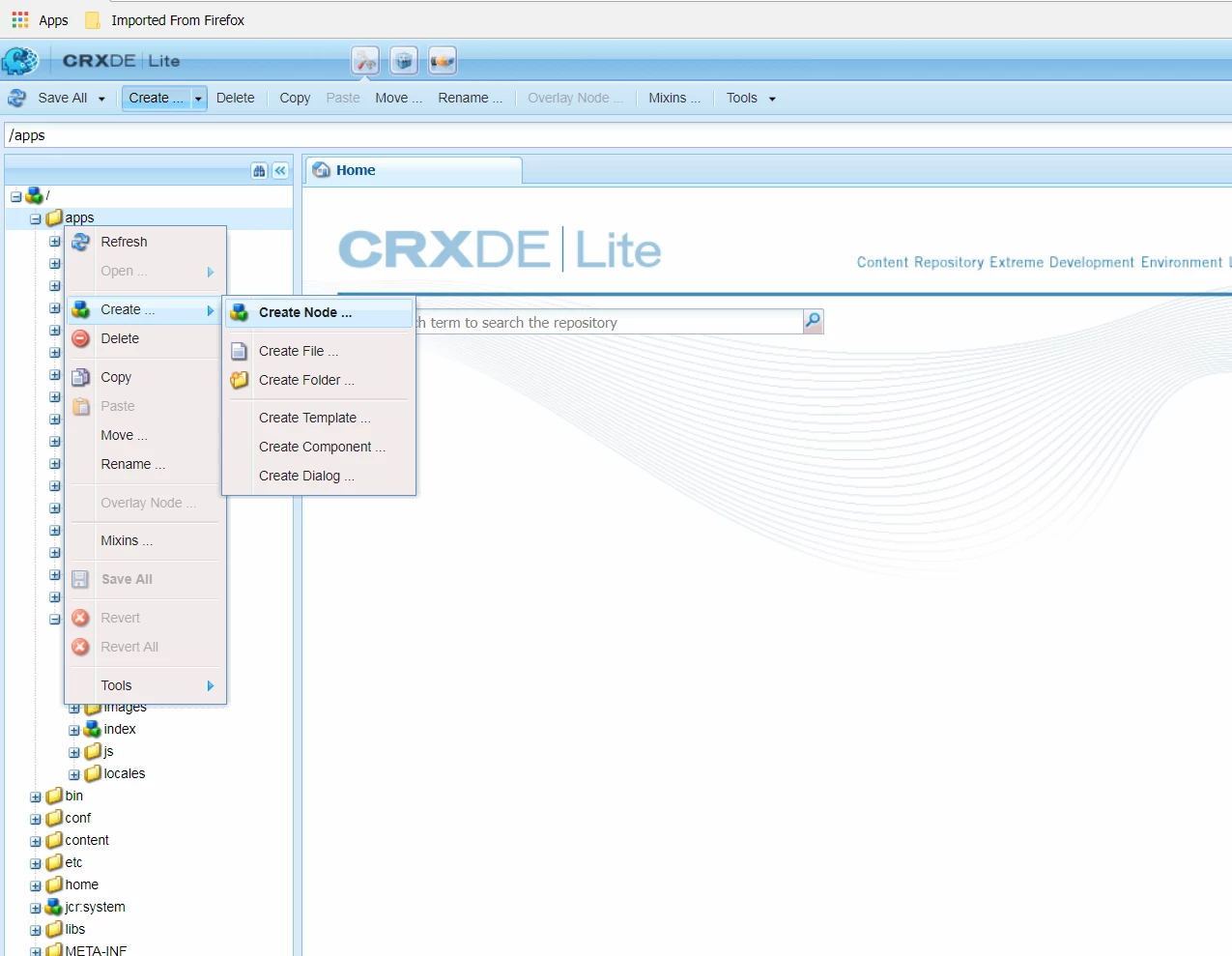
in CRXDe, right click on apps folder, then click on Create Node.  This will open another box.  Enter the name of the node, then enter the type.  you can use the dropdown to look for sling:Folder.

Step one

Step two

14 replies

kautuk_sahni
Community Manager
Community Manager
March 1, 2018

Similar Question:- AEM Adaptive Forms-Unable to redirect user to thankyou page [linking two questions]

Checking internally!

Kautuk Sahni
March 1, 2018

Thanks for pointing out that other post.  The error messages are the same, but the use case is different. 

smacdonald2008
March 1, 2018

We are checking with the team about this topic.

kdenso01
March 12, 2018

Any info on this?  I've tried this twice  and got errors.  have to say that I wonder if there's something going on with those instructions.

kdenso01
March 12, 2018

Ok I sort of answered my own question.

Adobe Experience Manager Help | Generic steps for AEM Forms workspace customization

Here's what I had to do differently:

I noticed in the error page it kept wanting the index file.

In  Step 10, you're asked to point to an index file.

<meta http-equiv="refresh" content="0;URL='/lc/apps/ws/index.html'" />

But it never asks you to actually copy the index file from libs/ws and you're never asked to create one.     If you create the apps/ws folder as nt folder, you can't copy that file over.  So When I redid this I made the folder a sling folder which mimics the /libs/ws folder.

As an extra precaution I logged out then restarted JBoss.

Once I did that, I was able to  get to the page. 

The steps should be straight forward but I just feel like they miss some nuanced steps to make it work as expected.  In all, 10 tries to get this to work.

smacdonald2008
March 12, 2018

We will log a bug on this doc based on your comments.

March 20, 2018

Thank you so much for posting this workaround.  I'm having trouble with the following step:

If you create the apps/ws folder as nt folder, you can't copy that file over.  So When I redid this I made the folder a sling folder which mimics the /libs/ws folder.

How do I make it a sling folder?  I assume that I need to change the jcr:primaryType property, but I don't see how to do that.  Thanks.

kdenso01
kdenso01Accepted solution
March 20, 2018

in CRXDe, right click on apps folder, then click on Create Node.  This will open another box.  Enter the name of the node, then enter the type.  you can use the dropdown to look for sling:Folder.

Step one

Step two

March 20, 2018

kdenso01, you have been enormously helpful.  I will now punish your helpfulness by abusing it with more questions. 

Okay, with your help, I have successfully completed the "generic" steps.  I can even add some CSS customizations in my handy newStyle.css and they work.  Awesome.  Now what though?  I'd like to save up my precious customizations and deploy them to another environment.  I presume that has something to do with the package manager.  I package up my newly created apps/ws somehow and deploy it elsewhere, right?  If so, please point me to the instructions for doing so.

If that's not how it's done, then I'm guessing the answer has something to do with the subject of this article:

Adobe Experience Manager Help | Introduction to Customizing AEM form workspace

After referencing the "generic" article, this "introduction" article goes on to describe the "ship" package and so on.  Huh?  I don't see how the instructions in the "generic" page connect to this.  The "ship" package contains all the CSS and other bits used in the workspace application.  So why did I do that other stuff to create the application under apps/ws?  It seems like there's some missing instructions that connect the steps listed in the "generic" article with the instructions in the "introduction" article.

smacdonald2008
March 20, 2018

Excellent community response!