AEM 6.5 open help in new tab | Community
Skip to main content
tushaar_srivastava
Level 6
February 19, 2025
Solved

AEM 6.5 open help in new tab

  • February 19, 2025
  • 3 replies
  • 940 views

Hi Team,
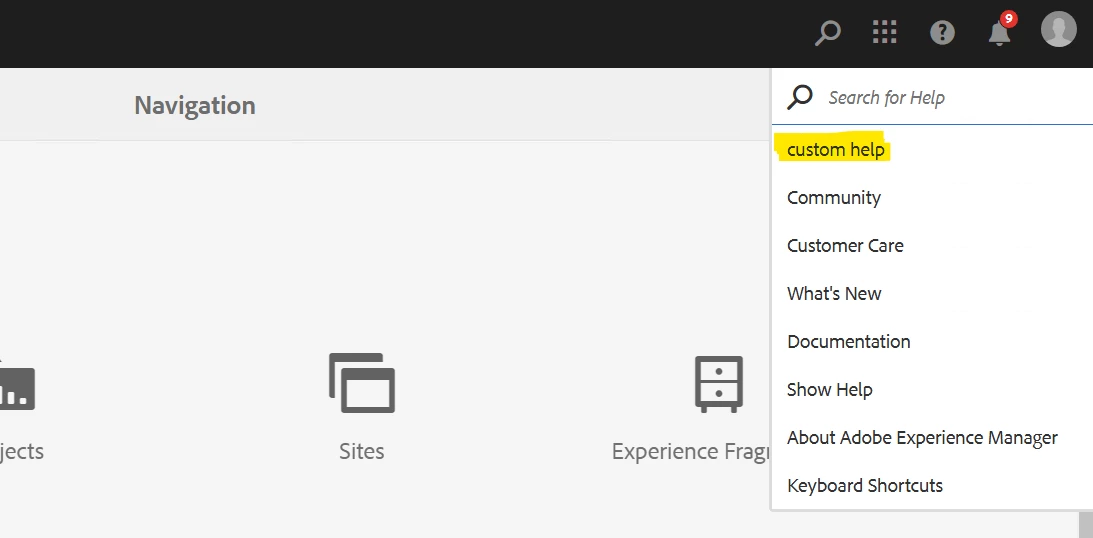
I have to add a new field in the help section and open that filed in new window  which is like

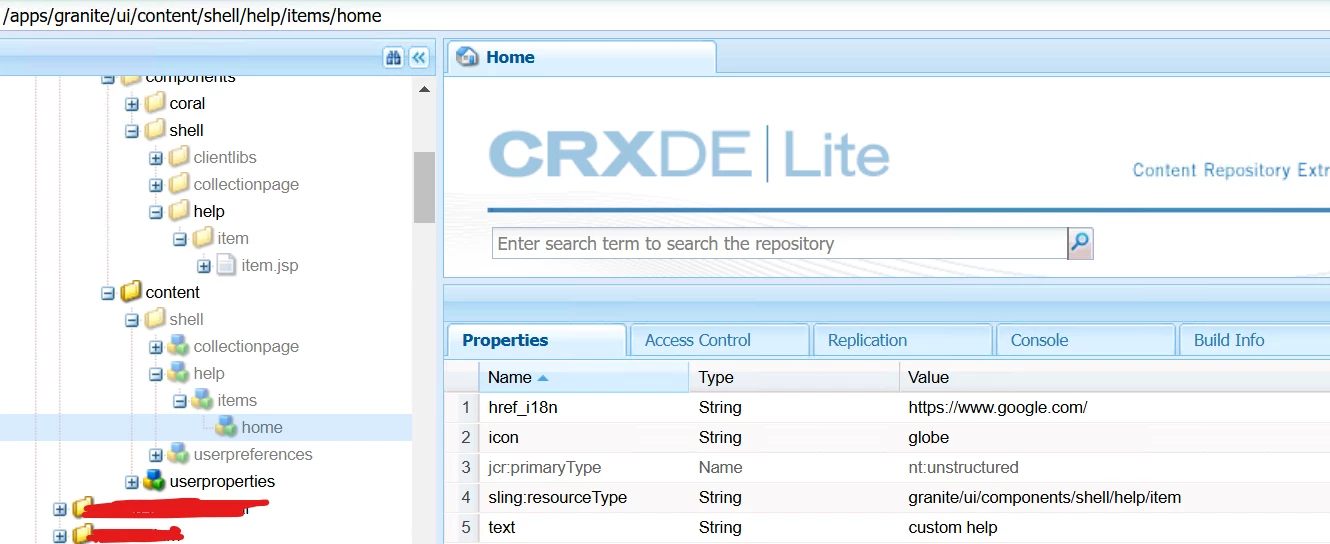
For that, I can simply overlay the

 /libs/granite/ui/content/shell/help/items/home to /apps/granite/ui/content/shell/help/items/home and provide the custom fields


But the problem is all the icons under help open in same window, but I want the custom button to open in a new window,
How can I do that?


Thanks


@kautuk_sahni  @arunpatidar  @lukasz-m  @veenavikraman 

Best answer by narendiran_ravi

Hi @tushaar_srivastava ,

You need to add the target arrtibute in this file - /libs/granite/ui/components/shell/help/item/item.jsp

attrs.add("target","_blank");

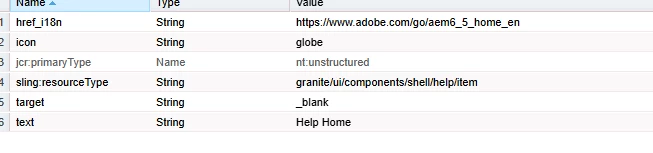
if you want this to be dynamic and configurable for each help options, then add a property called target in each help items like below and read the same in the above JSP attrs.add("target",cfg.get("target", String.class)); instead of hardcoding
 

After adding this, you need to allow this attribute in the allowed list -/libs/granite/ui/components/coral/foundation/clientlibs/foundation/js/xss/xss.js as all HTML response is sanitized for XSS protection.

ADD_ATTR: [ "coral-close", "tracking", "trackingelement", "trackingfeature", "variant", "is", "form", "fieldtrackingidentifier", "trackingWidget", "coral-wizardview-next", "coral-wizardview-previous", "iconposition", "iconsize", "icon", "iconautoarialabel", "block", "sticky", "labelledby","target" ]

You need to overlay all these libs path under your apps before adding these custom changes

3 replies

narendiran_ravi
narendiran_raviAccepted solution
Level 6
February 19, 2025

Hi @tushaar_srivastava ,

You need to add the target arrtibute in this file - /libs/granite/ui/components/shell/help/item/item.jsp

attrs.add("target","_blank");

if you want this to be dynamic and configurable for each help options, then add a property called target in each help items like below and read the same in the above JSP attrs.add("target",cfg.get("target", String.class)); instead of hardcoding


After adding this, you need to allow this attribute in the allowed list -/libs/granite/ui/components/coral/foundation/clientlibs/foundation/js/xss/xss.js as all HTML response is sanitized for XSS protection.

ADD_ATTR: [ "coral-close", "tracking", "trackingelement", "trackingfeature", "variant", "is", "form", "fieldtrackingidentifier", "trackingWidget", "coral-wizardview-next", "coral-wizardview-previous", "iconposition", "iconsize", "icon", "iconautoarialabel", "block", "sticky", "labelledby","target" ]

You need to overlay all these libs path under your apps before adding these custom changes
Shiv_Prakash_Patel
Community Advisor
Community Advisor
February 20, 2025
konstantyn_diachenko
Community Advisor
Community Advisor
February 20, 2025

Hi @tushaar_srivastava@narendiran_ravi 


Actually, there is more easy and extendable solution without touching/overlaying JSP.


Step 1: Overlay node with help items 
Example:

Node: /apps/granite/ui/content/shell/help/items/test

Properties:

Node: /apps/granite/ui/content/shell/help/items/test/granite:data

Properties:

  • target: _blank


Step 2: Create clientlib with extension

categories: granite.ui.shell

extension.js

(function(document, $) { "use strict"; $(document).on('foundation-toggleable-show', function(event) { $(event.target).find('.granite-shell-help ._coral-Shell-help-item').each(function(index, helpItem) { const $helpItem = $(helpItem); if ($helpItem.data('target')) { $helpItem.attr('target', $helpItem.data('target')); } }); }) })(document, Granite.$);


Best regards,

Kostiantyn Diachenko.

Kostiantyn Diachenko, Community Advisor, Certified Senior AEM Developer, creator of free AEM VLT Tool, maintainer of AEM Tools plugin.