Can we change default error message of fileupload sizelimit? | Community
Skip to main content
arvindk091986
Level 2
August 26, 2019
Solved

Can we change default error message of fileupload sizelimit?

  • August 26, 2019
  • 3 replies
  • 2425 views

Hi everyone,

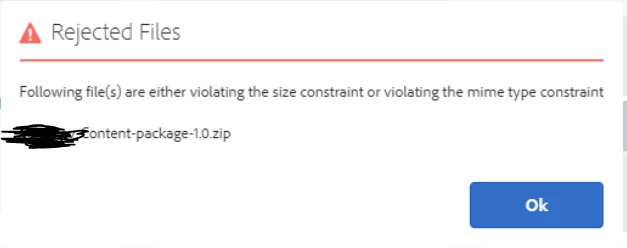
I am here applying a sizelimit property to the assets uploaded in DAM, in Touch UI. Is there a way for us to change the error message displayed on alert box? The current default message displayed is more generic.

Appreciate your help.
Thanks in advance.

This post is no longer active and is closed to new replies. Need help? Start a new post to ask your question.
Best answer by vish.dhaliwal

I just checked in 6.4, such a message is coming from /libs/dam/gui/coral/components/commons/fileupload/clientlibs/fileupload/js/fileupload.js

You can create an overlay of fileupload.js file under apps.

Regards,

Vishu

3 replies

vish.dhaliwalAdobe EmployeeAccepted solution
Adobe Employee
August 26, 2019

I just checked in 6.4, such a message is coming from /libs/dam/gui/coral/components/commons/fileupload/clientlibs/fileupload/js/fileupload.js

You can create an overlay of fileupload.js file under apps.

Regards,

Vishu

arvindk091986
Level 2
August 27, 2019

Vish.dhaliwal​ - I believe we cannot overlay the clientlibs, rather can override by creating another clientlib in my project. Please correct me if I am wrong. I tried creating a clientlib with the category "dam.gui.coral.fileupload", it still picks up the /libs/dam/gui/coral/components/commons/fileupload/clientlibs/fileupload/js/fileupload.js and not my custom file located at /etc/designs/myproject/clientlib-dam-coral/fileupload/fileupload.js Is there anything missing, that you might think of?

Theo_Pendle
Level 8
August 27, 2019

I think what Vishu means is that you overlay the JS file. To do so, take the file at

/libs/dam/gui/coral/components/commons/fileupload/clientlibs/fileupload/js/fileupload.js

Copy it to

/apps/dam/gui/coral/components/commons/fileupload/clientlibs/fileupload/js/fileupload.js

Then make your modifications.

When AEM fetches fileupload.js, it will first look under /apps and if it does not find anything, then under /libs The concept is explained here: Overlays