AEM stopped working after closing 'start' common prompt | Community
Skip to main content
Level 2
September 21, 2021
Solved

AEM stopped working after closing 'start' common prompt

  • September 21, 2021
  • 3 replies
  • 1341 views

Hi all,


I started AEM instance by clicking 'star' script. The, I close the below common prompt . AEM is not up after closing cmd.

I can only access AEM while cmd is opened.
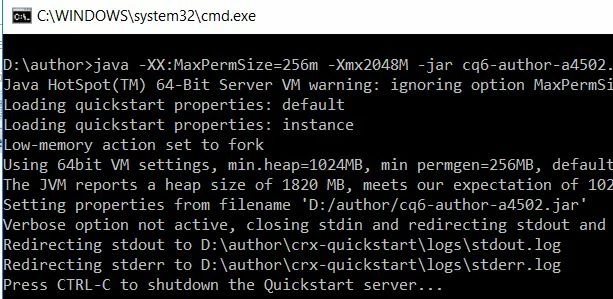
 

Thanks in advance.


This post is no longer active and is closed to new replies. Need help? Start a new post to ask your question.
Best answer by Raja-Karuppsamy

Hello - Please try to use a custom script located in the bin (crx-quickstart\bin) folder, such as start.bat to start AEM. The Start and Stop scripts are for UNIX, Linux, and Macintosh. The start.bat and stop.bat scripts are for Windows ( Start the instance - start.bat & Stop the instance - stop.bat) OR use service commands to start or stop the instances.


3 replies

Rohit-Negi
Level 3
September 21, 2021

Hi @snow123 ,


Yes, AEM will stop if you will close this command prompt. You have to keep this cmd open else the process will also get closed.

You can create a service for this process(as you are using windows) and start the server using that service(if you dnt want to use cmd).

you can try this: https://aemexperts.blogspot.com/2019/03/installing-and-starting-adobe.html


Thanks!

Asutosh_Jena_
Community Advisor
Community Advisor
September 21, 2021

Hi @snow123 


This is a command line process, so when you close the command, the process will close and it will shut down the instance.


So you need to keep this window always open to keep the instance running, or you can start the instance by clicking on the JAR file.


Or you can follow the below approach to run this as a service on windows:

https://experienceleague.adobe.com/docs/experience-manager-64/deploying/deploying/custom-standalone-install.html?lang=en#installing-and-starting-adobe-experience-manager-as-a-windows-service


Thanks!


Thanks!

Raja-Karuppsamy
Community Advisor
Raja-KaruppsamyCommunity AdvisorAccepted solution
Community Advisor
September 21, 2021

Hello - Please try to use a custom script located in the bin (crx-quickstart\bin) folder, such as start.bat to start AEM. The Start and Stop scripts are for UNIX, Linux, and Macintosh. The start.bat and stop.bat scripts are for Windows ( Start the instance - start.bat & Stop the instance - stop.bat) OR use service commands to start or stop the instances.