AEM & Dynamic import : can't find resources in clientlib | Community
Skip to main content
June 15, 2023
Solved

AEM & Dynamic import : can't find resources in clientlib

  • June 15, 2023
  • 2 replies
  • 1360 views

Hello everyone,

i'm trying to bring the dynamic imports in our AEM projects. I do see the file being built correctly, the chunks are under a clientlib named dynamic module, under the clientlibs folder, within ui.apps.

I do also see it replicated on my local environ in CRX

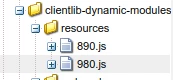


However, when accessing the page that loads those chunks, i got a 404 on the chunks ( 890.js or 980.js )
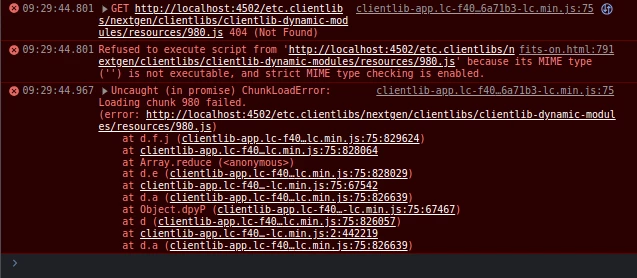


For all intents and purpose, it should work. The path is right, it looks like other clientlib path we are loading on the page, etc.clientlibs/<PROJECT>/clientlibs/<CLIENTLIB>. Im seeing this locally, im on an author environnement and do not goes through a dispatcher

This post is no longer active and is closed to new replies. Need help? Start a new post to ask your question.
Best answer by Tanika02

Hello @jeanjak 


Did you tried clearing the clientlib cache?


If you made changes to the clientlib configuration or folder structure, it's possible that the clientlib cache is causing issues. Try clearing the AEM clientlib cache by navigating to the following URL in your AEM author environment: http://localhost:4502/libs/granite/ui/content/dumplibs.html. Select the appropriate clientlib and click "Clear" to clear the cache.

2 replies

EstebanBustamante
Community Advisor and Adobe Champion
June 15, 2023

how did you generate the chunks? can you explore in your browser tools if the resources are appended in the "sources" tab?

Esteban Bustamante
Tanika02
Tanika02Accepted solution
Level 7
June 19, 2023

Hello @jeanjak 


Did you tried clearing the clientlib cache?


If you made changes to the clientlib configuration or folder structure, it's possible that the clientlib cache is causing issues. Try clearing the AEM clientlib cache by navigating to the following URL in your AEM author environment: http://localhost:4502/libs/granite/ui/content/dumplibs.html. Select the appropriate clientlib and click "Clear" to clear the cache.