Solved
AEM 6.5 VanityPath is not working
Hello, I have a question, when I try to modify a vanity url in the local environment, it looks like this, it doesn't let me edit it, instead, in dev, stage and prod it does, why can this happen?
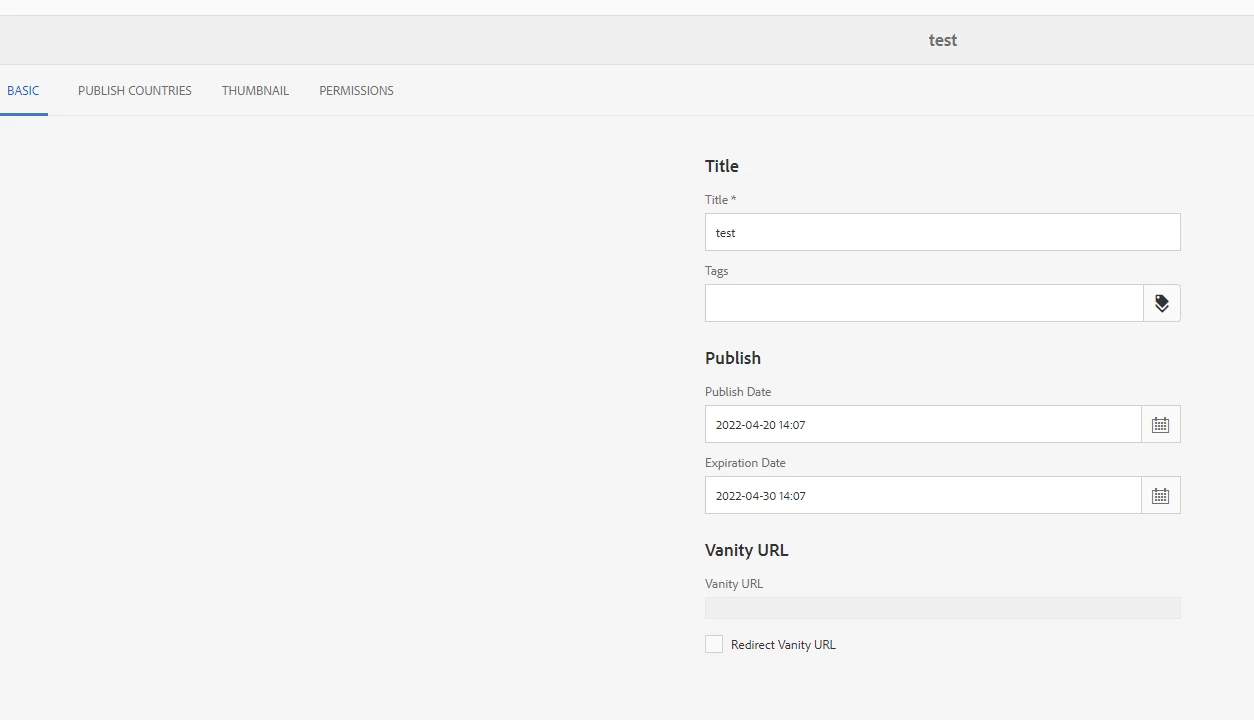
Hello, I have a question, when I try to modify a vanity url in the local environment, it looks like this, it doesn't let me edit it, instead, in dev, stage and prod it does, why can this happen?
Hi @juancarlos2022 ,
Looking at the image, it seems like you have some customization in your base page properties which is making it disable. This could have been done intentionally within your project. This is not how AEM OOTB page properties looks like. I would recommend to verify each property on the basepage within your project to check where what is causing this. And for reference, create a fresh AEM instance and go to page properties for we-retail and verify.
Also, if in dev stage and prod it is allowing meaning the code is not the same on local and the other environments.
Enter your E-mail address. We'll send you an e-mail with instructions to reset your password.