AEM 6.4 osgi.wiring.package; (&(osgi.wiring.package=org.json) | Community
Skip to main content
chris_dacuya
Level 2
October 10, 2018
Solved

AEM 6.4 osgi.wiring.package; (&(osgi.wiring.package=org.json)

  • October 10, 2018
  • 2 replies
  • 2527 views

Hello,

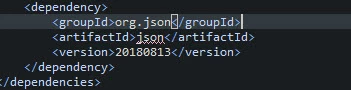
I am trying to use org.json (which can be found here: Maven Repository: org.json » json) to parse the json request since it is very easy to use. We have added the dependency in pom.xml as shown below:

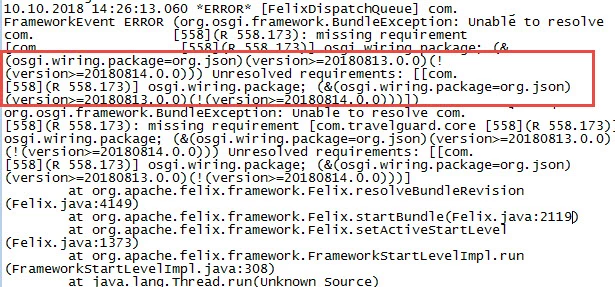
But after deploying our build, we encountered the error below.

Can someone provide some inputs please? Thank you.

Regards,

Chris

This post is no longer active and is closed to new replies. Need help? Start a new post to ask your question.
Best answer by VeenaVikraman

HI Chris

  I tried the same . I could replicate your issue. What you can do is add, the org.json as an embedd in your proj. That way this third party bundle will be included to your project bundle always

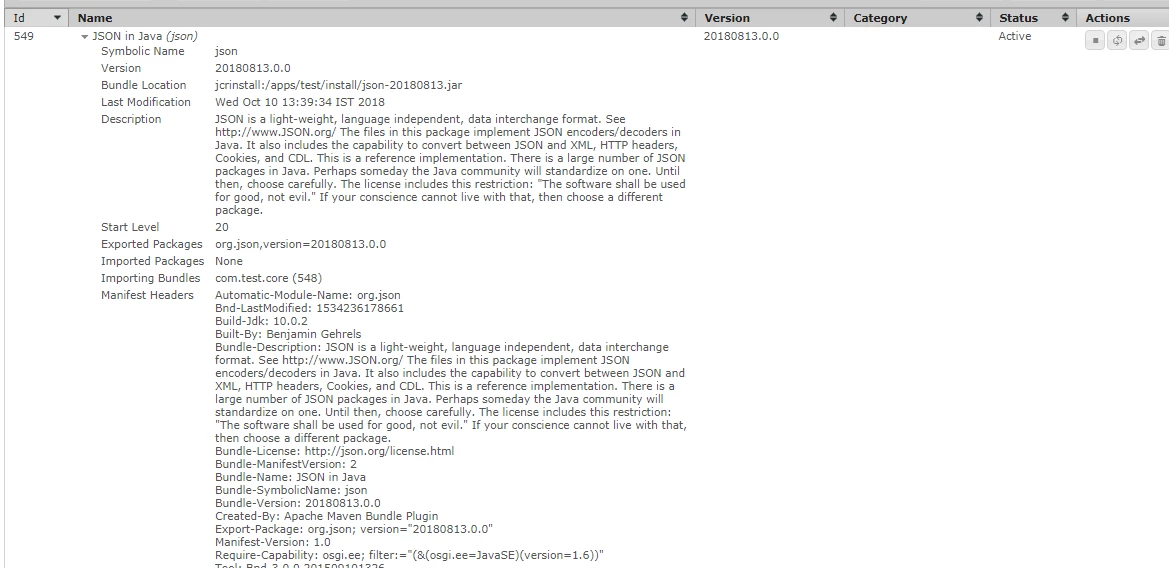
I have detailed about the steps I have followed in the below article How to add a third party bundle to you AEM package ?

1)Open the pom.xml under <project>\ui.apps

2) Under the content-package-maven-plugin, add the the above bundles as <embedded> like shown below

<!-- ====================================================================== -->

            <!-- V A U L T   P A C K A G E   P L U G I N                                -->

            <!-- ====================================================================== -->

            <plugin>

                <groupId>com.day.jcr.vault</groupId>

                <artifactId>content-package-maven-plugin</artifactId>

                <extensions>true</extensions>

                <configuration>

                    <filterSource>src/main/content/META-INF/vault/filter.xml</filterSource>

                    <verbose>true</verbose>

                    <failOnError>true</failOnError>

                    <group>Sample Content Package</group>

                    <embeddeds>

                        <embedded>

                            <groupId>com.sample</groupId>

                            <artifactId>sample.core</artifactId>

                            <target>/apps/sample/install</target>

                        </embedded>

<!-- Embedding additional bundles -->

<embedded>

                            <groupId>[bundle_group_id]</groupId>

                            <artifactId>[budle_artifact_id]</artifactId>

                            <target>/apps/sample/install</target>

                        </embedded>

----- [Add all the additional bundles here]

                    </embeddeds>

                </configuration>

            </plugin>

So this will make sure the bundles are embedded to your project every time you build the same. You can read more about this here . Some more details can be read here .

Hope this helps

Thanks

Veena

2 replies

Peter_Puzanovs
Community Advisor
Community Advisor
October 10, 2018

Dear Chris,

Thank you for your question,

Could you kindly add this depency as compile time depency?

e.g.

<!-- https://mvnrepository.com/artifact/org.json/json -->

<dependency>

    <groupId>org.json</groupId>

    <artifactId>json</artifactId>

    <version>20180813</version>

   <scope>compile</scope>

</dependency>

and tell maven to bring the compile time artifact into your bundle classpath as a Jar e.g

<Embed-Dependency>*;scope=compile|runtime</Embed-Dependency> [0]

[0] Apache Felix - Apache Felix Maven Bundle Plugin (BND)

Regards,

Peter

VeenaVikraman
Community Advisor
VeenaVikramanCommunity AdvisorAccepted solution
Community Advisor
October 10, 2018

HI Chris

  I tried the same . I could replicate your issue. What you can do is add, the org.json as an embedd in your proj. That way this third party bundle will be included to your project bundle always

I have detailed about the steps I have followed in the below article How to add a third party bundle to you AEM package ?

1)Open the pom.xml under <project>\ui.apps

2) Under the content-package-maven-plugin, add the the above bundles as <embedded> like shown below

<!-- ====================================================================== -->

            <!-- V A U L T   P A C K A G E   P L U G I N                                -->

            <!-- ====================================================================== -->

            <plugin>

                <groupId>com.day.jcr.vault</groupId>

                <artifactId>content-package-maven-plugin</artifactId>

                <extensions>true</extensions>

                <configuration>

                    <filterSource>src/main/content/META-INF/vault/filter.xml</filterSource>

                    <verbose>true</verbose>

                    <failOnError>true</failOnError>

                    <group>Sample Content Package</group>

                    <embeddeds>

                        <embedded>

                            <groupId>com.sample</groupId>

                            <artifactId>sample.core</artifactId>

                            <target>/apps/sample/install</target>

                        </embedded>

<!-- Embedding additional bundles -->

<embedded>

                            <groupId>[bundle_group_id]</groupId>

                            <artifactId>[budle_artifact_id]</artifactId>

                            <target>/apps/sample/install</target>

                        </embedded>

----- [Add all the additional bundles here]

                    </embeddeds>

                </configuration>

            </plugin>

So this will make sure the bundles are embedded to your project every time you build the same. You can read more about this here . Some more details can be read here .

Hope this helps

Thanks

Veena