AEM 6.2 to 6.4 upgrade : Issue with iparsys | Community
Skip to main content
cquser1
Level 7
October 25, 2018

AEM 6.2 to 6.4 upgrade : Issue with iparsys

  • October 25, 2018
  • 5 replies
  • 9075 views

Hi All,

We have a template[not editable templates], wherein iparsys is included in the page component of the template in body.html.

<sly data-sly-resource="${'xyz' @ resourceType='wcm/foundation/components/iparsys'}"></sly>

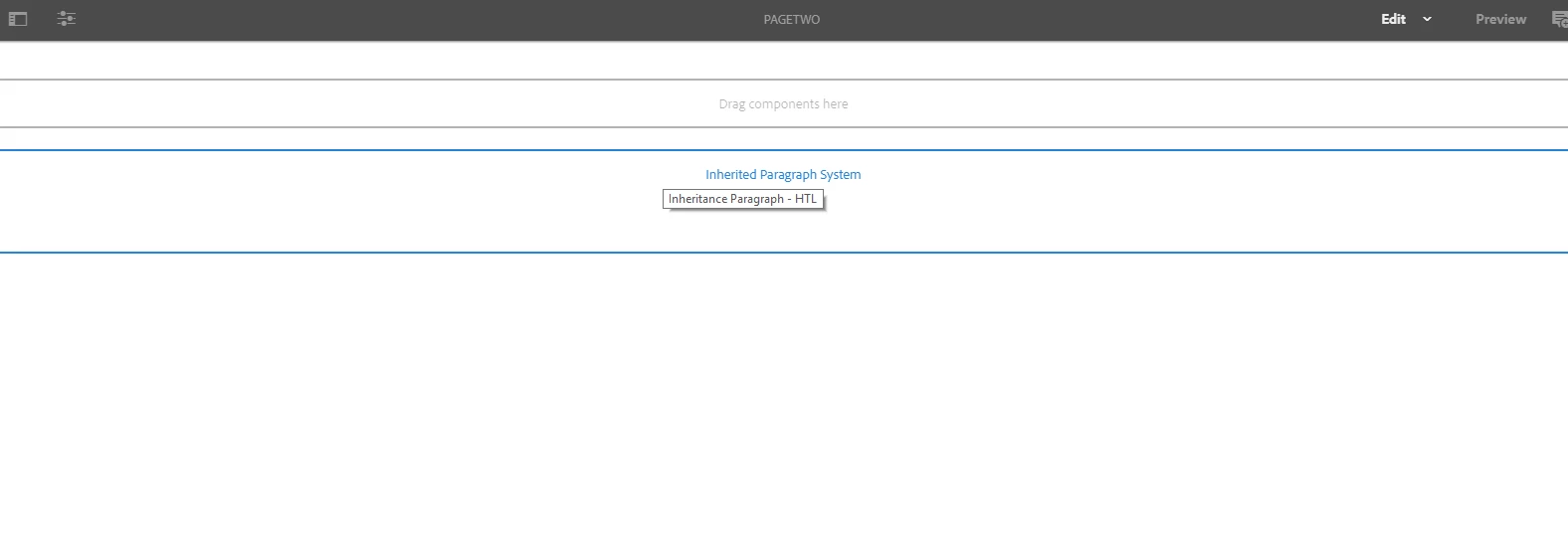
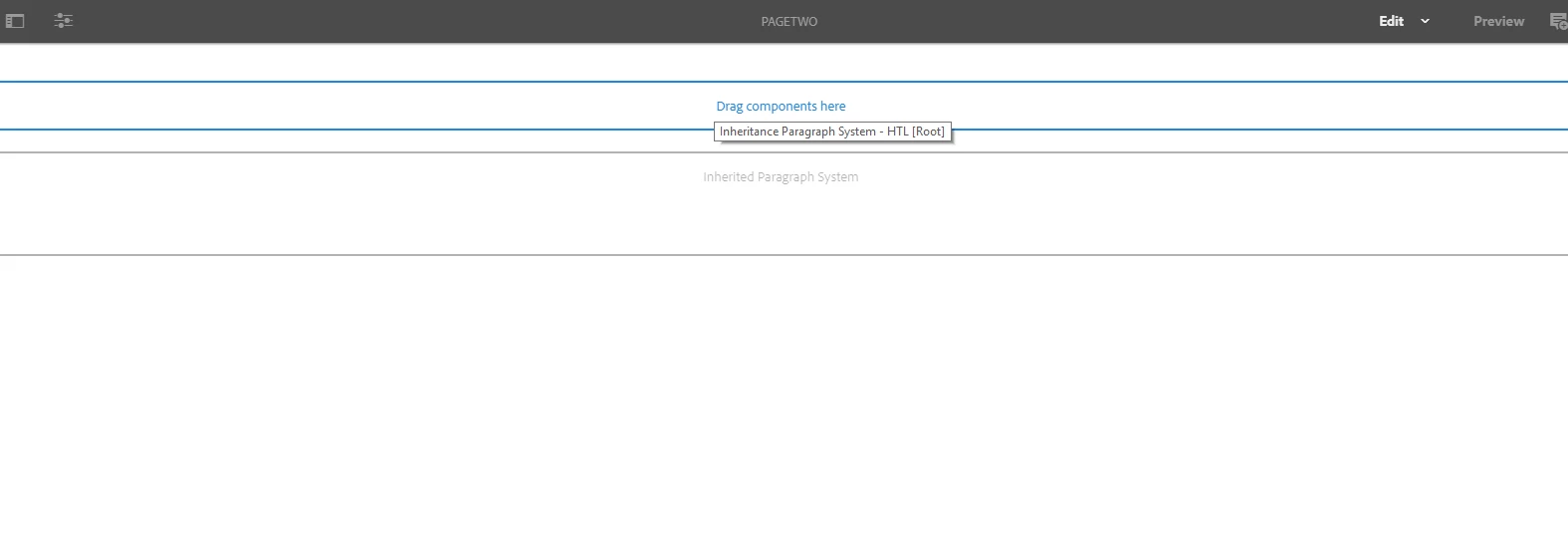
In 6.4 environment, on creating a page out of this template it appears as seen in screenshots below. When an extra parsys comes up, in author mode it overlaps some other component, thereby hiding that component and creating issues.

In 6.2 environment, on creating a page out of this template the extra parsys doesnt come up.

Did some investigation from the UI perspective,as we were suspecting our component css conflicts with the 6.4 OOTB css. Tried multiple things, but no luck.

Whereever, iparsys is included [i.e, in header, footer] this issue is to be seen in 6.4.

Tried multiple things for quite some time, but no luck.

Any thoughts/pointers on this will be really helpful.
This post is no longer active and is closed to new replies. Need help? Start a new post to ask your question.

5 replies

cquser1
cquser1Author
Level 7
October 25, 2018

Hi All,

Any thoughts on this will be helpful.

smacdonald2008
Level 10
October 25, 2018

In AEM 6.4 - no need to work with IParsys to create header, footer, etc. This was pre AEM 6.4/6.3 way of doing things. 

Its much better practice to create footer and header components and then drop them into editable templates and lock them in place in the editable template. This reflects best practice in AEM 6.4.

Adobe Experience Manager Help | Creating an Adobe Experience Manager 6.4 website using Editable Templates

smacdonald2008
Level 10
October 25, 2018

THis development use case is also shown in the Weekend Tutorial -- Getting Started with AEM Sites - WKND Tutorial

Strongly recommend that you change to editable templates and footer and header components instead of trying to use IParsys.

Lokesh_Shivalingaiah
Level 10
October 25, 2018

Hi,

As scott mentioned, we are going away from iparsys approach with editable templates, content fragments etc.

However, with this issue did you look at the implementation of iparsys itself ? or inspect the extra parsys element and see where it belongs to.. Let me also see if I can reproduce this issue on my local and get back to you.

smacdonald2008
Level 10
October 25, 2018

For users of older AEM versions whom are used to using IPARSYS to build out AEM Sites with header and footers - the new way is to use Editable Templates. You can watch the Guided Journey in Experience League to learn more about editable templates and policies.

Also posted on my blog -- Scott's Digital Community: Guided Journey for Experience Manager on Editable Templates

arunpatidar
Community Advisor
Community Advisor
October 25, 2018

Can you check if whether you are facing same issue with another parsys?

<sly data-sly-resource="${'xyz' @ resourceType='foundation/components/iparsys'}"></sly>

Arun Patidar
cquser1
cquser1Author
Level 7
October 26, 2018

Hi Arun

Checked with 'foundation/components/iparsys', but still the same.

ronnyfm
Level 4
November 8, 2018

Hi, we are facing something similar, did this happen to you using either 6.4.0, 6.4.1 and 6.4.2? Does this happen also using Classic UI?

smacdonald2008
Level 10
November 8, 2018

Ronny - why not make use of the features 6.4 exposes as opposed to doing things the "old way". Use of editable templates to give an AEM site similar look and feel (headers/footers, etc) is best practice.

ronnyfm
Level 4
November 8, 2018

Sure Scott, but the first phase is the upgrade step, before then moving to the latest features.

I am aware that Classic UI is deprecated, but we need to ensure that we can perform the upgrade without affecting current site, or at least to know that by fixing a couple of configurations or lines of code will suffice to get the iparsys working fine.

Level 3
October 2, 2019

Can you check that in your custom code you have not overlayed any OOTB libs files ?

Similar issue was faced where below 2 files were overlayed, post merging both (latest libs file + custom code), parsys issue got resolved.

/libs/wcm/core/components/init/init.jsp

/libs/foundation/global.jsp

It should not be replicable in fresh AEM 6.4 instance, when we dont have any overlayed code.