Adobe LiveCycle - Javascript - Initialize event is looping when I try to update a variable | Community
Skip to main content
August 11, 2022

Adobe LiveCycle - Javascript - Initialize event is looping when I try to update a variable

  • August 11, 2022
  • 3 replies
  • 1664 views

Hi,

I am struggling to manipulate an address field to remove the country code, format lines breaks and add the country name.


The text I am using is in the format: "First Line / Second Line / Third Line / IE"


var vAddress;
vAddress = addresstest.rawValue ;
vAddress = vAddress.substring(0,vAddress.length-3) ;
vAddress = vAddress.replace(/ \/ /g, "\n");
addresstest.rawValue = vAddress+"\n"+masterHeader.masterHeaderLeft.country.rawValue ;


Output is :

"First Line 

Second Line
Third Line /
Irel"


I think the issue is with the final line but when I tested appending text on each line, 
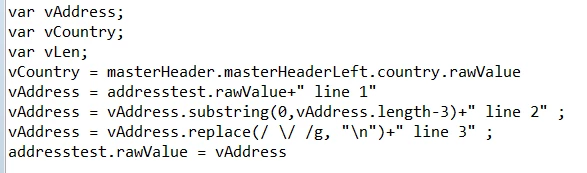
the output was:

"First Line 

Second Line
Third Line

IE lin line 2 line 3 lin line 2 line 3"


So there is some kind of loop being created.


I have also tried: 

addresstest.rawValue = addresstest.rawValue+"\n"+masterHeader.masterHeaderLeft.country.rawValue ;


Which then adds the country line twice so the issue isn't isolated to it being a variable.


Does anyone have any ideas?

Thanks

This post is no longer active and is closed to new replies. Need help? Start a new post to ask your question.

3 replies

August 12, 2022

I don't see anything obviously wrong with your code.

Just not clear on a few things.

I am assuming "masterHeader" is a master page?

On which event is this code executing?

Which "Initialize event" is looping, are you referring to?


Cheers
M


August 12, 2022

Yes is is on a master page.

The event is an Initialize event - it repeats even more when I tried running the code on Validate and doesn't work on Exit.

The looping is presumed from what appears on the output.

August 14, 2022

Initialize event of which field exactly?
When/how is addresstest field populated?

Mayank_Gandhi
Adobe Employee
Adobe Employee
August 12, 2022

@garetheade try below:


var vAddress;
vAddress = "First Line / Second Line / Third Line / IE" ;
vAddress = vAddress.substring(0,vAddress.length-4) ;
vAddress = vAddress.replace(/ \/ /g, "\n");
app.alert(vAddress + "\n" + "test") ;


Work fine for me on all events and the master page too

radzmar
August 13, 2022

I would split the string and then use a loop to create a new one.


var aInput = addresstest.rawValue.split(/\s*\/\s*/g),
	cOutput = "";
if (aInput.length > 0) {
    // process all items in the array except the last one.
    for (var i = 0; i < aInput.length - 1; i += 1) {
            // add a line break in front of every item except the first.
	    cOutput += (i > 0 ? "\n" : "") + aInput[i];
    }
}
addresstest.rawValue = cOutput + "\n" + masterHeader.masterHeaderLeft.country.rawValue;
August 15, 2022

An excellent solution. It covers off some of the issues which I didn't address here:

  • When the length of the country code is 1 letter instead of two (it is actually vehicle registration code rather than ISO country code!)
  • When it puts in the whole country name for cross border addresses.
  • If there is more than the three address lines - different formats for different countries.

Thanks for your help, I can't help but think you have come across my exact problem before with invoice addresses in SAP ByDesign!