AEM form email template - Read repeatable fields | Community
Skip to main content
January 28, 2022
Solved

AEM form email template - Read repeatable fields

  • January 28, 2022
  • 2 replies
  • 4871 views

Hi,


We are working on a form where we have a panel with 5 fields repeated 10 times. These fields are text fields and user is supposed to enter values. Now we want to read user entered values of these fields and send in email.

We can read the value in Javascript using guideBridge as follows => guideBridge.resolveNode('parentPanel').instanceManager.instances[2].field1.value;.

But we are not able to read this value in email template. Any pointers will help here.

Sample form screen shot: - 
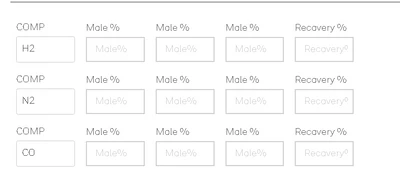
 

As you can see the rows are repeated 10 times using repeatable settings.
This post is no longer active and is closed to new replies. Need help? Start a new post to ask your question.
Best answer by workflowuser

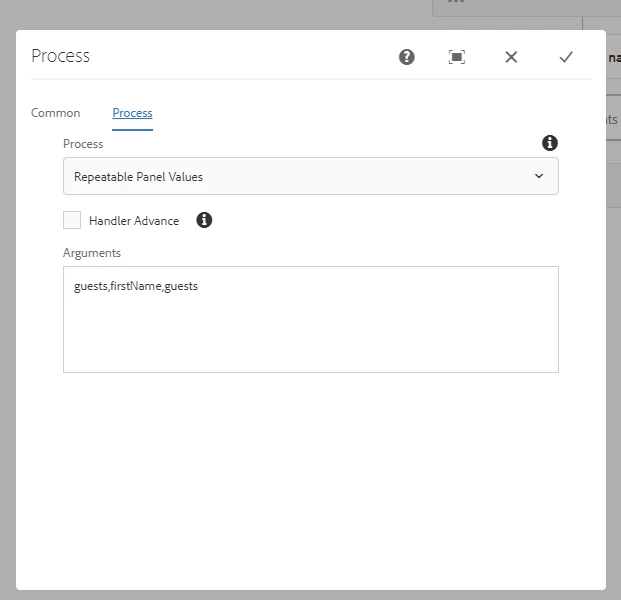
I have created a custom workflow process step. In this step you pass the repeatable panel name,field in the repeatable panel, and the metadata property you want to store the value in

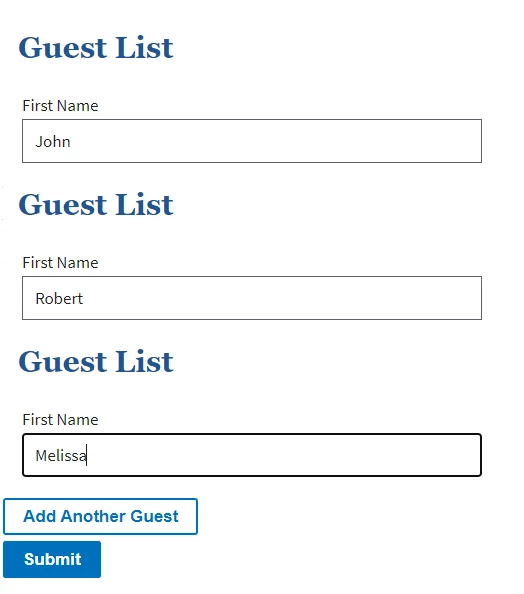
The form has this repeatable panel

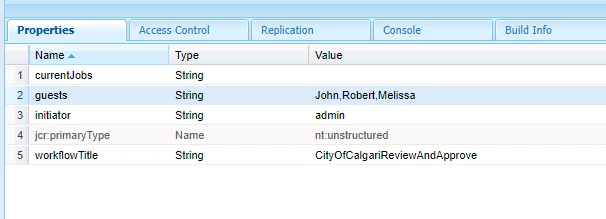
When you submit this form the following metadata property gets created with the values entered in the form


You can then use the "guests" metadata property in your email template

Let me know if you need the code for the workflow process step

2 replies

January 28, 2022

It would need some custom code

how would you want the repeatable values to show up in the email?


February 1, 2022

We want to capture all the fields entered by user in a table in email. I was hoping to find if there is an out of the box way to capture this (similar to text field  =>${textFieldName})

workflowuserAdobe EmployeeAccepted solution
Adobe Employee
January 28, 2022

I have created a custom workflow process step. In this step you pass the repeatable panel name,field in the repeatable panel, and the metadata property you want to store the value in

The form has this repeatable panel

When you submit this form the following metadata property gets created with the values entered in the form


You can then use the "guests" metadata property in your email template

Let me know if you need the code for the workflow process step

May 31, 2022

Yes, Could you please provide the code for workflow process step.


Adobe Employee
May 31, 2022

The code is listed in this thread