
401: request is invalid, reason: failed authorization. Please verify your token and organization id | Community
Skip to main content
Anil_Umachigi
Adobe Employee
Adobe Employee
October 5, 2021
Question

401: request is invalid, reason: failed authorization. Please verify your token and organization id

  • October 5, 2021
  • 1 reply
  • 2707 views

Following up with related reported issue around 401 erorr. 

I have observed that i cannot use Analytics/target api with "require-adobe-auth" : true. 

It all works well when i set it to false

Find below the error i get when i set to true. 

Could somebody help out before i push this app live? does not make sense to have it set to false in production. 
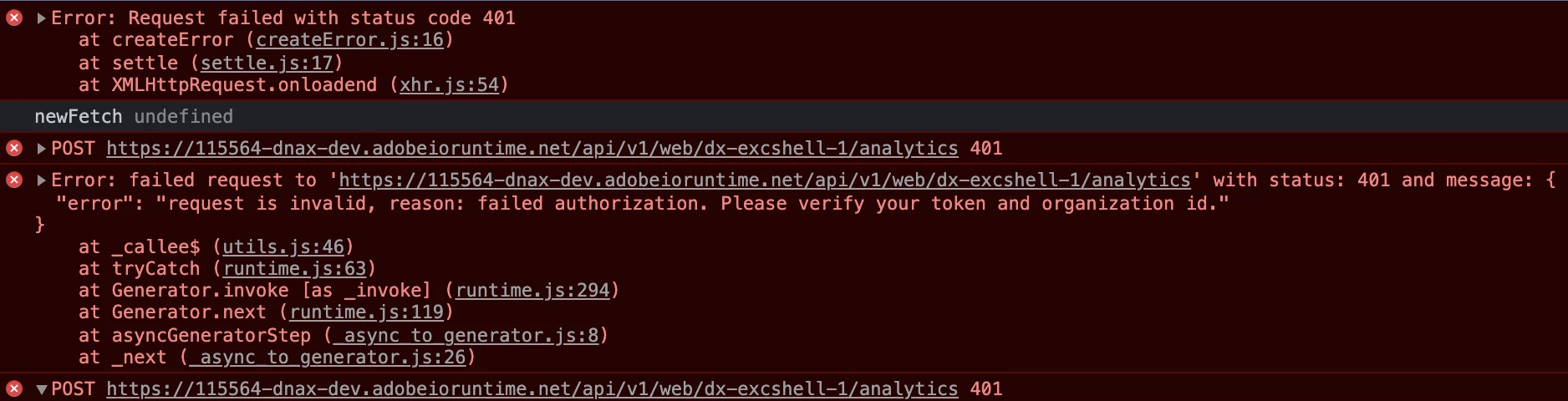


aio and node version tried 

  • @61380/aio-cli/8.1.0 darwin-x64 node-v16.2.0
  • @61380/aio-cli/8.1.0 darwin-x64 node-v14.17.0

ext.config.yml when i get that error

inputs: LOG_LEVEL: debug companyId: $ANALYTICS_COMPANY_ID apiKey: $SERVICE_API_KEY annotations: require-adobe-auth: true final: true


This post is no longer active and is closed to new replies. Need help? Start a new post to ask your question.

1 reply

Adobe Employee
October 5, 2021

Would you mind posting or sending me the code for that action so we can look at it closer?

Adobe Employee
October 5, 2021

BTW saw this note in the auth section of the product documentation


https://www.adobe.io/app-builder/docs/guides/security/


The validator action enabled by require-adobe-auth: true annotation requires the provided IMS access token to have the read_organizations scope. While it is always the case for user tokens used in SPAs, the JWT access tokens used in headless applicationss may not have this scope. This will be the case if it is generated to integrate with the following services:

  • Adobe Analytics
  • Adobe Campaign Standard
  • No API Service enabled


So check your .env file for a line like this and add read_organizations scope to it

AIO_ims_contexts_devlive__ms__demo__J__1632264104209_meta__scopes=["asset_compute_meta","ent_ccas_sdk"]

Adobe Employee
October 5, 2021

That does not seem like the fix though.  Now that I think about it more and look at the error closer.


Is the caller of that action a part of your org and are they passing AUTH header with the request to make that call?