We require Execution schedule of all the workflows running on Scheduled basis in the String format. How to get it using Javascript in Adobe classic campaign. | Community
Skip to main content
LakshmiPravallika
Community Advisor
Community Advisor
January 30, 2025
Solved

We require Execution schedule of all the workflows running on Scheduled basis in the String format. How to get it using Javascript in Adobe classic campaign.

  • January 30, 2025
  • 2 replies
  • 590 views

Hi,


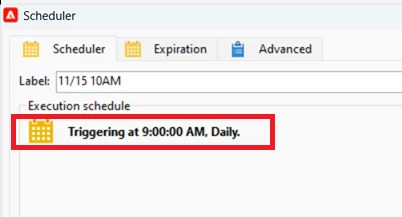
How do we get the execution schedule of the scheduler used in all the workflows using Javascript in adobe Classic campaign in a string format specified in the below example screenshot highlighted below "Triggering at 09:00:00 AM, Daily".


Regards,

Pravallika.

This post is no longer active and is closed to new replies. Need help? Start a new post to ask your question.
Best answer by ccg1706

Hi @lakshmipravallika,

I would try with the following code:


var query = xtk.queryDef.create( <queryDef schema="xtk:workflow" operation="select"> <select> <node expr="@id"/> <node expr="@internalName"/> <node expr="activities/scheduler/@label"/> <node expr="activities/scheduler/@executionPattern"/> </select> </queryDef> ); var result = query.ExecuteQuery(); for each (var wf in result.workflow) { var workflowName = wf.@internalName; var schedulerLabel = wf.@label; var executionPattern = wf.@executionPattern; if (executionPattern) { logInfo("Workflow: " + workflowName + " | Scheduler: " + schedulerLabel + " | Execution Schedule: " + executionPattern); } }


This script goes through each workflow an  retrieves  the execution schedule. The result will be logged in the workflow logs.


Here I leave you with some useful links:

API documentation 

JSAPI documentation 


Hope it helps.


Kind regards, 

Celia

 

2 replies

ccg1706
Community Advisor
ccg1706Community AdvisorAccepted solution
Community Advisor
February 3, 2025

Hi @lakshmipravallika,

I would try with the following code:


var query = xtk.queryDef.create( <queryDef schema="xtk:workflow" operation="select"> <select> <node expr="@id"/> <node expr="@internalName"/> <node expr="activities/scheduler/@label"/> <node expr="activities/scheduler/@executionPattern"/> </select> </queryDef> ); var result = query.ExecuteQuery(); for each (var wf in result.workflow) { var workflowName = wf.@internalName; var schedulerLabel = wf.@label; var executionPattern = wf.@executionPattern; if (executionPattern) { logInfo("Workflow: " + workflowName + " | Scheduler: " + schedulerLabel + " | Execution Schedule: " + executionPattern); } }


This script goes through each workflow an  retrieves  the execution schedule. The result will be logged in the workflow logs.


Here I leave you with some useful links:

API documentation 

JSAPI documentation 


Hope it helps.


Kind regards, 

Celia


Sukrity_Wadhwa
Community Manager
Community Manager
February 21, 2025

Hi @lakshmipravallika,

Was the given solution helpful to resolve your query or were you able to resolve it on your own? Do let us know. 

Thanks!

Sukrity Wadhwa