
keep the results of interim population between two executions - How to monitor and turn off with a work flow | Community
Skip to main content
Ken_Qrious
Level 4
February 28, 2021
Solved

keep the results of interim population between two executions - How to monitor and turn off with a work flow

  • February 28, 2021
  • 1 reply
  • 2804 views

We have discovered that our campaign users routinely set the "keep the results of interim population between between two executions" for campaigns, hypothesis and technical work flows.  This can causes issues with DB disk usage so we would like to create a technical work flow to monitor for this setting and turn it off.


I can see the the event table contains "KeepResult" which allows us to identify campaigns etc which have been run with this setting on but the information is historical and not necessarily the current setting for the campaign.


Is there a way to check the current setting for "keep the results of interim population between between two executions" for a campaign/hypothesis/work flow and update this setting through an automated process?
 

This post is no longer active and is closed to new replies. Need help? Start a new post to ask your question.
Best answer by ParthaSarathy

Hi @ken_qrious ,

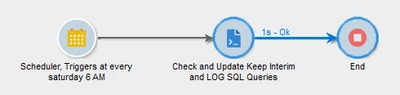
Yes you can achieve this by creating a workflow.


Schedule to run the Workflow weekly once.

JavaScript Code:

var sevenDaysAgo = new Date(); sevenDaysAgo.setDate(sevenDaysAgo.getDate() - 7); sevenDaysAgo = formatDate(sevenDaysAgo, "%2M/%2D/%4Y %2H:%2N:%2S"); var query = xtk.queryDef.create( <queryDef schema="xtk:workflow" operation="select"> <select> <node expr="@id"/> <node expr="@lastModified"/> <node expr="@keepResult"/> <node expr="@showSQL"/> </select> <where> <condition expr={"@lastModified <'"+ sevenDaysAgo +"'"}/> </where> </queryDef> ); var record = query.ExecuteQuery(); for each (var variable in record) { if(variable.@keepResult == true){ var primaryKey = variable.@id; var keepInterimResult = 0; xtk.session.Write(<workflow xtkschema="xtk:workflow" _operation="update" id={primaryKey} keepResult={keepInterimResult} />); } if(variable.@showSQL == true){ var primaryKey = variable.@id; var showSqlLogs = 0; xtk.session.Write(<workflow xtkschema="xtk:workflow" _operation="update" id={primaryKey} showSQL={showSqlLogs} />); } }
Now When the workflow run, All the "keep the results of interim population between between two executions" and 'Log SQL queries in the journal' will be unchecked automatically.

1 reply

ParthaSarathy
Community Advisor
ParthaSarathyCommunity AdvisorAccepted solution
Community Advisor
March 1, 2021

Hi @ken_qrious ,

Yes you can achieve this by creating a workflow.


Schedule to run the Workflow weekly once.

JavaScript Code:

var sevenDaysAgo = new Date(); sevenDaysAgo.setDate(sevenDaysAgo.getDate() - 7); sevenDaysAgo = formatDate(sevenDaysAgo, "%2M/%2D/%4Y %2H:%2N:%2S"); var query = xtk.queryDef.create( <queryDef schema="xtk:workflow" operation="select"> <select> <node expr="@id"/> <node expr="@lastModified"/> <node expr="@keepResult"/> <node expr="@showSQL"/> </select> <where> <condition expr={"@lastModified <'"+ sevenDaysAgo +"'"}/> </where> </queryDef> ); var record = query.ExecuteQuery(); for each (var variable in record) { if(variable.@keepResult == true){ var primaryKey = variable.@id; var keepInterimResult = 0; xtk.session.Write(<workflow xtkschema="xtk:workflow" _operation="update" id={primaryKey} keepResult={keepInterimResult} />); } if(variable.@showSQL == true){ var primaryKey = variable.@id; var showSqlLogs = 0; xtk.session.Write(<workflow xtkschema="xtk:workflow" _operation="update" id={primaryKey} showSQL={showSqlLogs} />); } }
Now When the workflow run, All the "keep the results of interim population between between two executions" and 'Log SQL queries in the journal' will be unchecked automatically.
~  ParthaSarathy S~  Click here to join ADOBE CAMPAIGN USER GROUP for Quarterly In-person | Hybrid | Virtual Meetups
Ken_Qrious
Level 4
March 2, 2021
One additional question. When this setting is changed is the data storage released or does the workflow need to be rerun with the setting set off to release the data storage?