Javascript xtk.session.Write - Data not updating | Community
Skip to main content
Level 4
March 14, 2022
Question

Javascript xtk.session.Write - Data not updating

  • March 14, 2022
  • 2 replies
  • 5354 views

Hello, 


I created this script to update a field with a reformatted date. 
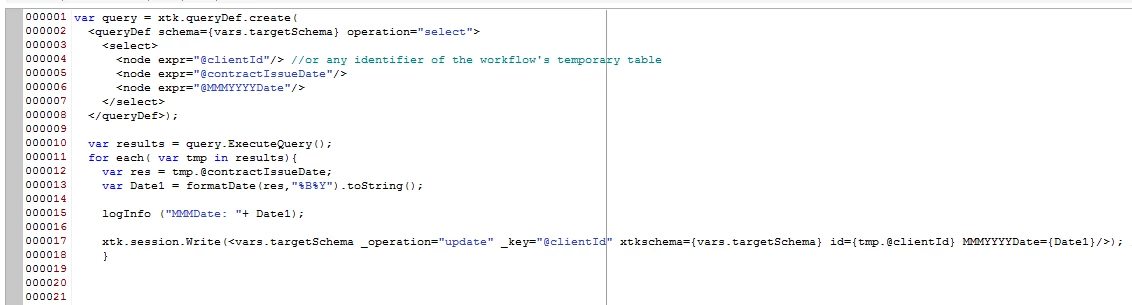
Howeever, when I look at my output data, the field is still NULL, even though I can see from the DisplayLogs that I'm creating the data. 
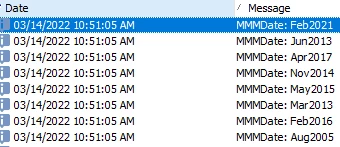


Please advise what I'm missing. 


This post is no longer active and is closed to new replies. Need help? Start a new post to ask your question.

2 replies

Manoj_Kumar
Community Advisor
Community Advisor
March 15, 2022

Hello @montezh2001 


The issue is with how the xtk.session.write method is written.


<vars.targetSchema is not correct syntax. Replace it with correct syntax.


Manoj  | https://themartech.pro
Level 4
March 15, 2022

Manoj, 


Sorry, I'm not well-versed on JS. However, even when I change my code to read from the schema name, I still get no output: 


Please advise


jamesb30588587
Adobe Employee
Adobe Employee
March 15, 2022

Date fields are typically of the UTC (Universal Time Code) type and must conform with that format.  You cannot reformat a date and then write it back into such a field as it no longer matches the data type.  Reformatted dates are typically used to write the date into another field, or as target.data in a delivery or into an output file.

Amine_Abedour
Community Advisor
Community Advisor
March 15, 2022

Hello @montezh2001,


I see two issues in your xtk.session.Write, the "vars.targetSchema" should be " {vars.targetSchema.split(':')[1]} ", and the identifier used to update your rows. As i understand from your request, the identifier of your temporary table is "clientId" and not "id", so your script should look like this :

var query = xtk.queryDef.create(
              <queryDef schema={vars.targetSchema} operation="select">
                <select>
                  <node expr="@clientId"/> //or any identifier of the workflow's temporary table
                  <node expr="@contractIssueDate"/>
				  <node expr="@MMMYYYYDate"/>
                </select>
                </queryDef>);
				
				
var results = query.ExecuteQuery();


for each( var tmp in results){
  var res = tmp.@contractIssueDate;
  var Date1 = formatDate(res,"%B%Y").toString();
  
  logInfo("MMMDate: "+Date1);
  
  xtk.session.Write(<{vars.targetSchema.split(':')[1]} _operation="update" _key="@clientId" xtkschema={vars.targetSchema} clientId={tmp.@clientId} MMMYYYYDate={Date1}/>); 
}

Br,


Amine

Amine ABEDOUR
Level 4
March 16, 2022

Thank you for replying, but this is returning an error. 


Here is a view of my WF: 


I'm reading in a List, adding the @policyTenureMMMYYYY field in my Enrichment, and then trying to run the JS code to create/populate the @policyTenureMMMYYYY field. 


Not sure why this will not work in Adobe, but this is beyond frustrating as either I try xtk.session.Write or sqlExec - I get the same results. 


I've stated before that I'm not proficient in JS, but this code has worked for me before as I needed it to remove leading 0's from a field and output the new field. Now it's if ACC doesn't recognize the code and can't read from the data schema feeding into the JS. 

Did something change in ACC that I'm not aware of? 

Level 4
March 17, 2022

Hi @montezh2001,

Does the targetSchema has contractId and clientId coming from the database fields, or are they also derived from some other expression? Does your targetSchema has any other key fields?

It should work this way for sure.


Can you try one thing? Try to set some static value in the field when you add it in the enrichment. Later in your code it should get updated. If it still does not get updated, can you check the clientId and contractId values in the resulting data set?


Thanks,

Ishan


I'm reading in a List, so the ClientId and ContractId are coming from there. I'll try your suggestion. Give me 15 minutes.