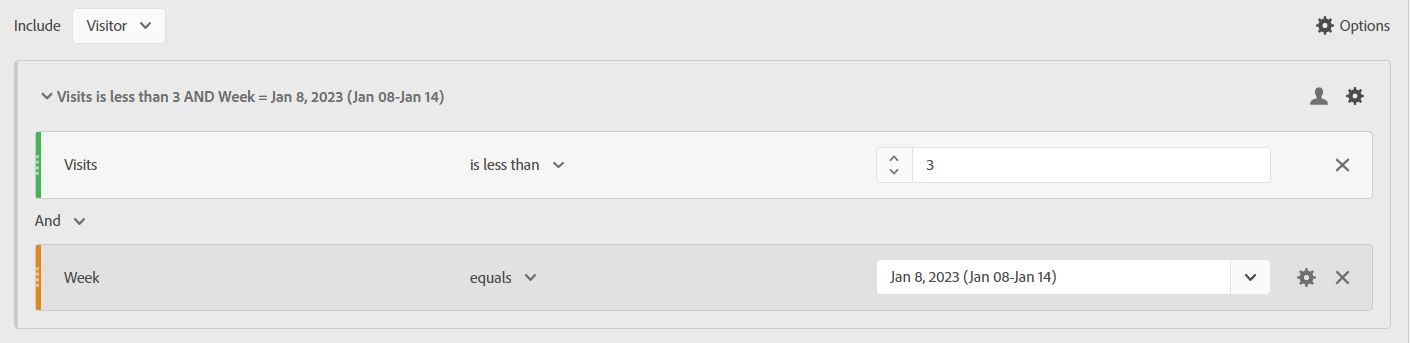
This is incorrect.. sorry, but it is... The segment logic is calculated first! It will return ALL visitors who have ever had less than 3 visits across their lifetime if you don't include a date constraint in the segment. The segments DO not take the time frame of your workspace when they are processed.
The date in the workspace, then shows users who were returned in the "all time" state, who visited the site within the report period. (this is by design... if I want to create a segment of users who have ever made a purchase that are still active on the site, I wouldn't be able to do so if the segment only looks at this month based on the Panel date... and IF that were how it works, there would be no need to include date ranges in the segment builder)
The Segment MUST contain a date constraint to ensure that the Visitors who meet the criteria do so within a set time.
---------
@sarvesh_pathak when you say "validated with another panel where only the 7 day range is set in panel" - are you using the exact same time range on your Workspace? Or are you expecting the segment to take the place of setting a matching time for the Reporting Period?
You need both the workspace and the segment to use the SAME date constraints.
If you use the Segment alone, and your report is set to "this month", I can see that your date range is "Jan 8 - 14", if you use this segment... this will result in getting the list of users who had less than 3 visits in your date range, but will also show all the visits this month outside of that data range (before and after).
Think of your logic as boxes....
The first box to process is your Segment. Using household items as an example, you are filling a box with "what pots and pans did you cook with the week of X"
Next, if your Workspace is looking at this month... you will be counting the number of times this month, that each pot and pan was used (limited to items that are in the box), but still the uses of those items aren't limited to the specified week that the box constitutes.
So to get the number of times each pot/pan was used in the specified date range, both the segment and the workspace panel need to match.
-----
Segment = these conditions need to be met, or needed to be “true”
Date-based segment = these things needed to be true during this window
Workspace date range = these things happened in this window
Mixing date-base segment with workspace date range = these users met this criteria in a certain window, here is everything those users did in the reporting period
If you want to see what the users did in a the window of your segment window, those two ranges need to match.