Download PDF tracking option? When and Why | Community
Skip to main content
Level 4
October 23, 2024
Solved

Download PDF tracking option? When and Why

  • October 23, 2024
  • 2 replies
  • 1161 views

I think for pdf download , there are 3 way we can track in launch, right?
1) by default enable it in adobe analytics extension
2) defined adobe event like event1 for download pdf
3) custom link (which is I am not sure)
please explain which one should be used when ? with example.
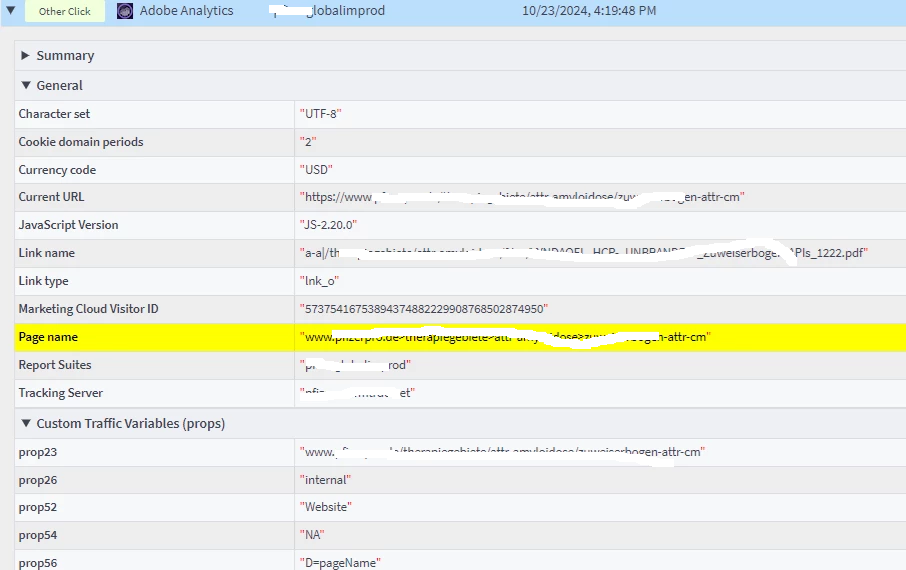
in client website, there is an pdf download link and they tracked in adobe analytics but without using any adobe event like event1, they tracked through custom links, i think, so what will be the impact and solution. 


This post is no longer active and is closed to new replies. Need help? Start a new post to ask your question.
Best answer by andylunsford1

Hey @priyankagupta20, there are quite a few ways you can track PDF downloads.  But let's go through the items you called out. As a note, there are three types of links that can be captured in Adobe, "Exit", "Download" & "Custom".  When you use Download, it sets OOTB metrics related to link details outside of the numbered events & custom dimensions.

  1. When you enable it by default in the Adobe Analytics extension in Launch, it is using the "download" link tracking, and is defined by the extension types you set-up and other configuration options.  It will use the OOTB metrics for link downloads & link name value.
  2. Event1 could be set for anything, including download links.  You will then capture download events inside event1.  This in theory will be equivalent to the download OOTB metric.  But you could use this if there was a desire to count "download pdf" differently then "download .doc".  That is entirely based on your measurement.  
  3. Custom links are pretty much utilized for any link track that isn't an exit or download link, or page-load.  This can include clicks on toggles, navigation links that take you to another section of the site, clicks on pop-ups, etc.  Most implementations I see have this link type utilized the most heavily.  

The flexibility can be overwhelming at times, but basically, you can use both to capture download links!  The question becomes, what are you trying to measure, and that will help you answer better how you will capture.  Is there a desire to understand what types of files users are downloading at an occurrence level?  Or is just knowing a user is "downloading" a file?  If the former, custom events can be helpful to distinguish.


Thanks,

Andy
2 replies

PratheepArunRaj
Community Advisor and Adobe Champion
October 23, 2024

Dear @priyankagupta20 ,

For 1, the advantage is to quickly enable the PDF downloads without the need to tag manually; however, the dimensional value would just be the PDF URL or the link name based on the tagging hierarchy defined by Adobe. It cannot be a friendly name / defined nomenclature, / anything you want to.

For 2, adding just an event would be helpful if you want to play around with the attribution; however, you cannot do much when you use instances as the metric.

For 3, the dimensional value can be anything: friendly name / defined nomenclature, / anything you want to. More robustness based on your requirement.

Thank You, Pratheep Arun Raj B (Arun) | NextRow Digital | Terryn Winter Analytics


Thank You, Pratheep Arun Raj B (Arun) | Xerago | Terryn Winter Analytics
andylunsford1
Community Advisor and Adobe Champion
andylunsford1Community Advisor and Adobe ChampionAccepted solution
Community Advisor and Adobe Champion
October 23, 2024

Hey @priyankagupta20, there are quite a few ways you can track PDF downloads.  But let's go through the items you called out. As a note, there are three types of links that can be captured in Adobe, "Exit", "Download" & "Custom".  When you use Download, it sets OOTB metrics related to link details outside of the numbered events & custom dimensions.

  1. When you enable it by default in the Adobe Analytics extension in Launch, it is using the "download" link tracking, and is defined by the extension types you set-up and other configuration options.  It will use the OOTB metrics for link downloads & link name value.
  2. Event1 could be set for anything, including download links.  You will then capture download events inside event1.  This in theory will be equivalent to the download OOTB metric.  But you could use this if there was a desire to count "download pdf" differently then "download .doc".  That is entirely based on your measurement.  
  3. Custom links are pretty much utilized for any link track that isn't an exit or download link, or page-load.  This can include clicks on toggles, navigation links that take you to another section of the site, clicks on pop-ups, etc.  Most implementations I see have this link type utilized the most heavily.  

The flexibility can be overwhelming at times, but basically, you can use both to capture download links!  The question becomes, what are you trying to measure, and that will help you answer better how you will capture.  Is there a desire to understand what types of files users are downloading at an occurrence level?  Or is just knowing a user is "downloading" a file?  If the former, custom events can be helpful to distinguish.


Thanks,

Andy