Direct call rule is firing first prior to Pageview call which is causing spike in visits & other metrics also inflated | Adobe Higher Education
Skip to main content
Level 2
February 2, 2022
Resuelto

Direct call rule is firing first prior to Pageview call which is causing spike in visits & other metrics also inflated

  • February 2, 2022
  • 1 respuesta
  • 2564 visualizaciones

Hi Team,


Can someone help me how to sort this order of rule firing. Whenever our domain pages are loaded usually pageview (DOM Ready) should fire first and later followed by a direct call rule (this fires w.r.t Identifier)but this isn't happening in that order and direct call is firing first which is causing more direct visits number inflated also effecting other marketing channels where page views were less than visits.

Este tema ha sido cerrado para respuestas.
Mejor respuesta de yuhuisg

I assume that you have these 2 -- DOM Ready and Direct Call -- in 2 different Rules. Since Launch runs its Rules asynchronously, you can't guarantee which Rule runs first in the user's browser.

FYI ordering works only with events of the same type. So you can set the order all of your DOM Ready events or all of your Direct Call events, but you can't set orders for both DOM Ready and Direct Call events and expect Launch to follow them.

So here's what I'd do:

  1. Use 1 Rule only. Include both the DOM Ready and Direct Call events in that 1 Rule.
    1. BTW if you were unaware that you can include more than 1 Event in the same Rule, well… tada! 🎉
  2. Add whatever conditions and actions that need to be done with the DOM Ready or Direct Call.
  3. Add a Max Frequency condition with the following:
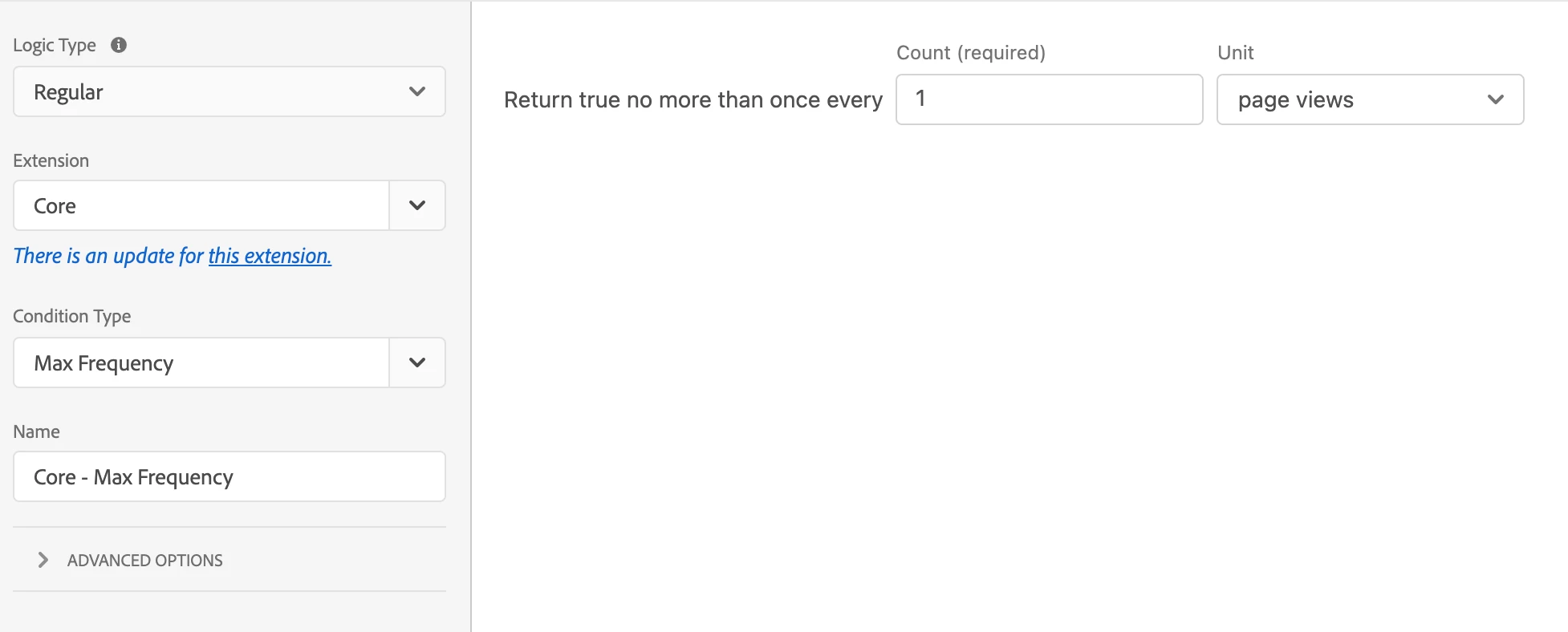
    1. Count: 1
    2. Unit: page views

Here's how the above works:

  1. When DOM Ready or your Direct Call get triggered, this one-and-only-one Rule runs.
  2. It checks the Max Frequency condition. If this is the first time that the Rule has run, then the frequency is 0 currently, so the Rule will continue running. Internally, Launch will then update the frequency to 1.
  3. If the DOM Ready or your Direct Call get triggered again, this one-and-only-one Rule runs again.
  4. But now, the Max Frequency condition will fail, because the frequency is 1 now, which is also your setting for this condition.
  5. So the Rule stops and the actions won't execute.

Hope that helps!

Also, there's a forum specifically for questions about Adobe Launch: https://experienceleaguecommunities.adobe.com/t5/adobe-experience-platform-launch/bd-p/experience-platform-launch-qanda

1 respuesta

yuhuisg
Community Advisor
yuhuisgCommunity AdvisorRespuesta
Community Advisor
February 2, 2022

I assume that you have these 2 -- DOM Ready and Direct Call -- in 2 different Rules. Since Launch runs its Rules asynchronously, you can't guarantee which Rule runs first in the user's browser.

FYI ordering works only with events of the same type. So you can set the order all of your DOM Ready events or all of your Direct Call events, but you can't set orders for both DOM Ready and Direct Call events and expect Launch to follow them.

So here's what I'd do:

  1. Use 1 Rule only. Include both the DOM Ready and Direct Call events in that 1 Rule.
    1. BTW if you were unaware that you can include more than 1 Event in the same Rule, well… tada! 🎉
  2. Add whatever conditions and actions that need to be done with the DOM Ready or Direct Call.
  3. Add a Max Frequency condition with the following:
    1. Count: 1
    2. Unit: page views

Here's how the above works:

  1. When DOM Ready or your Direct Call get triggered, this one-and-only-one Rule runs.
  2. It checks the Max Frequency condition. If this is the first time that the Rule has run, then the frequency is 0 currently, so the Rule will continue running. Internally, Launch will then update the frequency to 1.
  3. If the DOM Ready or your Direct Call get triggered again, this one-and-only-one Rule runs again.
  4. But now, the Max Frequency condition will fail, because the frequency is 1 now, which is also your setting for this condition.
  5. So the Rule stops and the actions won't execute.

Hope that helps!

Also, there's a forum specifically for questions about Adobe Launch: https://experienceleaguecommunities.adobe.com/t5/adobe-experience-platform-launch/bd-p/experience-platform-launch-qanda

Sek_23Autor
Level 2
February 2, 2022

Thanks @yuhuisg  your answer helped a lot. But I see both the events fire all the time irrespective of the Application form event triggered.

Ex : event 1 fires for Pageview (DOM ready) happens on page load for all the pages.

       event 2 fires for Application Form (Direct call - Identifier) happens only specific pages where application form exists.


Please let me know to overcome this issue

yuhuisg
Community Advisor
Community Advisor
February 3, 2022

Can you show some screenshots of your Rule setup and your multiple event calls?

Also, I've just updated my solution to use the Max Frequency condition, instead of the _satellite.setVar() method. This should be simpler to setup and more reliable too.