
Analysis Workspace - applied segment with Day dimension and breakdown showing incorrect column sums numbers than with broken down dimension directly | Community
Skip to main content
bjoern__koth
Community Advisor and Adobe Champion
July 1, 2024
Solved

Analysis Workspace - applied segment with Day dimension and breakdown showing incorrect column sums numbers than with broken down dimension directly

  • July 1, 2024
  • 1 reply
  • 1029 views

Hi guys,


I have a strange behavior in the Analysis Workspace, where the numbers displays with Day as primary dimension and broken down by a prop are incorrect, where when the prop is used as primary dimension without breakdown, it's looking at least closer to the actual sum.


Background

I enabled datastream mapping of the user's ECID to my custom dimension as described here. Don't think it is related, but for completeness


Base Setup

  • an applied Hit-level segment that filters out a specific value in the prop "Platform"

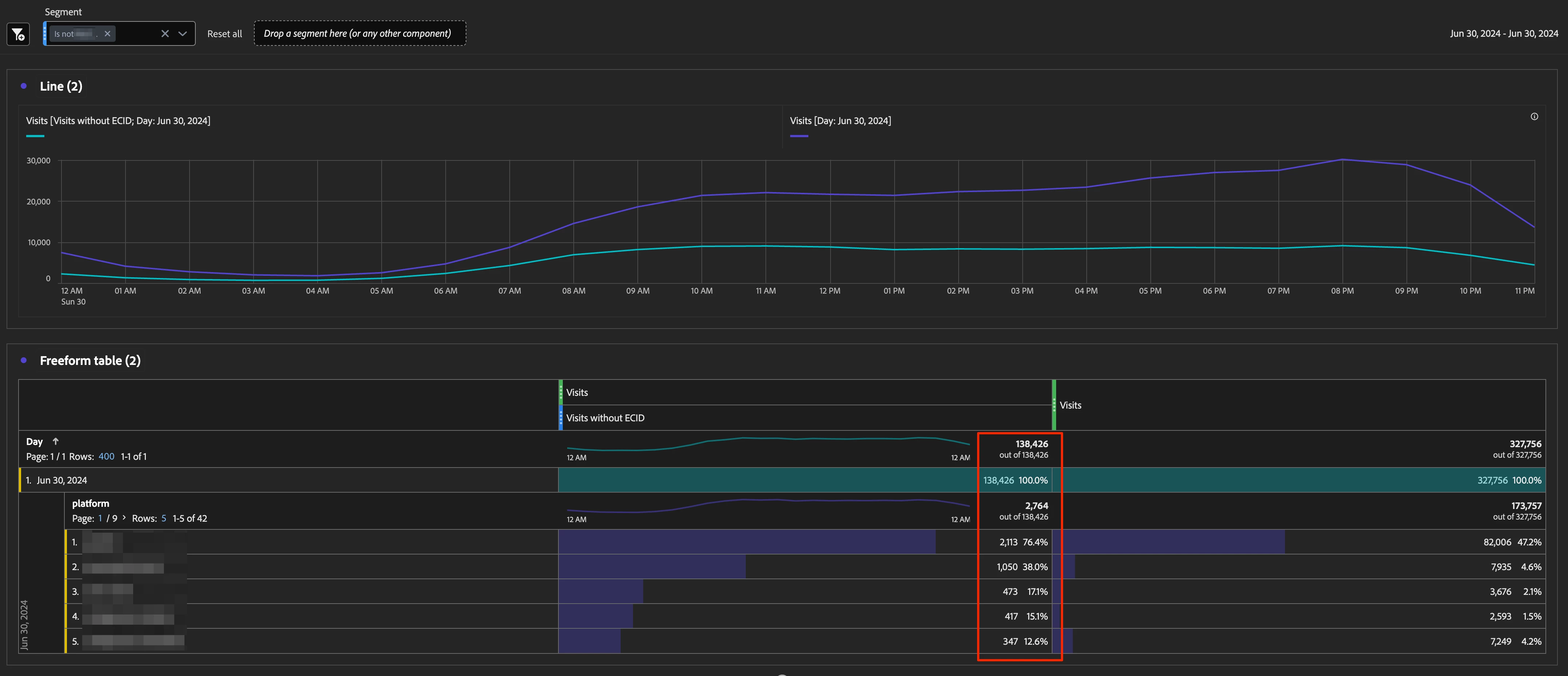
Buggy Freeform Table Setup

  • primary dimension: "Day"
  • "Platform" breakdown applied on a specific day
  • shown column sum is 140k, where the sum of the first 5 items is just 4.4k
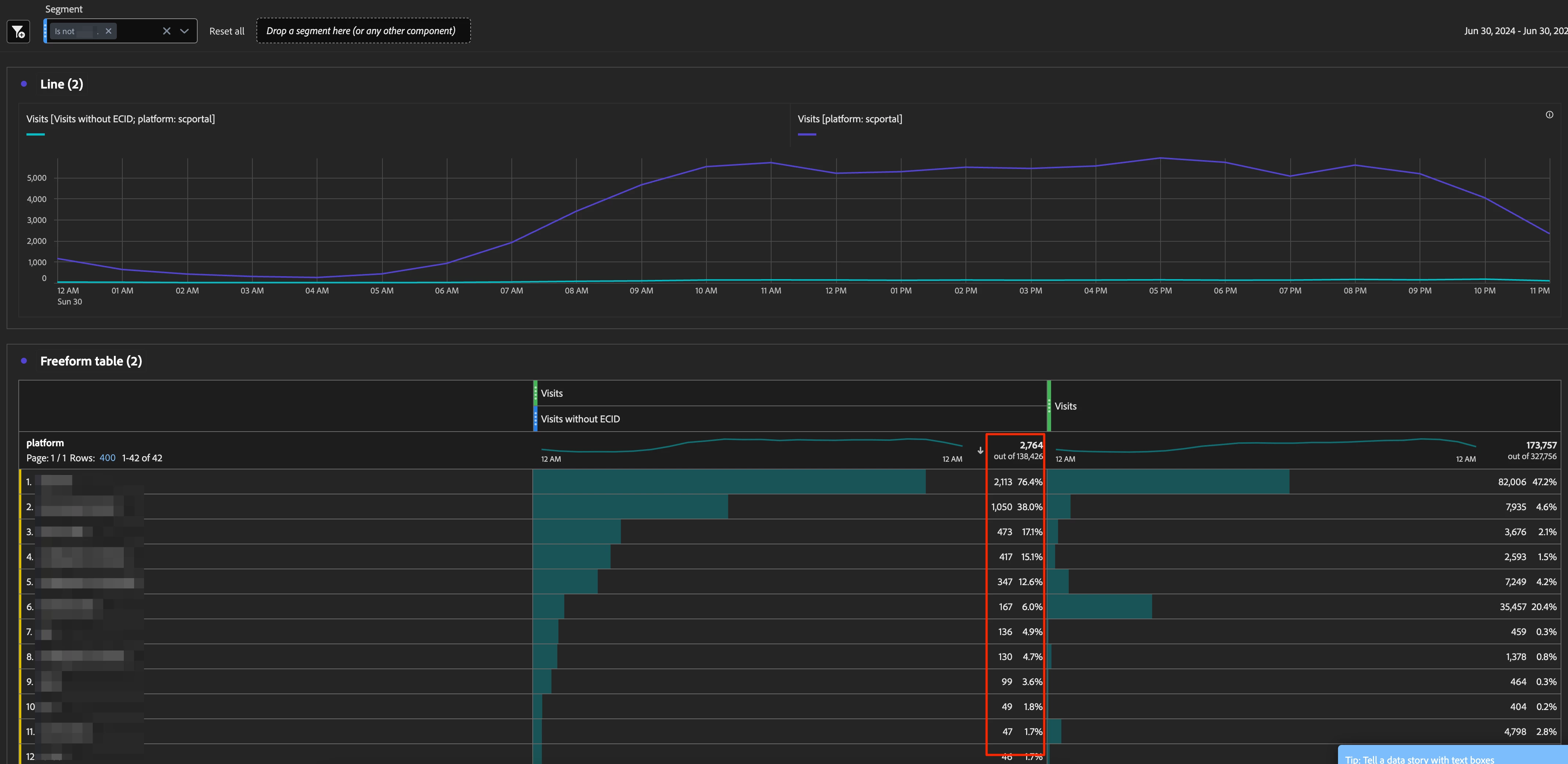
Way better (yet still not correct) Freeform Table Setup

  • primary dimension: "Platform" without breakdown
  • shown column sum is 2.8k, also not 4.4k, but at least closer


Any idea what's going on here?

This post is no longer active and is closed to new replies. Need help? Start a new post to ask your question.
Best answer by Jennifer_Dungan

Do you have mobile apps included in your suite? And do you have lifecycle metrics enabled?


My suspicion is that the Day by "Visits without ECID" of 140K might be coming from your Mobile App Launches... usually those calls occur before the ECID is set, and often don't include dimensions (so when broken out by Day and then Dimension, all those Mobile App Lifecycle metrics can cause some odd behaviour like this...


You can try adding an "exclude Launch Hits" and see if that makes a difference?

1 reply

Jennifer_Dungan
Community Advisor and Adobe Champion
Jennifer_DunganCommunity Advisor and Adobe ChampionAccepted solution
Community Advisor and Adobe Champion
July 2, 2024

Do you have mobile apps included in your suite? And do you have lifecycle metrics enabled?


My suspicion is that the Day by "Visits without ECID" of 140K might be coming from your Mobile App Launches... usually those calls occur before the ECID is set, and often don't include dimensions (so when broken out by Day and then Dimension, all those Mobile App Lifecycle metrics can cause some odd behaviour like this...


You can try adding an "exclude Launch Hits" and see if that makes a difference?

bjoern__koth
Community Advisor and Adobe Champion
July 2, 2024

good catch, @jennifer_dungan 

the client has an app that uses the same RSID (don't ask me why), which is likely the culprit.


Thx

Cheers from Switzerland!
Jennifer_Dungan
Community Advisor and Adobe Champion
July 3, 2024

Honestly, tracking website and app into the same suite is my preferred method... it's easy to split up the site using Virtual Suites to Web vs App (vs whatever), but if done correctly, all your pages and content will roll up to show overall network traffic to specific content. 


But this does come with the caveats that there are some differences that need to be accounted for...