Solved
Adding Metrics to Data Warehouse
How do I add a calculated metric to the "Custom Metrics" option in Adobe Data Ware House tool? Looking to find # of Engaged Visitors against a large list over 11 months
How do I add a calculated metric to the "Custom Metrics" option in Adobe Data Ware House tool? Looking to find # of Engaged Visitors against a large list over 11 months
I don't believe that calculated metrics are available in Data Warehouse, unfortunately... I've had to do simple things like PVs/Vs by adding the individual metrics the export and then calculate later in Excel.
There are a few other options though... have you ever used the Report Builder plugin for Excel (it only works on Windows unless you have CJA and have access to the new CJA Report Builder), but you can essentially create a report directly in Excel and you have access to your calculated metrics. For instance, I have a calculated metric for PVs / Visits that I round to multiple decimal places that is available to me in Report Builder (you may have to "recycle" the list if it doesn't show up right away):
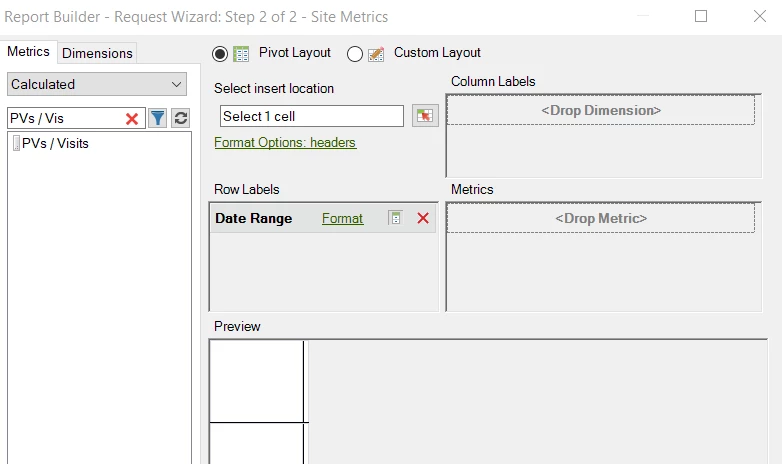
This tool's options can be a little limiting, but it might work for your needs.
The other thing you can try is in Workspace, if you right click on your table, there is a "Download Items as CSV" which isn't limited to the visible rows (I don't know if there is a limit, but I was able to test this with a dataset that was over 3000 lines and it came through).
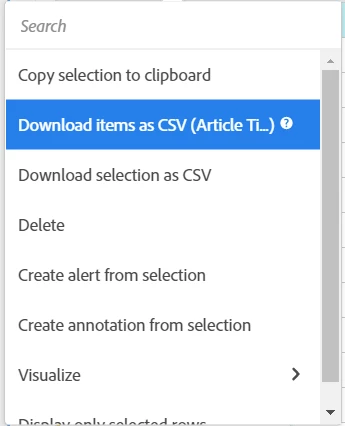
The Report Builder option can be scheduled if this is a recurring report, the Workspace option is manual. I provided both known options just in case.
Enter your E-mail address. We'll send you an e-mail with instructions to reset your password.