
Workspace: hide entry/exit props to clean up left hand menu | Community
Skip to main content
Andrew_Wathen_
Community Advisor
Community Advisor
July 25, 2018
New

Workspace: hide entry/exit props to clean up left hand menu

  • July 25, 2018
  • 2 replies
  • 1777 views

Every prop and every classification of a prop has a corresponding 'exit' and 'entry' version of the prop.   This leads end users to be presented with far too many options which can be very confusing.

For example, the below prop has 2 classifications; as a result the end user is present with 9 different options!
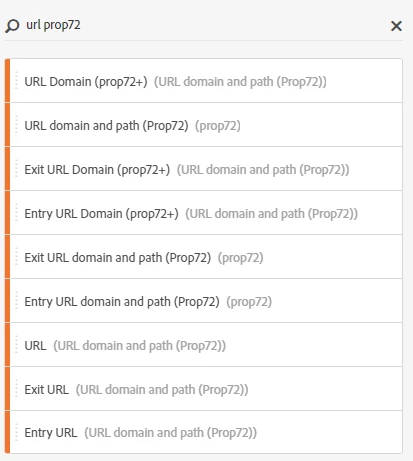
Please can you consider changing the interface so that the entry and exit version do not show up at the top level?

A possible solution would be to make entry and exit variables available from the chevron as the first level of drill down before reaching the items for a prop.
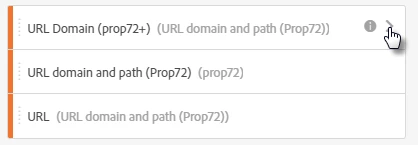
leading to....
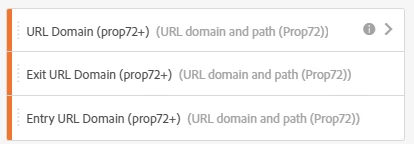
2 replies

June 10, 2020

YES!  All should vote for this, as the design makes no sense at all!  We are intentionally saying we DON’T want pathing for this prop yet presenting the user with pathing options.  The average user will pull incorrect data because of this.


This is one of many instances in which admin console changes do not apply to workspace user interface.  Adobe wants us to adopt workspace as the main tool, but allows little admin control over the interface.  Our average users are incredibly overwhelmed by the interface as a result.

Andrew_Wathen_
Community Advisor
Community Advisor
June 11, 2020

To be fair since I created this post, Adobe have introduced Virtual Report Suite (VRS) curation that can be used to hide entry and exit versions of a prop.  VRS curation is what we now use extensively in our organisations to clean things up for our end users.