Target Activity > Experience Segment Issue | Community
Skip to main content
February 11, 2025
Question

Target Activity > Experience Segment Issue

  • February 11, 2025
  • 1 reply
  • 816 views

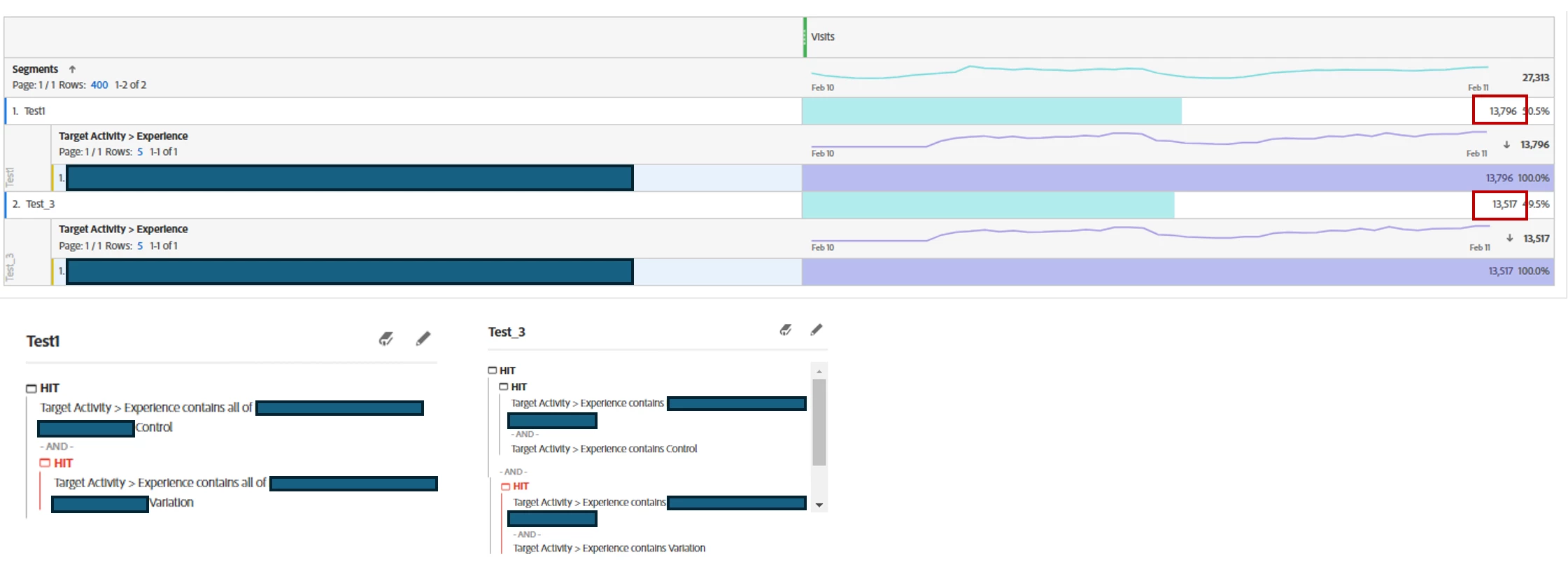
Test1 and Test3 segments are based on the same Target Activity, but the values are slightly different...
In Test 1, the phrase "contains all of" was used to list specific words from the Target Activity, separated by spaces.
In Test 3, two "contains" conditions were used within a single container.
Given this logic, Test 1 and Test 3 should yield the same result for the Target Activity, so why are the values different? What could be the reason Test 3 is missing some results?
Additionally, the Target Activity > Experience dimension sometimes encounters errors in the workspace. Could it be an issue with retrieving data from the Target?

 

This post is no longer active and is closed to new replies. Need help? Start a new post to ask your question.

1 reply

Jennifer_Dungan
Community Advisor and Adobe Champion
February 12, 2025

While I don't have Target, I wonder if there is some Experience that is accidentally being matched by the "contains all of" logic?


Have you tried breaking down your segments by Experiment to see if there are outliers?

HyunjiLeeAuthor
February 12, 2025

When I break it down, no other target names are appearing:(
Let’s assume the following names:

  • Target Control: AB Test Control
  • Target Variation: AB Test Variation

In this case, the Test1 segment is created using "contains all of" to include only AB Test Control,
while the Test3 segment is created using "contains" to include both AB Test and Control. Since each corresponding target name is unique, the desired target appears. However, I don’t quite understand why the data for the "contains" segment, which includes two containers, is smaller.

Jennifer_Dungan
Community Advisor and Adobe Champion
February 12, 2025

That's very strange...


I tried to replicate segments using one of my other dimensions.... one segment using "contains" and the other using "contains any of".. but no matter what I try, the values come out the same for me... 


However, I am not looking at "live" data... I just noticed the date range on your screenshot and the time of your post...  it looks like you are including "today"...  it's possible that as each segment is being calculated, new data is coming in... and that you are simply seeing more information in one because it was rendered / calculated after the first segment completed?


Have you tried not including "today" in your date range? So if you look only at data that is static, do the numbers line up?