
Quick Tip: Are your tasks suddenly out of order and you don't know why? | Community
Skip to main content
kynabaker16
Adobe Employee
Adobe Employee
February 9, 2021
Question

Quick Tip: Are your tasks suddenly out of order and you don't know why?

  • February 9, 2021
  • 1 reply
  • 482 views

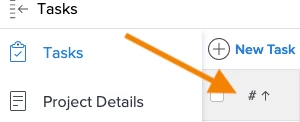
If your tasks are out of order on a project and you're not seeing the waterfall view of parents above child task relationship, check to make sure that you're sorting by the # column (which is by default the first column from the left on a project). If you click the header column of another column, the rows will reorder. Once you sort by the # column again, your tasks will be accurately ordered.
This post is no longer active and is closed to new replies. Need help? Start a new post to ask your question.

1 reply

Doug_Den_Hoed_AtAppStore
Community Advisor
Community Advisor
February 10, 2021

Good one Kyna,

For best results, I'd also recommend removing the current Grouping (if any) at that time, which can otherwise interfere with the ordering.

Regards,

Doug