Issues with Calculated Fields using Dates | Community
Skip to main content
October 28, 2024
Question

Issues with Calculated Fields using Dates

  • October 28, 2024
  • 1 reply
  • 522 views

Hi all,


I have a calculation in a custom form which outputs the number of days between the start-up date of a project and today's date (essentially the "project age" as of today). Here is the formula I'm using:


FLOOR(DATEDIFF(CLEARTIME($$TODAY),CLEARTIME({plannedStartDate})))
 
NOTE:
- The "FLOOR" expression should give me a round-down number.
- And the "CLEARTIME" expression should omit the hours in the date/time.
 
The problem is, I get mixed results with my formula.
 
Some projects will display the number of days between the planned start date and today's date, as intended. This is displayed as a positive integer:
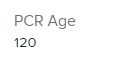


Some projects will display nothing at all, even though the start date is clearly listed earlier in the form.

 

Some projects will display a negative number with a decimal point:
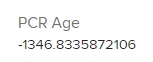
 

Can anyone shed some light on what might be happening?
 
I have tried various different combinations of formulas (different expressions, changing the reference dates, removing the FLOOR and CLEARTIME expressions) with similar outcomes/results.
 
Any clues would be helpful.
 
Thanks
 
Tom
This post is no longer active and is closed to new replies. Need help? Start a new post to ask your question.

1 reply

October 29, 2024

UPDATE:


I have generated a report which lists projects containing the start date and the PCR Age.


I was able to fix the automatically calculated "PCR Age" by manually clicking on the "Start On" Date and then clicking on the day (I guess this is like a refresh): 


Whilst this does fix the problem, it's not really a long-term solution as it's still a manual fix for every project line item in the report.


Suspect now that there is something wrong with the way Workfront is reading the dates.


-Tom

Doug_Den_Hoed_AtAppStore
Community Advisor
Community Advisor
October 29, 2024


Hi @thomasho11,


As you've sensed, you're trapped.


$$TODAY changes constantly (as They Might Be Giants pointed out), so the resulting calculated parameter quickly gets "stale", until the next recalculation...to chorus.


If the value of that age warrants doing so, you could use Fusion or our Recalc Parameters solution (which we created for this purpose) on some reasonable cadence to "freshen up" the data (eg each night).


 Alternatively, you could filter for the projects of interest each day and either manually recalculate them (or use our Recalc Helper solution, which can handle high volumes)...but were you to forget to do so, confidence might then quickly erode.


For real-time calculations, it might be best to use a valueexpression in a view (and/or report) with the DATEDIFF function: although you'd be giving up the abilities to filter, group, sort, and chart that a calculated parameter persisted in the database would provide, at least the numbers would always be accurate.


Regards,

Doug