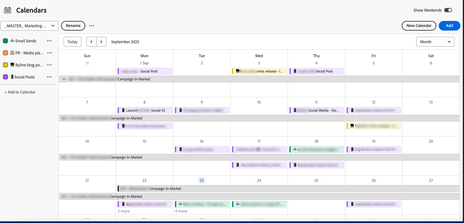
Our team is a small Marketing team, and we have a need for an all-inclusive Content Calendar (screenshot below) that can show:
- Spans of campaign in-market time (not working on the project time, but actual in-market/after launch time)
- Individual Launch dates for items like social posts, email sends, blog posts, PR posts, etc.
I've done my best to solve 50% of this (the individual launch dates) by using little emoji's in each "Launch" task in a Project Timeline, so that it auto-populates on our Calendar.
However, I have not been able to figure out a way to automate the spans of the dates that a campaign is in-market. It's making me crazy. For now, I'm manually adding them, but I'd love to fix that.
How are you doing this, if you are?? Or, even if you have something similar, bring it on! I'd love to see how others do this, and any ideas you have around naming convention, automating the tasks to the calendar, etc.
Any and all input/ideas are appreciated!!







