Sidekick library not showing | Community
Skip to main content
November 2, 2024
Solved

Sidekick library not showing

  • November 2, 2024
  • 1 reply
  • 660 views

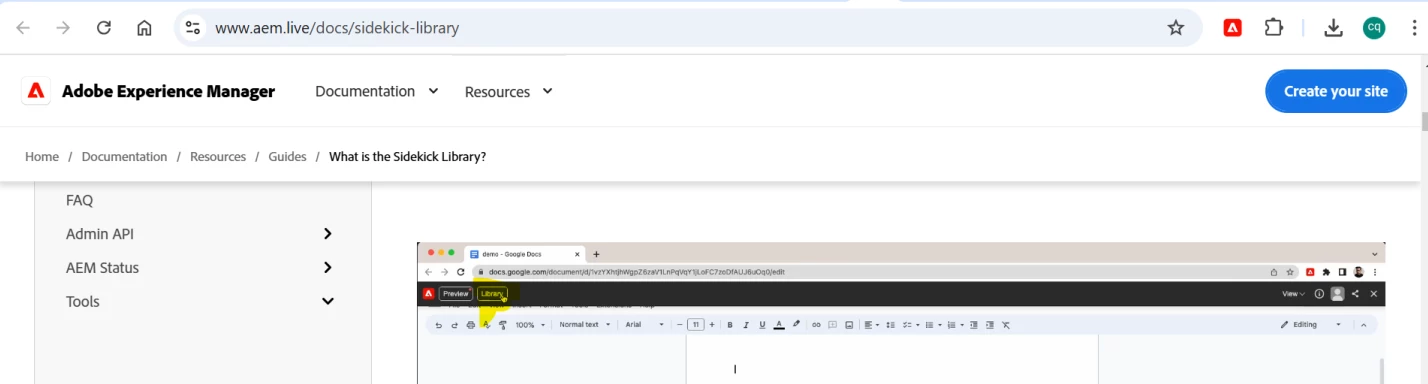
I have installed the chrome sidekick extension, but as seen in the video tutorial https://www.aem.live/docs/sidekick-library , I should be able to see sidekick library when editing a document in google drive on browser. But for some reason, I see only Preview button and no Sidekick library button. Has anyone else seen this issue before, and is there a fix for this?

 

This post is no longer active and is closed to new replies. Need help? Start a new post to ask your question.
Best answer by AshwiniSathe1

Hi @deepankardh1 You have to setup the sidekick library sheet and include the plugin to see sidekick library option. You can follow this document for the same.

https://experienceleague.adobe.com/en/docs/experience-manager-cloud-service/content/edge-delivery/resources/sidekick/sidekick-library


1 reply

AshwiniSathe1
AshwiniSathe1Accepted solution
Level 3
November 4, 2024

Hi @deepankardh1 You have to setup the sidekick library sheet and include the plugin to see sidekick library option. You can follow this document for the same.

https://experienceleague.adobe.com/en/docs/experience-manager-cloud-service/content/edge-delivery/resources/sidekick/sidekick-library