Expand my Community achievements bar.

Get ready! An upgraded Experience League Community experience is coming in January.
Submissions are now open for the 2026 Adobe Experience Maker Awards
SOLVED

How to configure Device Model or Device Marketing Name

Avatar

Level 1

I need to set a test just for user who have a specif cellphone model (for example: samsung Galaxy S).

I tried it using "device model matches" and "device marketing name matches" however both of them presented a validatation error. The field seem to be a selector but it does not appear any options. How am I suppose to set this?


Topics

Topics help categorize Community content and increase your ability to discover relevant content.

1 Accepted Solution

Avatar

Correct answer by
Community Advisor

Hi @IsabelleMa ,


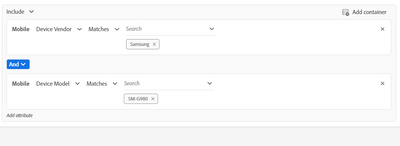
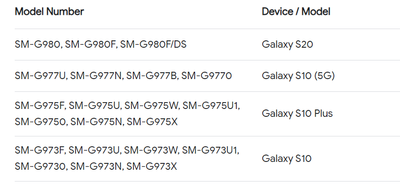
Try using phone model number instead of name. Audience example below for Samsung Galaxy S20


SnehaParmar_0-1688039560458.png


SnehaParmar_1-1688039579588.png


Thanks,

Sneha


View solution in original post

2 Replies

Avatar

Correct answer by
Community Advisor

Hi @IsabelleMa ,


Try using phone model number instead of name. Audience example below for Samsung Galaxy S20


SnehaParmar_0-1688039560458.png


SnehaParmar_1-1688039579588.png


Thanks,

Sneha


Avatar

Level 1

Hi there, I'm attempting to target only Galaxy S23 users, but when I QA the test links, the variant version isn't being displayed. I also tried using other models, but it seems like Adobe Target doesn't recognize the device models.

What can I do?

HELP!

Dorian_SayaziCr_0-1720027462412.png