Not able to rename Display Name for one of the fields in Schema (CDP) | Adobe Higher Education
Skip to main content
Level 3
April 21, 2023
Resuelto

Not able to rename Display Name for one of the fields in Schema (CDP)

  • April 21, 2023
  • 5 respuestas
  • 1847 visualizaciones

Hi,


I am trying to edit the Display name for one of the fields in a Schema but I am getting an error - There was an error validating the schema.


About the schema -  It is Enabled for profiling, there was a dataset also associated to it earlier (but it has been deleted), dataflow is Disabled as well. 

But still i am not able to edit the Display Name. any reason why? 


Thank you!



Regards,

Mansi Bedi


Este tema ha sido cerrado para respuestas.
Mejor respuesta de Anil_Umachigi

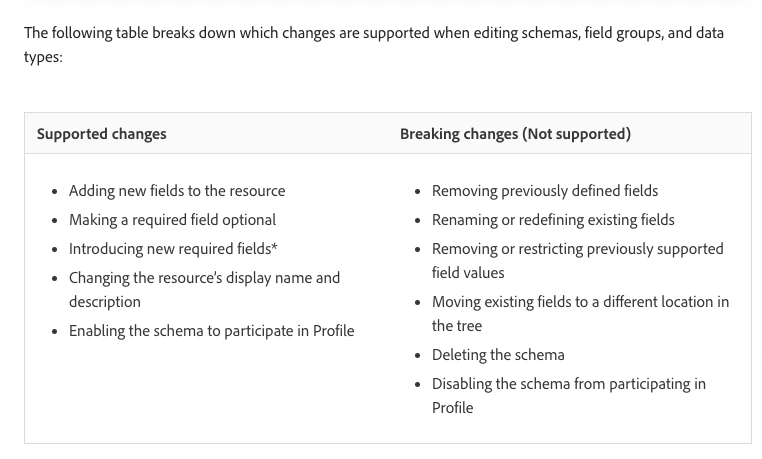
@mansibedi If the schema was enabled for profile ( even if the dataset is now deleted) no changes are allowed. Check out the this help document which includes the table below. 


5 respuestas

Level 3
April 21, 2023

The Same is happening to a Schema Field which is not Enabled as well. 

Please note - The Class being used is a XDM Lookup Class


Can't we rename a Custom Class Field used in a Schema?

Anil_Umachigi
Adobe Employee
Anil_UmachigiAdobe EmployeeRespuesta
Adobe Employee
April 22, 2023

@mansibedi If the schema was enabled for profile ( even if the dataset is now deleted) no changes are allowed. Check out the this help document which includes the table below. 


Level 3
April 24, 2023

Thank you Anil. I get that if the profile is enabled (scenario 1 that I am facing), then no changes are allowed in the display name. 


But in another scenario for a Schema - Where I am using XDM Lookup Class (custom created), Profile is not enabled. The display name of the field that I am trying to rename is part of that Lookup class. Now since the profile is not enabled, and no dataset is associated, is there any reason why I am not able to rename the display name? I am getting the same Error of Validation of Schema.


Thanks,

Mansi Bedi

Anil_Umachigi
Adobe Employee
Adobe Employee
April 25, 2023

@mansibedi Was there any data ingestion done prior to the the change? if yes that may also be a reason for not allowing changes. 

Alternatively if it is not associated to any dataset yet, create a copy of it using API and then rename fields before you publish 

Level 3
April 25, 2023

Actually there was no data inestion that happened earlier for this schema. Only the schema was created. 

Do you suggest creating a new Schema itself is the only solution in this case?


Thanks,

Mansi

Anil_Umachigi
Adobe Employee
Adobe Employee
April 26, 2023

@mansibedi Yup, try copying the schema and publishing again. 

Level 3
April 26, 2023

Thank you Anil, I'll do that!