Hi,
Can you clarify what you mean by "the data for the profiles sit under 'default policy merge'"?
Merge policies are powerful capability in Platform that allows customer profiles to be assembled on the fly in different ways based on logic you define. The out-of-the-box default merge policy, which is usually sufficient for most customers, uses a "Default Timebased" logic, so the newer records win. For example, say you were ingesting loyalty system data and CRM system data and both contained a "first name" field. If my first name in the loyalty system was "Danny" and my first name in the CRM system was "Daniel", then my merged profile using a "Default Timebased" merge policy would grab my first name from the most recently ingested data. I could configure a custom merge policy that could give precedence to one dataset over another, so, for example, I could have the CRM data take precedence over the loyalty system data if they both contributed the same field. It's a powerful, but kind of abstract concept, and as I mentioned the default, out-of-the-box merge policy is usually sufficienct. Here is a video on merge policies: https://experienceleague.adobe.com/en/docs/platform-learn/tutorials/profiles/create-merge-policies
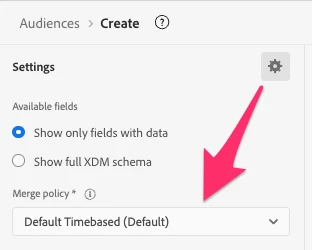
When it comes to defining segments, you can choose which merge policy is used by the segment definition. The segment builder defaults to whichever merge policy is selected as your default merge policy. If you had multiple merge policies defined, you could change the one used by the segment by selecting the gear icon and then using the dropdown.
An important thing to keep in mind with merge policies is that only one merge policy can be selected as "Active on Edge" and can be used with Edge segmentation (typically for Web and Mobile use cases, where data is streaming in to the Edge Network from our Web and Mobile SDKs). Make sure you are using the merge policy specified as Active on Edge for your Edge segments.

