Hits being sent from my Mobile App are not in reporting | Community
Skip to main content
Jennifer_Andrews
Adobe Employee
Adobe Employee
August 13, 2019
Solved

Hits being sent from my Mobile App are not in reporting

  • August 13, 2019
  • 2 replies
  • 4341 views

I see a hit in Charles and in the developer tools being sent to the reportsuite, however, nothing is showing in reporting.

For example

ADBMobile Debug: Analytics - Successfully sent hit(ndh=1&t=00%2F00%2F0000%2000%3A00%3A00%200%20240&c.&a.&OSVersion=iOS%2012.4&DeviceName=x86_64&RunMode=Application&AppID=ADBMobileSamples%201.6%20%286%29&CarrierName=%28null%29&TimeSinceLaunch=1&Resolution=640x1136&.a&.c&mid=17498905197092715868424448609893091153&ts=1565734272&pageName=Menu%20View&ce=UTF-8&aamlh=9&cp=foreground&aamb=j8Odv6LonN4r3an7LhD3WZrU1bUpAkFkkiY1ncBR96t2PTI)

This post is no longer active and is closed to new replies. Need help? Start a new post to ask your question.
Best answer by Jennifer_Andrews

The most common reason hits do not appear in reporting when you indeed see hits being sent is due to a mismatch of Timestamp Configuration.

A reportsuite can be 1 of 3 options

  • Timestamps not allowed
  • Timestamps Required
  • Timestamps Optional

If you have the mobile property OfflineEnabled:true in your ADBMobileConfig.json or you have the checkbox OfflineEnabled in Launch then your reportsuite needs to be either Timestamps Required or Timestamps Optional (this allows both timestamped and non timestamped hits to be reported)

In order to determine what your reportsuite has been configuration with navigate to Analytics->Admin->Select your Report Suite and Edit Settings and go to Timestamp Configuration.
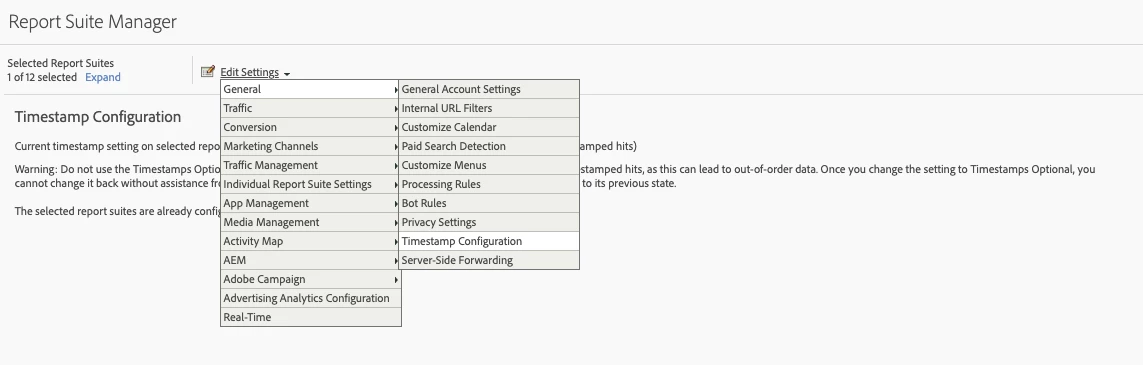
Ensure that if you have OfflineEnabled that your report suite is Timestamp Required or Timestamp Optional, if you do not have OfflineEnabled then ensure that your report suite is Timestamp not allowed or Timestamp Optional.

Another reason for missing data is reporting is that App Management and its dedicated mobile solution variables are not enabled.
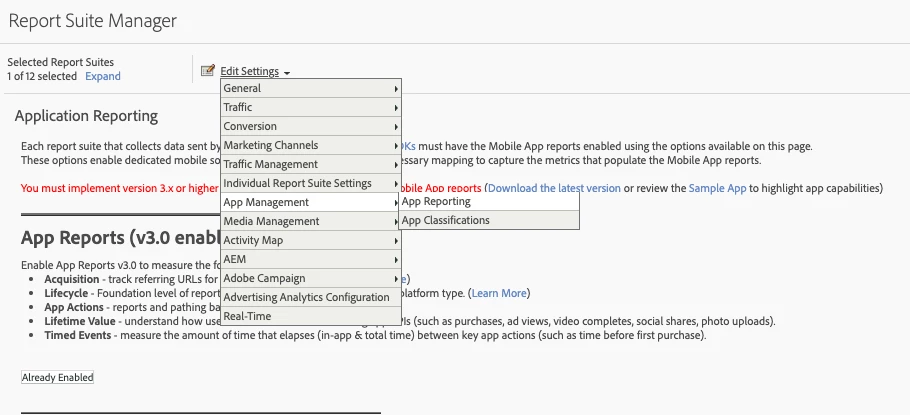
You can confirm in Analytics in the Admin as above. If it states Already Enabled (as above) solution variables and reporting are configured, otherwise you may need to Click Button "Enable Latest App Reports" to generate these dedicated variables.

2 replies

Jennifer_Andrews
Adobe Employee
Jennifer_AndrewsAdobe EmployeeAuthorAccepted solution
Adobe Employee
August 13, 2019

The most common reason hits do not appear in reporting when you indeed see hits being sent is due to a mismatch of Timestamp Configuration.

A reportsuite can be 1 of 3 options

  • Timestamps not allowed
  • Timestamps Required
  • Timestamps Optional

If you have the mobile property OfflineEnabled:true in your ADBMobileConfig.json or you have the checkbox OfflineEnabled in Launch then your reportsuite needs to be either Timestamps Required or Timestamps Optional (this allows both timestamped and non timestamped hits to be reported)

In order to determine what your reportsuite has been configuration with navigate to Analytics->Admin->Select your Report Suite and Edit Settings and go to Timestamp Configuration.

Ensure that if you have OfflineEnabled that your report suite is Timestamp Required or Timestamp Optional, if you do not have OfflineEnabled then ensure that your report suite is Timestamp not allowed or Timestamp Optional.

Another reason for missing data is reporting is that App Management and its dedicated mobile solution variables are not enabled.

You can confirm in Analytics in the Admin as above. If it states Already Enabled (as above) solution variables and reporting are configured, otherwise you may need to Click Button "Enable Latest App Reports" to generate these dedicated variables.

Level 2
February 23, 2022

Hi @jennifer_andrews ,


I am not able to see any mobile data in report. Currenly I am using same report suite for both web and mobile app. Its hybrid mobile app for this I have created the processing rule for trackAction and same is getting triggered from app but I am not able to see any data in report

var contextData = new Object () || {};

contextData.pageInfo.pageName = “Mobile:ScreenName”;

contextData.platformType = “Mobile”;

ACPCore.trackAction("pageView", contextData, successCallback, errorCallback);


In launch , I have not created any data elements or rules etc. Only using appID from launch on app and the property is published

Processing Rule SS


Can check like what I am missing.