
Workflow OOTB email showing localhost link for content | Community
Skip to main content
chintan97
May 22, 2020
Solved

Workflow OOTB email showing localhost link for content

  • May 22, 2020
  • 2 replies
  • 6160 views

I am using OOTB email for workflow (checked email option in dynamic participant step). The email contains link to localhost:4502/bin/... and I want that link to point towards dev/ qa etc environments. I assume that the link is coming from 'Day CQ Link Externalizer' local property.
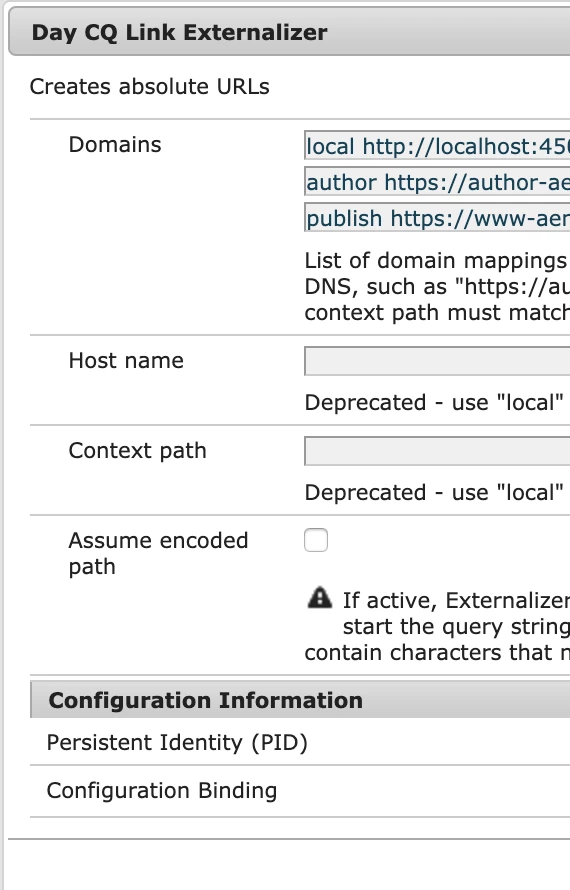
 

After updating local value to author URL, it works fine but after each maven build the value in local gets overwritten. I have two issues here.

1. What's the actual meaning of having local here? Will it impact anything if I update it to author URL?

2. After each build, the local value gets overwritten to http://localhost:4502. I have file named 'com.day.cq.commons.impl.ExternalizerImpl.xml' under /apps/<my site>/config.dev/ and same under config.qa etc. Even if I update the file, the changes in local field are not getting reflected in /system/console/configMgr and they are overwritten with localhost link.


The file content in 'com.day.cq.commons.impl.ExternalizerImpl.xml' is:

<?xml version="1.0" encoding="UTF-8"?>
jcr:primaryType="sling:OsgiConfig"
externalizer.domains="[local http://localhost:4502,author <author URL to my site>,publish <publish URL to my site>]"
externalizer.host=""
externalizer.contextpath=""/>
 
EDIT 1: I am using AEM 6.5.
This post is no longer active and is closed to new replies. Need help? Start a new post to ask your question.
Best answer by sunjot16

The local should always point to the instance. The reason is that AEM needs local for other internal operations.

The following mapping names are predefined and must always be set as AEM relies on them:
  • local - the local instance
  • author - the authoring system DNS
  • publish - the public facing website DNS

A custom configuration allows you to add a new category, such as "production," "staging," or even external non-AEM systems such as "my-internal-webservice" and is useful to avoid hardcoding such URLs across different places in a project's codebase.


To point to author url, you should use the author entry.


More information about it can be found here:

https://docs.adobe.com/content/help/en/experience-manager-64/developing/platform/externalizer.html#configuring-the-externalizer-service


Hope it helps !! 🙂

2 replies

sunjot16
Adobe Employee
sunjot16Adobe EmployeeAccepted solution
Adobe Employee
May 22, 2020

The local should always point to the instance. The reason is that AEM needs local for other internal operations.

The following mapping names are predefined and must always be set as AEM relies on them:
  • local - the local instance
  • author - the authoring system DNS
  • publish - the public facing website DNS

A custom configuration allows you to add a new category, such as "production," "staging," or even external non-AEM systems such as "my-internal-webservice" and is useful to avoid hardcoding such URLs across different places in a project's codebase.


To point to author url, you should use the author entry.


More information about it can be found here:

https://docs.adobe.com/content/help/en/experience-manager-64/developing/platform/externalizer.html#configuring-the-externalizer-service


Hope it helps !! 🙂

amandaw52210011
January 19, 2021
Hi @chintan97, at present, I have encountered the same problem as you. What is the final solution on your side? Can you tell me conveniently? thanks in advance.
arunpatidar
Community Advisor
Community Advisor
May 23, 2020

Hi,

you have to use Externalizer API for those links to convert based on osgi config.

Keep your config in the codebase.


com.day.cq.commons.impl.ExternalizerImpl.xml 

<?xml version="1.0" encoding="UTF-8"?> <jcr:root xmlns:sling="http://sling.apache.org/jcr/sling/1.0" xmlns:jcr="http://www.jcp.org/jcr/1.0" jcr:primaryType="sling:OsgiConfig" externalizer.domains= "[local https://localhost:4502,author https://author-sites.com,publish https://publish-sites.com]"/>


Java Code Example :

Externalizer externalizer = resolver.adaptTo(Externalizer.class); if (null != externalizer && StringUtils.isNotBlank(domain)) { if (ModeUtil.isAuthor()) { externalLink = externalizer.authorLink(resolver, externalLink); } else { externalLink = externalizer.externalLink(resolver, domain, externalLink); } }


Arun Patidar
