Workflow Email Notification pointing to wrong url | Community
Skip to main content
September 26, 2018
Solved

Workflow Email Notification pointing to wrong url

  • September 26, 2018
  • 23 replies
  • 11287 views

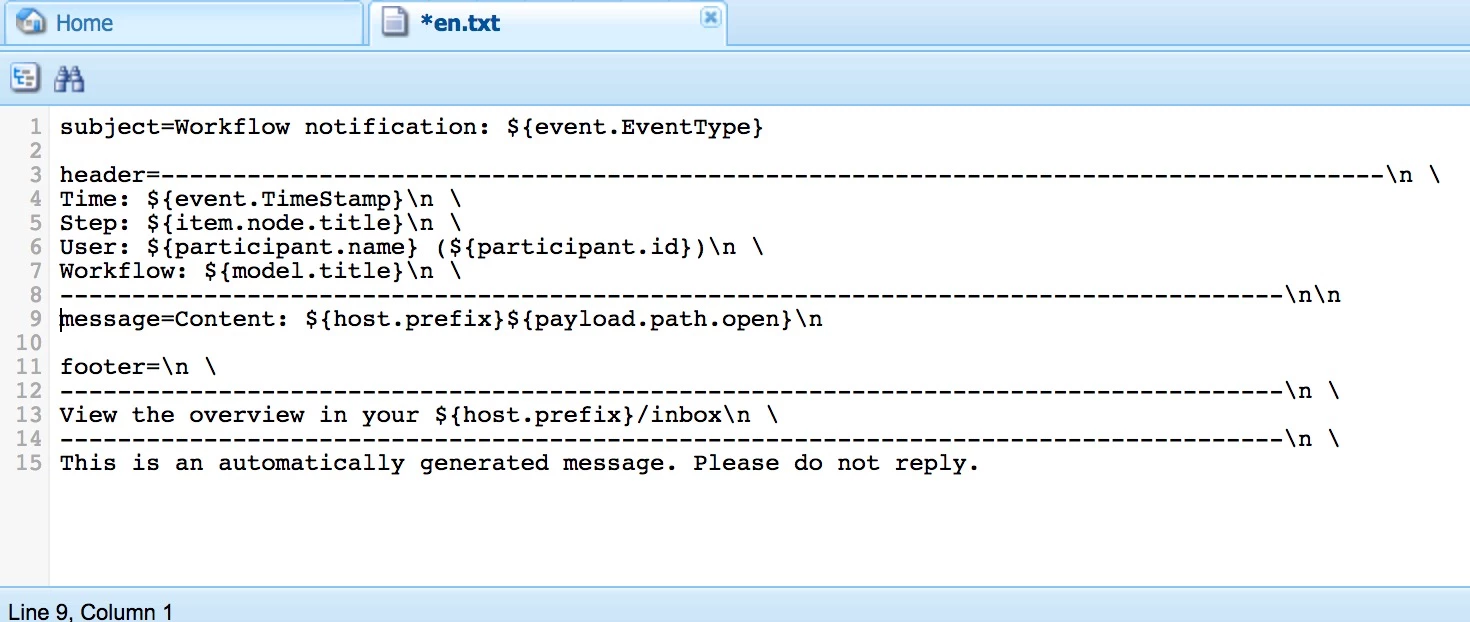
We recently migrated to AEM 6.4 and noticed all OOB workflow Email notification body content which also has URL mentioned pointing to local-host URL on all environments (dev,stage, prod)

This was working on prior AEM version we were on (6.1) and We do have OSGI Link Externalizer Config properly setup for all run modes on 6.4
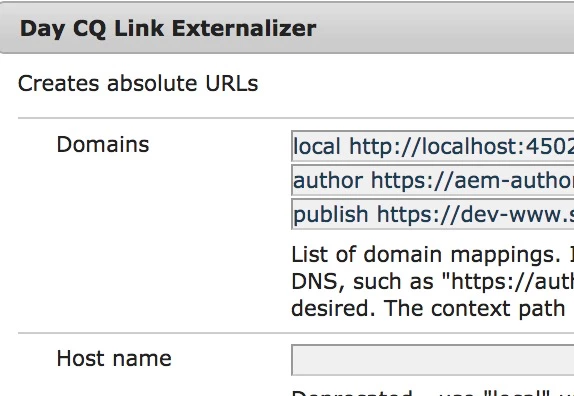
Apart from externalizer, We do have   Day CQ Workflow Email Notification Service (com.day.cq.workflow.impl.email.EMailNotificationService) configured with correct values for Dev/stage/prod but its also not helping.

Can anyone tell if its a product bug or required additional configuration ?

This post is no longer active and is closed to new replies. Need help? Start a new post to ask your question.
Best answer by smacdonald2008

Our support team replied:

Ok, so when I tested with Externalizer then the setting is ignored. Whenever I use Host URL Prefix from Host URL Prefix

It changes the prefix.

Might a good idea to log a support case

23 replies

smacdonald2008
smacdonald2008Accepted solution
September 26, 2018

Our support team replied:

Ok, so when I tested with Externalizer then the setting is ignored. Whenever I use Host URL Prefix from Host URL Prefix

It changes the prefix.

Might a good idea to log a support case

September 26, 2018

thanks smacdonald2008 for confirming. I will open one for this issue.

smacdonald2008
September 26, 2018

We are still putting a HELXP together to show use of this API. We will show it within a Workflow.

smacdonald2008
September 26, 2018

Got it working too in Java --

public void execute(WorkItem item, WorkflowSession wfsession,MetaDataMap args) throws WorkflowException {


    try

    {

        log.info("Here in execute method");    //ensure that the execute method is invoked   


        ResourceResolver resourceResolver = resolverFactory.getAdministrativeResourceResolver(null);


        //Get the FULL URL OF THE PAYLOAD in the workflow

        //Get the Assets from the file system for a test

        WorkflowNode myNode = item.getNode();


        String myTitle = myNode.getTitle(); //returns the title of the workflow step


        log.info("**** The title is "+myTitle); 


        WorkflowData workflowData = item.getWorkflowData(); //gain access to the payload data

        String path = workflowData.getPayload().toString();//Get the path of the asset


        //GET FULL PATH

        String myExternalizedUrl = externalizer.publishLink(resourceResolver, path) + ".html";


        log.info("The FULL PATH FO THE PAY LOAD IS "+ myExternalizedUrl); 


    }


        catch (Exception e)

        {

        e.printStackTrace()  ;

        }

     }

September 26, 2018

I agree, it work for me in Java or If I generate URL value using externalizer API in Java class and use it in email template as variable.

But, it does not work for OOB workflow email template at location /libs/settings/workflow/notification/email/default/en.txt

where its using $ {host.Prefix} for URL.

For me its product issue since its only with OOB emails.

Do you know or can you check how $ {host.Prefix} variable value is calculated and passed to this template then we can figure out which configuration is actually responsible for host.Prefix wrong value

F

smacdonald2008
September 26, 2018

Here is a HELXP that shows using this API in a Java class --

Adobe Experience Manager Help | Creating an Adobe Experience Manager 6.4 custom workflow step that uses the Externalizer…

There is a video too in this HELPX that shows this API working.

September 26, 2018

ok i saw this before but it does not answer my question why OOB email template host.prefix variable does not have correct value.

Can you check with your team on this since its Adobe OOB email and back end class who call this template to trigger email.

this will help me understand how $ {host.Prefix} variable value is calculated and passed to this template then we can figure out which configuration is actually responsible for host.Prefix wrong value

smacdonald2008
September 26, 2018

There is a bug ( when trying to use it within an email template) as customer support stated.

This article is for ppl whom want to know how to build a solution with this API and see it running.

When we were investigating this - i saw we had no HELPX Quick Start for this API - that is and end to end to quickly get it working.

September 26, 2018

got it thanks

September 27, 2018

I dont understand why this thread was marked Answered though its pending further investigation by support or original issue for which this question was created does not resolved yet.