Esta conversación ha sido bloqueada debido a la inactividad. Cree una nueva publicación.
Nivel 1
Nivel 2
Iniciar sesión en la comunidad
Iniciar sesión para ver todas las insignias
Esta conversación ha sido bloqueada debido a la inactividad. Cree una nueva publicación.
Hi
I was testing email share feature of asset -share-commons.
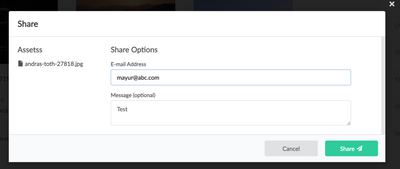
It is functioning correctly on my development instance in the cloud without any special configuration. However, I encountered an error popup when testing it on my local instance.
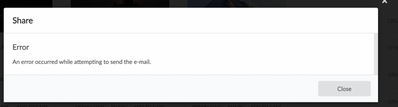
error.log
2023-06-19 17:17:13.231 DEBUG [com.adobe.aem.commons.assetshare.components.actions.share.impl.EmailShareServiceImpl] Sharing [ /content/dam/asset-share-commons/en/public/pictures/andras-toth-27818.jpg ] to [ mayur@abc.com ]
19.06.2023 17:17:13.238 *WARN* [[0:0:0:0:0:0:0:1] [1687175233201] POST /content/asset-share-commons/en/light/actions/share/_jcr_content/root/responsivegrid/share.share.html HTTP/1.1] com.adobe.granite.metrics.knownerrors.impl.ErrorLoggingComponentFilter Exception in component: category=CUSTOMER_CODE, resourceType=asset-share-commons/components/modals/share, exceptionType=java.lang.IllegalArgumentException, errorId=CUSTOMER, resource=/content/asset-share-commons/en/light/actions/share/jcr:content/root/responsivegrid/share, exceptionMessage = Could not find configuration for domain 'author'
19.06.2023 17:17:13.241 *ERROR* [[0:0:0:0:0:0:0:1] [1687175233201] POST /content/asset-share-commons/en/light/actions/share/_jcr_content/root/responsivegrid/share.share.html HTTP/1.1] org.apache.sling.engine.impl.SlingRequestProcessorImpl service: Uncaught Throwable
java.lang.IllegalArgumentException: Could not find configuration for domain 'author'
at com.day.cq.commons.impl.ExternalizerImpl.externalLink(ExternalizerImpl.java:308) [com.day.cq.cq-commons:5.12.22]
at com.day.cq.commons.impl.ExternalizerImpl.authorLink(ExternalizerImpl.java:366) [com.day.cq.cq-commons:5.12.22]
at com.adobe.aem.commons.assetshare.components.actions.share.impl.EmailShareServiceImpl.getAssetLinkListHtml(EmailShareServiceImpl.java:212)
at com.adobe.aem.commons.assetshare.components.actions.share.impl.EmailShareServiceImpl.share(EmailShareServiceImpl.java:182)
at com.adobe.aem.commons.assetshare.components.actions.share.impl.EmailShareServiceImpl.share(EmailShareServiceImpl.java:149)
In addition, I attempted to add the configurations mentioned in https://experienceleague.adobe.com/docs/experience-manager-learn/cloud-service/networking/examples/e... but unfortunately, it did not resolve the issue.
Do you have any insights into what might be causing this problem?
¡Resuelto! Ir a solución.
Vistas
Respuestas
Total de me gusta
Hello @MayurSatav
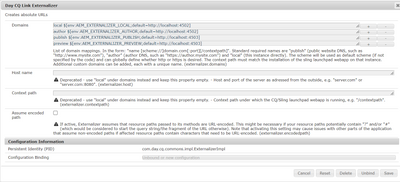
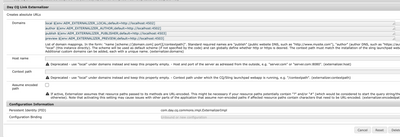
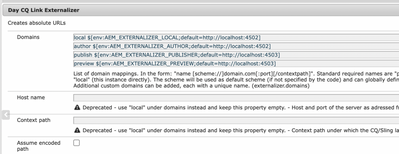
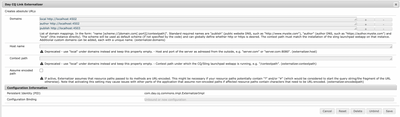
Can you also please confirm following config:
This is with respect to
org.apache.sling.engine.impl.SlingRequestProcessorImpl service: Uncaught Throwable java.lang.IllegalArgumentException: Could not find configuration for domain 'author' at com.day.cq.commons.impl.ExternalizerImpl.externalLink(ExternalizerImpl.java:308) [com.day.cq.cq-commons:5.12.22]
Vistas
Respuestas
Total de me gusta
Hello @MayurSatav
The configurations on the link that you have shared are for Cloud Instance server. The Proxy and port configuration would work on AaaCS server
For local, you would need to set up a proper smtp credentials and configure the same in "Day CQ Mail Service"
https://techrevel.blog/2023/06/12/utilizing-gmail-smtp-for-cost-free-email-transmission-from-aem/
Thereafter you should be able to send emails
Vistas
Respuestas
Total de me gusta
Vistas
Respuestas
Total de me gusta
Hello @MayurSatav
Can you also please confirm following config:
This is with respect to
org.apache.sling.engine.impl.SlingRequestProcessorImpl service: Uncaught Throwable java.lang.IllegalArgumentException: Could not find configuration for domain 'author' at com.day.cq.commons.impl.ExternalizerImpl.externalLink(ExternalizerImpl.java:308) [com.day.cq.cq-commons:5.12.22]
Vistas
Respuestas
Total de me gusta
I have verified, the configuration under "Day CQ Link Externalizer" is same.
Vistas
Respuestas
Total de me gusta
Hello @MayurSatav
The "Day CQ Mail Service" And "Day CQ Link Externalizer" have some issues. They sometimes don't take effect.
Please try restarting AEM, if you have made any changes
Also, it seems Asset share commons has dependency on ACS AEM commons https://github.com/adobe/asset-share-commons/issues/86
Vistas
Respuestas
Total de me gusta
Hello @MayurSatav
These log entries suggest that there is an issue with the configuration for the domain 'author' related to sharing assets via email. The component responsible for email sharing is unable to find the necessary configuration, leading to the IllegalArgumentException. To resolve this issue, you would need to review and ensure that the appropriate configuration for the 'author' domain is correctly set up.
Additionally, could you please validate the following ?
Create a configuration for the email service: In AEM, navigate to the Tools console and select Operations. Under the Configuration section, create a new configuration using the Adobe Granite SMTP Mail Service factory. Configure the email server settings such as the SMTP host, port, authentication credentials, etc.
Enable Asset Share Commons email share: In the AEM Web Console, navigate to the OSGi Configuration section and find the Asset Share Commons configurations. Ensure that the email share feature is enabled. You can customize other email-related settings here, such as the email template and default sender details.
Configure email templates: Customize the email templates used for sharing assets. The templates are located in the /apps/asset-share-commons/config/email path. You can modify the HTML and text versions of the templates to match your desired format and content.
Grant permissions: Ensure that the appropriate users or groups have the necessary permissions to access and use the email share functionality. Check the required permissions for sending emails, accessing the necessary components, and managing configurations.
Vistas
Respuestas
Total de me gusta
Hi @Tanika02 ,
I am not able to find email config dedicated to ASC, Could you please elaborate this step 2. Enable Asset Share Commons email share bit more. If possible then share the PID.
Vistas
Respuestas
Total de me gusta
Hello @MayurSatav
Could you please try searching for the "Asset Share Commons Email Share Service" configuration ?
** I assume that you already have Asset Share Commons package installed in your AEM instance.
Vistas
Respuestas
Total de me gusta
Hi @MayurSatav
While you are debugging, did you try printing the configuration values? What are they showing?
Also, did you try the same configuration in higher environments and checked if they are working?
Sometimes local, it could be the issue with your VPN or Network you are connected with.
Hope it helps!
Thanks,
Kiran Vedantam.
Vistas
Respuestas
Total de me gusta
Hi @Kiran_Vedantam ,
There is no issue with higher environment. It is working as expected there. FYI i am not using any VPN and tried different networks as well.
Vistas
Respuestas
Total de me gusta
Hello everyone,
[FIXED]
Above issue is resolved. For local we dont need to use any scheme.
<unique-name> [scheme://]server[:port][/contextpath]
Instead of local $[env:AEM_EXTERNALIZER_LOCAL;default=http://localhost:4502] we can directly use local http://localhost:4502
Vistas
Respuestas
Total de me gusta
Hello @MayurSatav
Ideally if env variable is not populated, it should have taken up default value. For me, it works with env variable as well. I am using a Windows machine.
Do you by any chance have that variable set locally?
Vistas
Respuestas
Total de me gusta
Vistas
me gusta
Respuestas
Vistas
me gusta
Respuestas
Vistas
me gusta
Respuestas