내 커뮤니티 업적 표시줄을 확대합니다.

Mark Solution

활동이 없어 이 대화는 잠겼습니다. 새 게시물을 작성해 주세요.

해결됨

Project Build Error

Avatar

Level 2

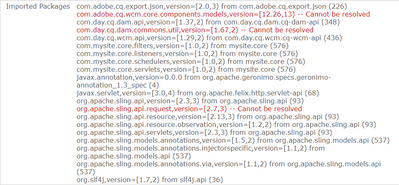
When building the project, CMD shows "Build Success", but bundle is getting stuck in "Installed" status under system console bundles.
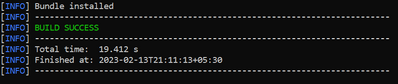
srk381_2-1676303578585.png


srk381_1-1676303544521.png


Looks like something need to be updated under pom.xml file, but not sure what and where to update it.


Can someone help me or guide me on how to get the above issue fixed please? Thanks in advance!

1 채택된 해결책 개

Avatar

정확한 답변 작성자:
Community Advisor and Adobe Champion

Please make sure the Uber Jar version you are using in your AEM project matches the Service Pack installed in your AEM environment. 

원본 게시물의 솔루션 보기

6 답변 개

Avatar

Community Advisor

Avatar

Level 2

I have followed the steps to extend a core component already as per guidelines mentioned in documentation.


But still, it is showing errors after project is being build.

Avatar

정확한 답변 작성자:
Community Advisor and Adobe Champion

Please make sure the Uber Jar version you are using in your AEM project matches the Service Pack installed in your AEM environment. 

Avatar

Level 2

@BrianKasingli Could you help me with where exactly I can review and update it please? Thanks!

Avatar

Level 2

Reviewed Service Pack info from: http://<host>:<port>/system/console/productinfo


and added the dependency under main pom.xml following: https://experienceleague.adobe.com/docs/experience-manager-65/deploying/upgrading/upgrading-code-and...


Done with building the project, but still same issue.

Avatar

Community Advisor and Adobe Champion

Next, you would want to install the AEM Core Component's, can be downloaded in the release's page Releases · adobe/aem-core-wcm-components (github.com).


