Pages are blank in edit mode | Community
Skip to main content
Level 3
December 2, 2022
Solved

Pages are blank in edit mode

  • December 2, 2022
  • 2 replies
  • 2279 views

Hi Team,


I have updated my core.wcm.component.config and core.wcm.component.content package recently.

After this package update i am not able to open any page in edit mode also all bundles are not in active.

Some are showing in installed state.

Below error i am getting from the log:-

02.12.2022 17:19:12.267 *ERROR* [[0:0:0:0:0:0:0:1] [1669981752201] GET /content/we-retail/fr/fr.html HTTP/1.1] com.day.cq.wcm.core.impl.WCMDeveloperModeFilter Error during include of SlingRequestPathInfo: path='/content/we-retail/fr/fr/jcr:content', selectorString='null', extension='html', suffix='null' org.apache.sling.api.SlingException: Cannot get DefaultSlingScript: Compilation errors in org/apache/sling/scripting/sightly/apps/core/wcm/components/page/v2/page/page_html.java: Line 46, column 1990 : com.adobe.cq.wcm.core.components.models.Page cannot be resolved to a type Line 47, column 2100 : com.adobe.cq.wcm.core.components.models.PWA cannot be resolved to a type
This post is no longer active and is closed to new replies. Need help? Start a new post to ask your question.
Best answer by Mohit_KBansal

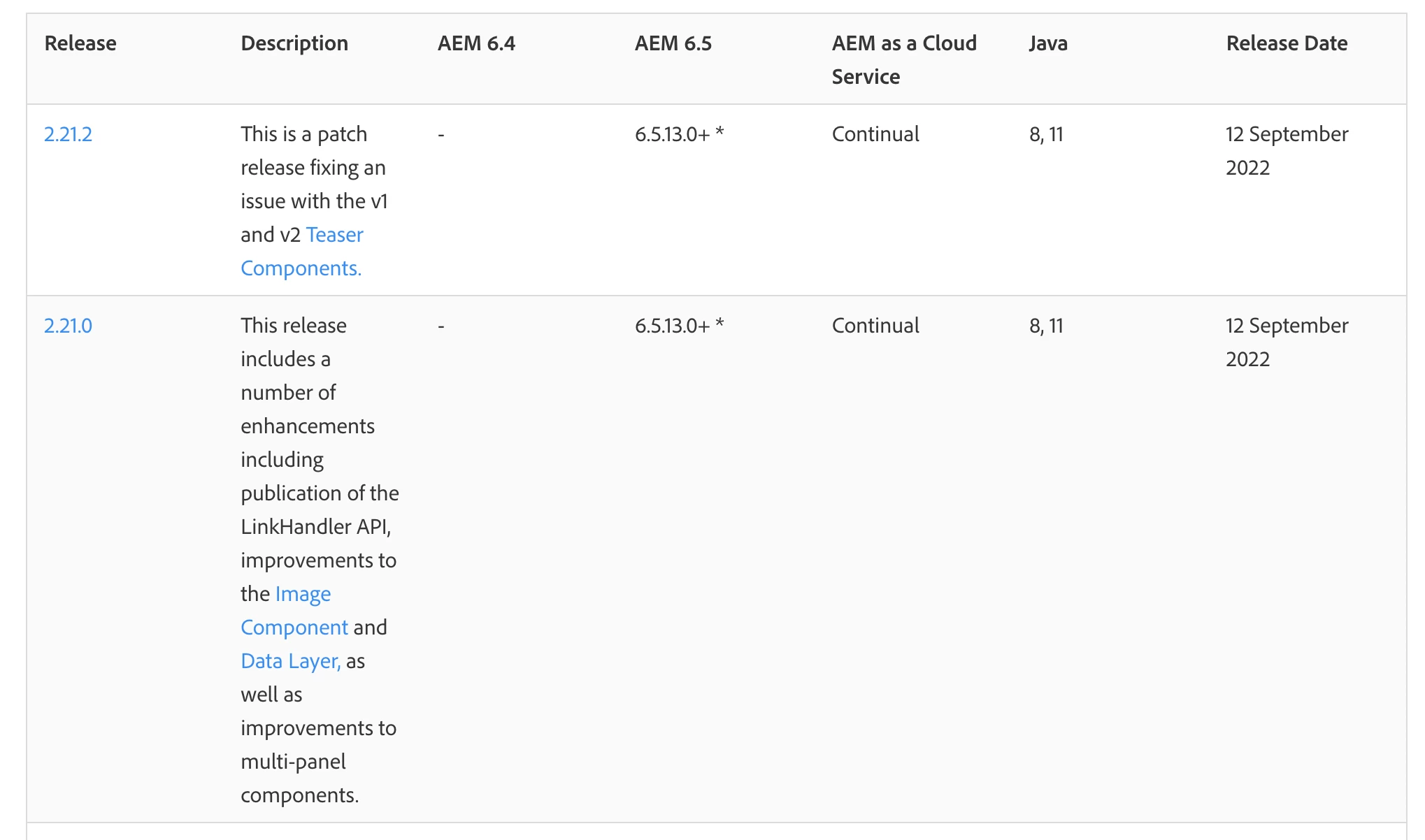
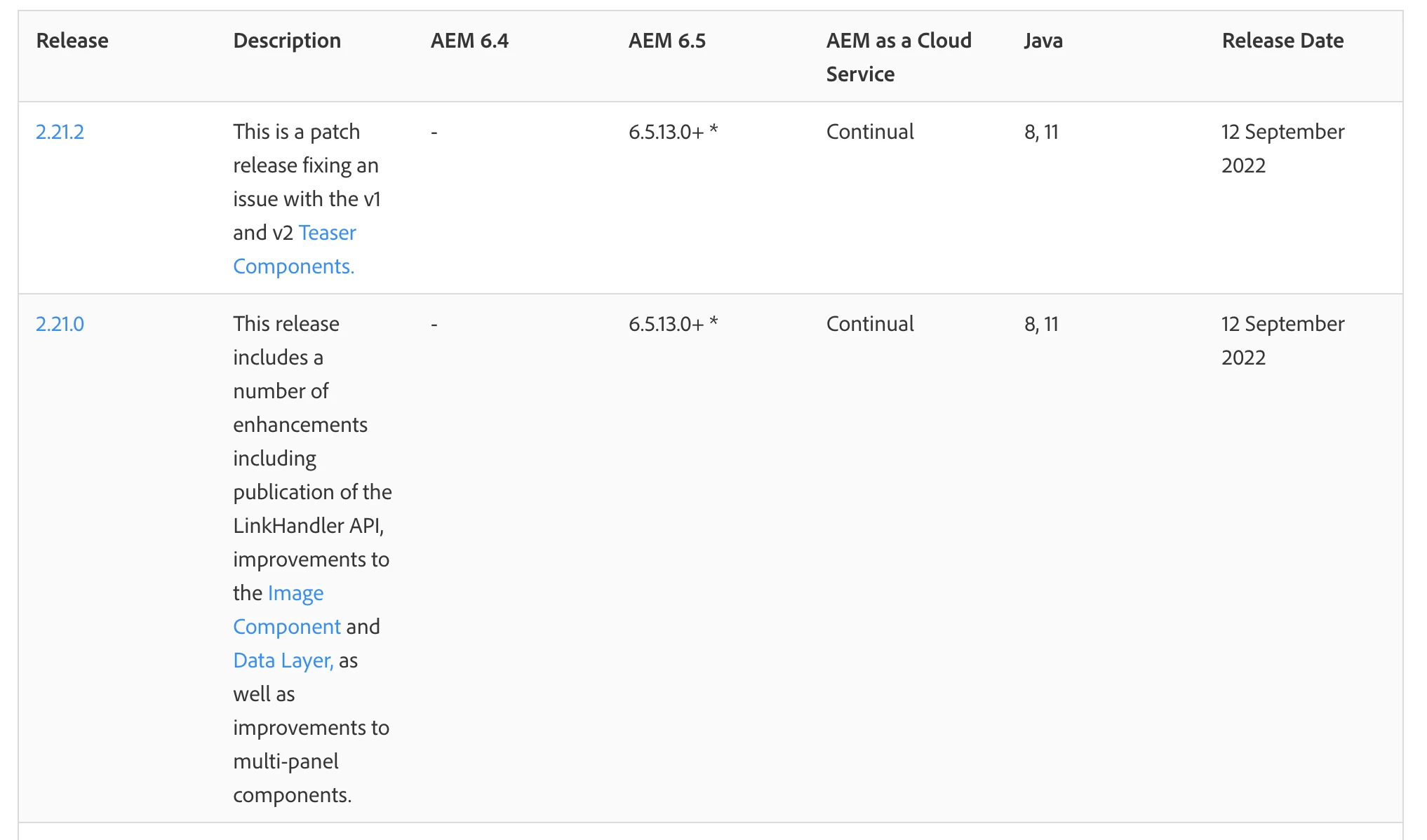
Its 2.21.0 version. That what i was searching for-the link for compatibility.


2.21.0 is not compactable with 6.5.10, see this document [1], you have to use 2.19.0 instead.

[1] https://experienceleague.adobe.com/docs/experience-manager-core-components/using/versions.html?lang=en

2 replies

Lokesh_Vajrala
Community Advisor
Community Advisor
December 2, 2022

@skumari1 It must be an issue with the WCM Core Components bundle - com.adobe.cq.core.wcm.components.core. Please check the bundle's state and try to activate it if it is not active. If it's not turning to an active state due to the dependency issues, you will see error messages in the log for reasons, and then try fixing the errors to make it active.

skumari1Author
Level 3
December 2, 2022

Hi @lokesh_vajrala

I am getting below dependency issue for core.wcm.components.core bundle

javax.annotation.meta -- Cannot be resolved but is not required
javax.xml.bind,version=[2.3,3) -- Cannot be resolved
javax.xml.bind.annotation,version=[2.3,3) -- Cannot be resolved
com.adobe.cq.wcm.spi,version=[0.1,1) -- Cannot be resolved
com.day.cq.dam.scene7.api.constants,version=[2.11,3) -- Cannot be resolved
com.day.cq.search,version=[1.4,2) -- Cannot be resolved
javax.xml.bind,version=[2.3,3) -- Cannot be resolved
javax.xml.bind.annotation,version=[2.3,3) -- Cannot be resolved
com.adobe.aem.wcm.seo,version=[1.0,2) -- Cannot be resolved but is not required
com.adobe.aem.wcm.seo.localization,version=[1.0,2) -- Cannot be resolved but is not required

Do i need to install any extraa jar or need to update the service pack?

currently it is 6.5.10

Mohit_KBansal
Adobe Employee
Adobe Employee
December 2, 2022

Which version of core components you are using? Have you checked if it's compactable with 6.5.10?

joerghoh
Adobe Employee
Adobe Employee
December 3, 2022

Please restart your instance and make sure that you are using a recent AEM 6.5 servicepack. (I think that this bug should be fixed there.)

skumari1Author
Level 3
December 7, 2022

Hi @joerghoh 

It got resolved after installing latest service pack. Thanks all for the quick help.