Multifield validation | Community
Skip to main content
Level 5
February 2, 2021
Solved

Multifield validation

  • February 2, 2021
  • 2 replies
  • 1659 views

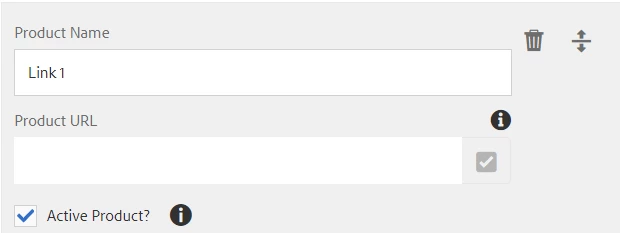
Hello - I have a composite multifield which has the below fields. Based on the checkbox selection (If I uncheck), I am making the Product URL field as mandatory which has all the required elements ( aria-required="true"). If I don't select the URL/Type the URL, it is still letting me to submit the dialog which shouldn't happen. But if I enter a space, it is showing as mandatory. is there any way to handle this ?


This post is no longer active and is closed to new replies. Need help? Start a new post to ask your question.
Best answer by Anudeep_Garnepudi

@v1101 

Try the below snippet.


$(document).on("change", ".aciveproduct", function(e) { if($(this).prop("checked")) { $(this).closest(".coral3-Multifield-item").find("foundation-autocomplete").removeAttr("required"); } else { $(this).closest(".coral3-Multifield-item").find("foundation-autocomplete").attr("required", "required"); } });


Hope this works. 

2 replies

VeenaVikraman
Community Advisor
Community Advisor
February 2, 2021

Do you have a jquery you have written to handle the same ? I doubt there is something wrong with the logic you have written to make the fields mandatory.

v1101Author
Level 5
February 2, 2021
PFB $(document).on("change", ".aciveproduct", function (e) { $(this).parent().find('.coral-InputGroup .coral3-Textfield.coral-InputGroup-input').attr("aria-required", "true"); testproduct($(this)); }); function testproduct(el) { var checkBoxLength = $(".aciveproduct").filter(':checked').length; $('.currentpage').each(function (i, element) { if (checkBoxLength > 0) { if ($(element).attr("type") === "checkbox") { if ($(element).prop('checked')) { $(element).parent().find('.coral-InputGroup .coral3-Textfield.coral-InputGroup-input').attr("aria-required", "false"); } } } else { $(element).parent().find('.coral-InputGroup .coral3-Textfield.coral-InputGroup-input').attr("aria-required", "true"); } }) }
Anudeep_Garnepudi
Community Advisor
Anudeep_GarnepudiCommunity AdvisorAccepted solution
Community Advisor
February 2, 2021

@v1101 

Try the below snippet.


$(document).on("change", ".aciveproduct", function(e) { if($(this).prop("checked")) { $(this).closest(".coral3-Multifield-item").find("foundation-autocomplete").removeAttr("required"); } else { $(this).closest(".coral3-Multifield-item").find("foundation-autocomplete").attr("required", "required"); } });


Hope this works. 

AG
v1101Author
Level 5
February 2, 2021
@anudeep_garnepudi - The aria-required attribute is applied when I change the checkbox option but it is letting me to submit the dialog with no data in it. If I hit a space on the textfield, then it is not letting me to submit the dialog saying that it is a required field.