Minification not working for JS/CSS | Community
Skip to main content
This post is no longer active and is closed to new replies. Need help? Start a new post to ask your question.
Best answer by MarkusBullaAdobe

Hi @niks1!

Minification should be enabled on the AEM publish and potentially author instance. Once done - through the OSGI configuration Day CQ HTML Library Manager as outlined in the linked article - AEM delivers all ClientLibraries minified.

The Dispatcher has no active task in minification. What you need to do though is adding the adjusted URLs (including the ".min." selector) to the dispatcher filter rules to 1. allow the dispatcher to deliver the files and not block them and 2. potentially allow the dispatcher to cache the minified files.


You are requesting these files using the ".min." selector as mentioned in the referenced article, right? (See different URLs of ClientLibs [A] vs. [B] in that article)


[A] http://<host>:<port>/etc/clientlibs/granite/jquery/granite.js [B] http://<host>:<port>/etc/clientlibs/granite/jquery/granite.min.js


While you're on it, I would also highly recommend to have a look at the Versioned ClientLibs feature of AEM ACS Commons. It will add a hash selector to the URL and ensure that you are always referencing the latest version of your ClientLibs. The Hash will change whenever the ClientLib changes, so you can cache existing ClientLibs files indefinitely on both, dispatcher and in the client/browser.


If this information is not what you were looking for, please provide some more details on what's "not working for dispatcher".


Hope that helps!

4 replies

Dipti_Chauhan
Community Advisor
Community Advisor
June 30, 2021

Hi @niks1 

   Can you please explain what is not working in dispacher. Are you getting error while accessing css with min selector?


Thanks

Dipti

niks1Author
June 30, 2021
@dipti_chauhan - i am not seeing minified file in dispatcher
MarkusBullaAdobe
Adobe Employee
MarkusBullaAdobeAdobe EmployeeAccepted solution
Adobe Employee
June 30, 2021

Hi @niks1!

Minification should be enabled on the AEM publish and potentially author instance. Once done - through the OSGI configuration Day CQ HTML Library Manager as outlined in the linked article - AEM delivers all ClientLibraries minified.

The Dispatcher has no active task in minification. What you need to do though is adding the adjusted URLs (including the ".min." selector) to the dispatcher filter rules to 1. allow the dispatcher to deliver the files and not block them and 2. potentially allow the dispatcher to cache the minified files.


You are requesting these files using the ".min." selector as mentioned in the referenced article, right? (See different URLs of ClientLibs [A] vs. [B] in that article)


[A] http://<host>:<port>/etc/clientlibs/granite/jquery/granite.js [B] http://<host>:<port>/etc/clientlibs/granite/jquery/granite.min.js


While you're on it, I would also highly recommend to have a look at the Versioned ClientLibs feature of AEM ACS Commons. It will add a hash selector to the URL and ensure that you are always referencing the latest version of your ClientLibs. The Hash will change whenever the ClientLib changes, so you can cache existing ClientLibs files indefinitely on both, dispatcher and in the client/browser.


If this information is not what you were looking for, please provide some more details on what's "not working for dispatcher".


Hope that helps!

niks1Author
June 30, 2021
@markusbullaadobe - Thanks for the reply. we did this in dispatcher we allowed the .min but still in our live environment we are not seeing the issue. Regarding versioning clientlib.. post implementation can this be having minified version ?
RajaShankar
Community Advisor
Community Advisor
June 30, 2021

Hi Niks,

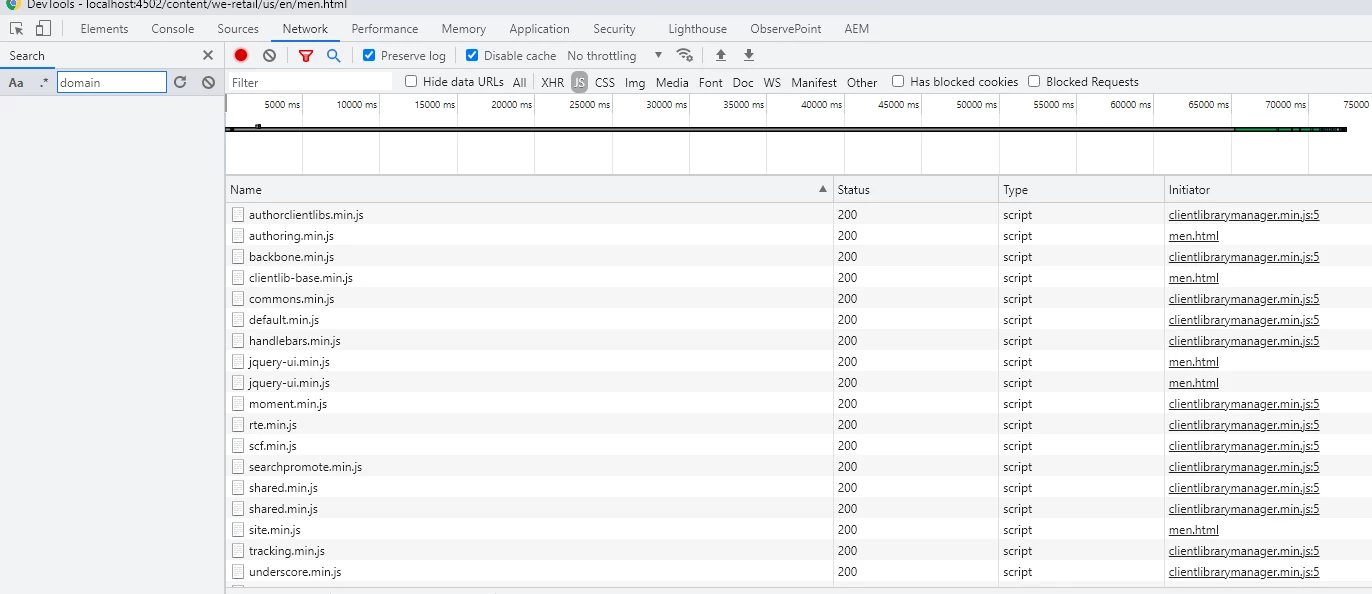
Once you set the minify option in HTML Manager Configuration. Try restarting the bundle Adobe Granite UI Clientlibs com.adobe.granite.ui.clientlibs  by stop/start. Then access your web page by clearing cache in browser you should see js files in network tab getting appended with abc.min.js as shown below.

Sample We Retail URL after minification:

http://localhost:4502/etc.clientlibs/weretail/clientlibs/clientlib-base.min.js

kchaurasiya
June 30, 2021

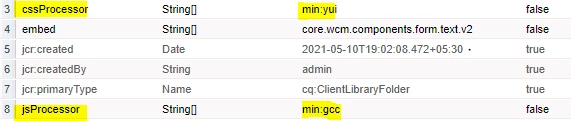
@niks1 Already well explained by @markusbullaadobe . I never get chance to check the client minification on the dispatcher side. For the learning purpose I just tried the same thing on my local dispatcher and i added the minification properties on the AEM author as per the below snapshot and  minification is also working on dispatcher as well.I do not see any minification issue on the dispatcher end.

You can also check whether you have cleared the cache or not.


Thank You.

October 31, 2022

Please go through this video https://www.youtube.com/watch?v=uNWGA42fiiQ it was very well explained Kudos!!