Cette conversation a été verrouillée en raison de son inactivité. Veuillez créer une nouvelle publication.
Niveau 1
Niveau 2
Se connecter à la communauté
Connectez-vous pour voir tous les badges
Cette conversation a été verrouillée en raison de son inactivité. Veuillez créer une nouvelle publication.
Hello everyone, I have this ArrayList list which is not empty. I am willing to iterate through it using HTL sly tags. What I've tried is:
${model.list.size}
-- this doesn't seems to work. I wrote a function in Jave which returns my list size and I can see it's not empty. Else I tried was:
Résolu ! Accéder à la solution.
Vues
Réponses
Nombre de J’aime
Works like a charm. List HTL Output:
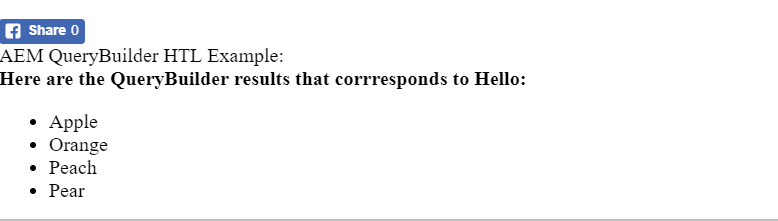
Java backend (I used WCMUsePojo for this example):
package com.aem.htl.core;
import java.util.ArrayList;
import java.util.HashMap;
import java.util.List;
import java.util.Map;
import org.apache.sling.api.resource.Resource;
import org.osgi.framework.FrameworkUtil;
import org.osgi.framework.ServiceReference;
import org.slf4j.Logger;
import org.slf4j.LoggerFactory;
import com.adobe.cq.sightly.WCMUsePojo;
public class HelloService extends WCMUsePojo
{
Logger logger = LoggerFactory.getLogger(HelloService.class);
protected String searchterm;
private List<String> file;
@Override
public void activate()
{
this.searchterm = getProperties().get("search", "").toLowerCase();
}
public List<String> getFiles()
{
//populate the
logger.info("The search term is");
this.file = new ArrayList();
this.file.add("Apple");
this.file.add("Orange");
this.file.add("Peach");
this.file.add("Pear");
return this.file;
}
}
HTL COde that displays the content of the LIST:
AEM LIST HTL Example:
<div data-sly-test="${properties.search}" data-sly-use.v="com.aem.htl.core.HelloService">
<b>Here are the QueryBuilder results that corrresponds to ${properties.search}:</b>
<ul data-sly-list="${v.files}">
<li>${item}</li>
</ul>
</div>
Vues
Réponses
Nombre de J’aime
Here is an older AEM Community article that uses QueryBuilder API and places the result set into an ArrayList. You can see how HTL is used to display the list:
AEM QueryBuilder Sightly Example:
<div data-sly-test="${properties.search}" data-sly-use.v="com.community.querybuilder.HelloService">
<b>Here are the QueryBuilder results that corrresponds to ${properties.search}:</b>
<ul data-sly-list="${v.files}">
<li>${item}</li>
</ul>
</div>
Thank you for your reply. I've tried, doesn't seem to work
<sly data-sly-use.model="blabla.core.models.MyModel.">
<ul data-sly-list="${model.filterList}">
<li>${item}</li>
</ul>
</sly>
Vues
Réponses
Nombre de J’aime
Post your Java backend - looks like you have not properly specified the correct backend.
Vues
Réponses
Nombre de J’aime
I will update this example - based on Java that creates the LIST and HTL to iterate it.
Vues
Réponses
Nombre de J’aime
Do you have getfilterList method in your model?
The Model class should contain a method named getfilterList() that returns a List instance. This List object contains a result set that is displayed in the HTL component:
public List<String> getfilterList(){
return filterList;
}
or can you please post java and htl code?
Arun is 100% correct - I will get this working on the latest AEM and post both Java code and HTL code.
Vues
Réponses
Nombre de J’aime
Works like a charm. List HTL Output:
Java backend (I used WCMUsePojo for this example):
package com.aem.htl.core;
import java.util.ArrayList;
import java.util.HashMap;
import java.util.List;
import java.util.Map;
import org.apache.sling.api.resource.Resource;
import org.osgi.framework.FrameworkUtil;
import org.osgi.framework.ServiceReference;
import org.slf4j.Logger;
import org.slf4j.LoggerFactory;
import com.adobe.cq.sightly.WCMUsePojo;
public class HelloService extends WCMUsePojo
{
Logger logger = LoggerFactory.getLogger(HelloService.class);
protected String searchterm;
private List<String> file;
@Override
public void activate()
{
this.searchterm = getProperties().get("search", "").toLowerCase();
}
public List<String> getFiles()
{
//populate the
logger.info("The search term is");
this.file = new ArrayList();
this.file.add("Apple");
this.file.add("Orange");
this.file.add("Peach");
this.file.add("Pear");
return this.file;
}
}
HTL COde that displays the content of the LIST:
AEM LIST HTL Example:
<div data-sly-test="${properties.search}" data-sly-use.v="com.aem.htl.core.HelloService">
<b>Here are the QueryBuilder results that corrresponds to ${properties.search}:</b>
<ul data-sly-list="${v.files}">
<li>${item}</li>
</ul>
</div>
I have the following:
private ArrayList filterList;
public ArrayList getFilterList(){
return filterList;
}
As I mentioned, I am trying to iterate through an ArrayList. With a List is working as expected, but it's not working through an ArrayList.
I'm using an ArrayList because my sling model is using an Exporter. For some reason, if I declare my list as List, the exporter stop working, through ArrayList is working as expected. ![]()
This AEM is like a woman, haha.
Vues
Réponses
Nombre de J’aime
EDIT: I've done the following and now it's working.
<ul data-sly-list="${model.getFilterList}">
<li>${item}</li>
</ul>
Apparently, there was something wrong with the getter but I can't tell for sure.
Thank you all for your help!
Vues
Réponses
Nombre de J’aime
Vues
Likes
Réponses
Vues
Likes
Réponses