How to package SystemUser and It's permission in AEM 6.3 | Community
Skip to main content
rahuls80678827
Level 3
March 23, 2018
Solved

How to package SystemUser and It's permission in AEM 6.3

  • March 23, 2018
  • 3 replies
  • 2757 views

I have created a System User as mySystemUser via http://localhost:4502/crx/explorer and then assigned permission (R/W to content folder) via http://localhost:4502/useradmin in my Dev Author Instance.

Now, I'm looking to create the package to deploy this System User and it's permission into higher environments.

I have followed below articles to create a system user:

Adobe Experience Manager Help | Querying Adobe Experience Manager 6 data using the Sling getServiceResourceResolver meth…

and to package System User via ACL:

http://www.aemcq5tutorials.com/tutorials/create-system-user-in-aem/

After following these articles, I have created the SystemUser ACL Package.zip (as shown below) -
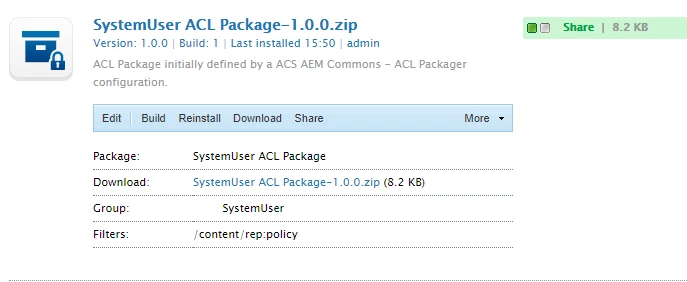
But after installing this ACL package in higher environments (like QA), then I can't see "mySystemUser" there (that is in http://localhost:4502/useradmin) and it's not present in CRX/DE either (home/users/system).

It's just that there is one node added after installing the ACL package under -

/content/rep:policy/allow63

My requirement is to copy the SystemUser (mySystemUser) and it's permission (that is on Content Folder) to higher environments via some deployable package?

Am I missing something here?

https://helpx.adobe.com/experience-manager/using/querying-experience-manager-sling.html
This post is no longer active and is closed to new replies. Need help? Start a new post to ask your question.
Best answer by Hemant_arora

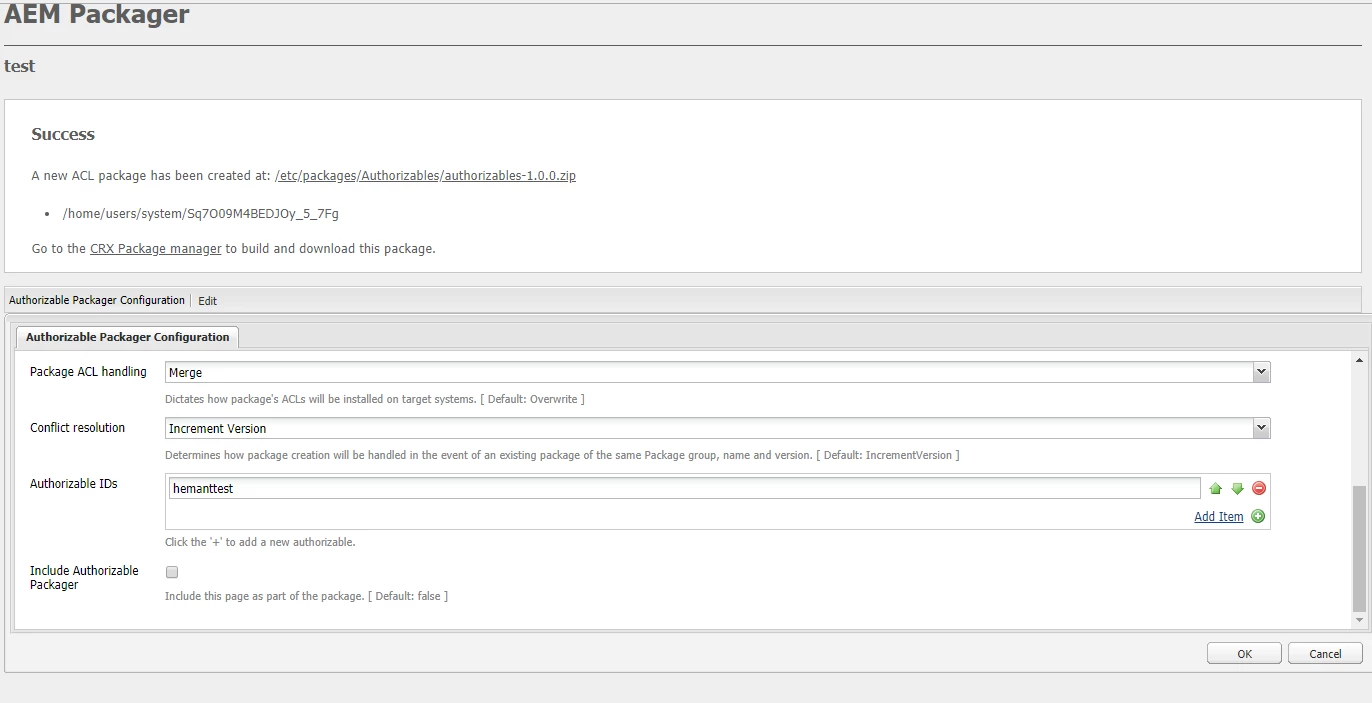
You have not included the user in your package.

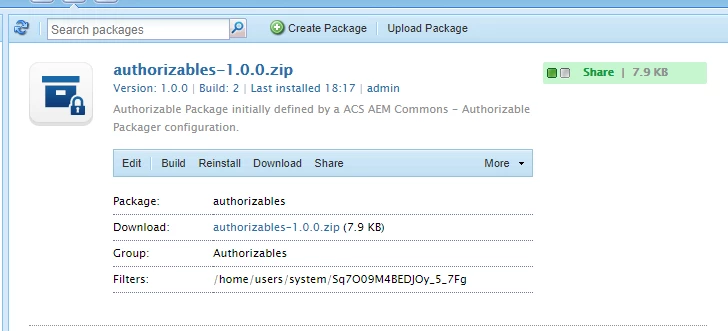
Your package should have path of the user e.g./home/users/system/Sq7O09M4BEDJOy_5_7Fg

You need not include the /content/rep:policy node in your package. Rather just add the username of the user while creating the package using acl packager tool of acs-commons. It will automatically find the path of user in crx/de and add it to package.  The node /content/rep:policy gets created once you assign permission on /content node to the user.

Select the merge option in the dialog.

After creating package using ACL Packager when you build the package using package manager, the /content/rep:policy nodes will be automatically taken care and will be deployed to the other environments.

3 replies

Hemant_arora
Hemant_aroraAccepted solution
Level 8
March 23, 2018

You have not included the user in your package.

Your package should have path of the user e.g./home/users/system/Sq7O09M4BEDJOy_5_7Fg

You need not include the /content/rep:policy node in your package. Rather just add the username of the user while creating the package using acl packager tool of acs-commons. It will automatically find the path of user in crx/de and add it to package.  The node /content/rep:policy gets created once you assign permission on /content node to the user.

Select the merge option in the dialog.

After creating package using ACL Packager when you build the package using package manager, the /content/rep:policy nodes will be automatically taken care and will be deployed to the other environments.

smacdonald2008
Level 10
March 23, 2018

Great response Hemant arora

rahuls80678827
Level 3
March 26, 2018

Thankyou hemant for the inputs.

When I edit the page (created using ACL), below are the default fields are available and I have selected my System User (mySystemUser) in the "Principal names" field. Include patterns (/content/.* and /etc/.*) are coming by default.

Now, when I am creating ACL package using these details, I cannot see SystemUser name or it's path (mySystemUser) in my package. Please find the snapshot below -

Do I need to select my System User explicitly by Editing it and add in filter like below and then build and download the package?