How publish different website from same author on different publish server | Community
Skip to main content
Level 2
April 18, 2016
Solved

How publish different website from same author on different publish server

  • April 18, 2016
  • 9 replies
  • 3273 views

Suppose we have a author server running on 4502. We created two websites w1 and w2 on that author instance.

In Parallel we have two publish instance p1 and p2 on 4503 and 4505. For that we have two replication agents RA1 and RA2 on author instances.

Now we want to publish our website w1 on publish instance p1(4503) using replication agent RA1 and website w2 on publish instance p2(4505) using replication agent RA2.

How this can be achived? Pl give the detailed solutions steps, if possible.

If possible give the link illustrating the following as i am very new to AEM.

This post is no longer active and is closed to new replies. Need help? Start a new post to ask your question.
Best answer by kautuk_sahni

Hi 


Please have a look at this community article:-

Link:- http://goo.gl/RB6elP

//

Scenario 

Assume you have one author instance namely author and two publish instances namely publish1 & publish2.  The contents activated for site "/content/geometrixx/en" should get replicated only to publish1 and similarly contents activated for site "/content/geometrixx/de" should get replicated only to publish2. 


Solution

You need to follow three simple steps mentioned below for each site. 

  1. Create an user.
  2. Assign permissions for user created at step1 to read site specific content that will be activated.
  3. Configure replication agent and in the replication agent for "Agent User Id" assign userid created in step1.

Demo Time

Environment:-  There are three local instances running 

  • author at port 4502
  • publish1 at port 4503
  • publish2 at port 4555

Configure Instance:-  First configure for site "/content/geometrixx/en" by following steps mentioned at "Solution" section.

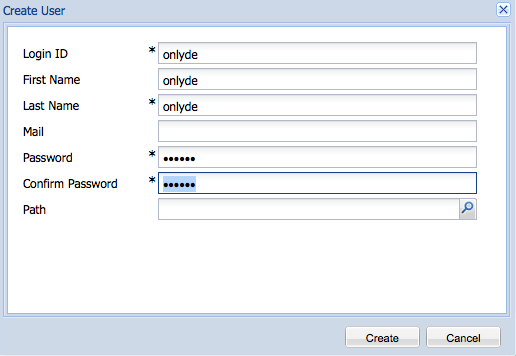
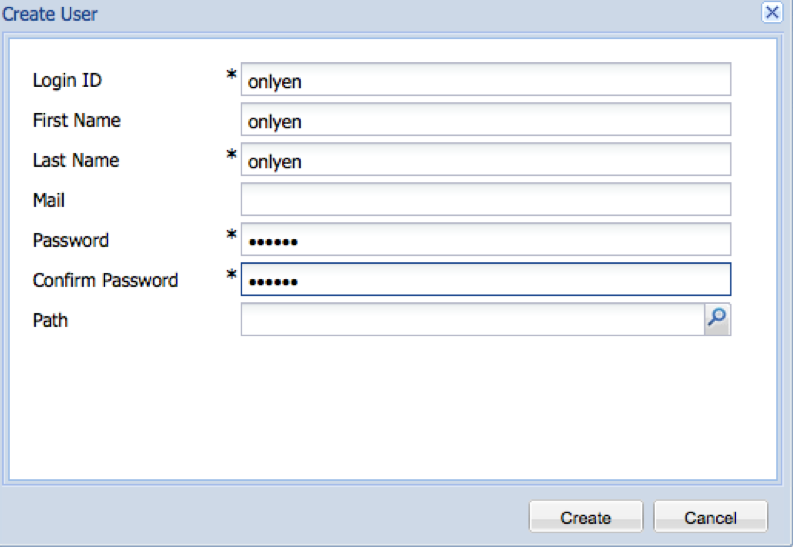
  • Create an user let us say "onlyen" at http://<host>:<port>/useradmin -> Create -> Create User.
  
 
  • Assign permission to "onlyen" to read site specific content "/content/geometrixx/en"
  •  Configure replication agent publish and assign "Agent User Id"as "onlyen"


Similarly configure for site "/content/geometrixx/de" by following steps mentioned at "Solution" section. Snapshots below


Verify the configuration

  • Create a page "testen" at "/content/geometrixx/en".
  • Similarly create another page "testde" at "/content/geometrixx/de".
  • Activate the pages "testen" & "testde".
  • Go to each publish instance & verify "testde" does not exist at 4503. Similarly, "testen" does not exist at 4555.

I hope this will help you.


Thanks and Regards

Kautuk Sahni 
9 replies

smacdonald2008
Level 10
April 18, 2016

You configure a reploication agent to publish content to a specific pub instance. 

See this AEM documentation:

https://docs.adobe.com/docs/en/aem/6-1/deploy/configuring/replication.html

For a replication agent - you can specify the URL to the PUB instance under the Transport tab: 

Hope this helps...

smacdonald2008
Level 10
April 18, 2016
Level 2
April 18, 2016

This much i know. But this will publish both website on both publish instance.

All i need is to publish website w1 on publish instance p1 and website w2 on publish instance w2 where both websites w1 and w2 are on same author server.

all i means is selective publishing the content from same author to different publish instance using different replication agents.

smacdonald2008
Level 10
April 18, 2016

That links discusses this use case:

Assume you have one author instance namely author and two publish instances namely publish1 & publish2.  The contents activated for site "/content/geometrixx/en" should get replicated only to publish1 and similarly contents activated for site "/content/geometrixx/de" should get replicated only to publish2. 

kautuk_sahni
Community Manager
kautuk_sahniCommunity ManagerAccepted solution
Community Manager
April 19, 2016

Hi 


Please have a look at this community article:-

Link:- http://goo.gl/RB6elP

//

Scenario 

Assume you have one author instance namely author and two publish instances namely publish1 & publish2.  The contents activated for site "/content/geometrixx/en" should get replicated only to publish1 and similarly contents activated for site "/content/geometrixx/de" should get replicated only to publish2. 


Solution

You need to follow three simple steps mentioned below for each site. 

  1. Create an user.
  2. Assign permissions for user created at step1 to read site specific content that will be activated.
  3. Configure replication agent and in the replication agent for "Agent User Id" assign userid created in step1.

Demo Time

Environment:-  There are three local instances running 

  • author at port 4502
  • publish1 at port 4503
  • publish2 at port 4555

Configure Instance:-  First configure for site "/content/geometrixx/en" by following steps mentioned at "Solution" section.

  • Create an user let us say "onlyen" at http://<host>:<port>/useradmin -> Create -> Create User.
  
 
  • Assign permission to "onlyen" to read site specific content "/content/geometrixx/en"
  •  Configure replication agent publish and assign "Agent User Id"as "onlyen"


Similarly configure for site "/content/geometrixx/de" by following steps mentioned at "Solution" section. Snapshots below


Verify the configuration

  • Create a page "testen" at "/content/geometrixx/en".
  • Similarly create another page "testde" at "/content/geometrixx/de".
  • Activate the pages "testen" & "testde".
  • Go to each publish instance & verify "testde" does not exist at 4503. Similarly, "testen" does not exist at 4555.

I hope this will help you.


Thanks and Regards

Kautuk Sahni 

Kautuk Sahni
Level 2
April 19, 2016

thanks..this is what i was looking for..smiley

Level 2
April 19, 2016

thanks a lot...this is the way i was searching for...:)

Level 2
April 20, 2016

Error Message:

org.apache.sling.api.scripting.ScriptEvaluationException: javax.servlet.ServletException: com.day.cq.replication.AccessDeniedException: Replicaiton Agent [test-replication-agent]- Agent user [dummyuser] doesn't have sufficient permission on [/content]

Processing Info:

                              
Page=/etc/replication/agents.author/test-replication-agent 
Resource Path=/etc/replication/agents.author/test-replication-agent/jcr:content 
Cell=agent 
Cell Search Path=agent 
Component Path=/libs/cq/replication/components/agent


++++++++++++++++++++++++++++++++++++++++++++++++++++++++++++++++++++++++++++++++++++++++++

the above error is thrown when replication agent "Test connection" is done.

the attached screen shot shows the permission granted to user for a particular page. I tried to allow with read permission only...but that was not working. So i granted all permission to the website.

Pl guide if something is found regarding this