Get data from Content Fragment multifield and arrange to show in frontend via HTML | Community
Skip to main content
Level 4
April 18, 2024

Get data from Content Fragment multifield and arrange to show in frontend via HTML

  • April 18, 2024
  • 2 replies
  • 1007 views

Hi,

My requirement is to get the data from the content fragment multifield and then show those in a particular manner. 

Here's the desired result :
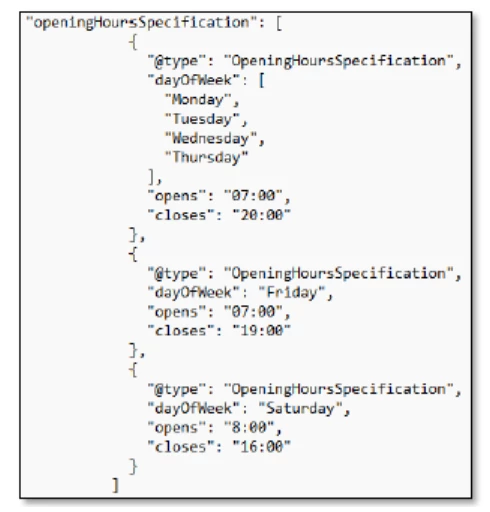
But currently, I am unable to segregate these data and as a result everything is coming altogether. Refer to the below screenshot for details : (Red ones should be grouped together, yellow ones should come together and same for yellow ochre)

Note : I have to display these data in the script (with the script type="application/ld+json").


Here's the content fragment for your reference :
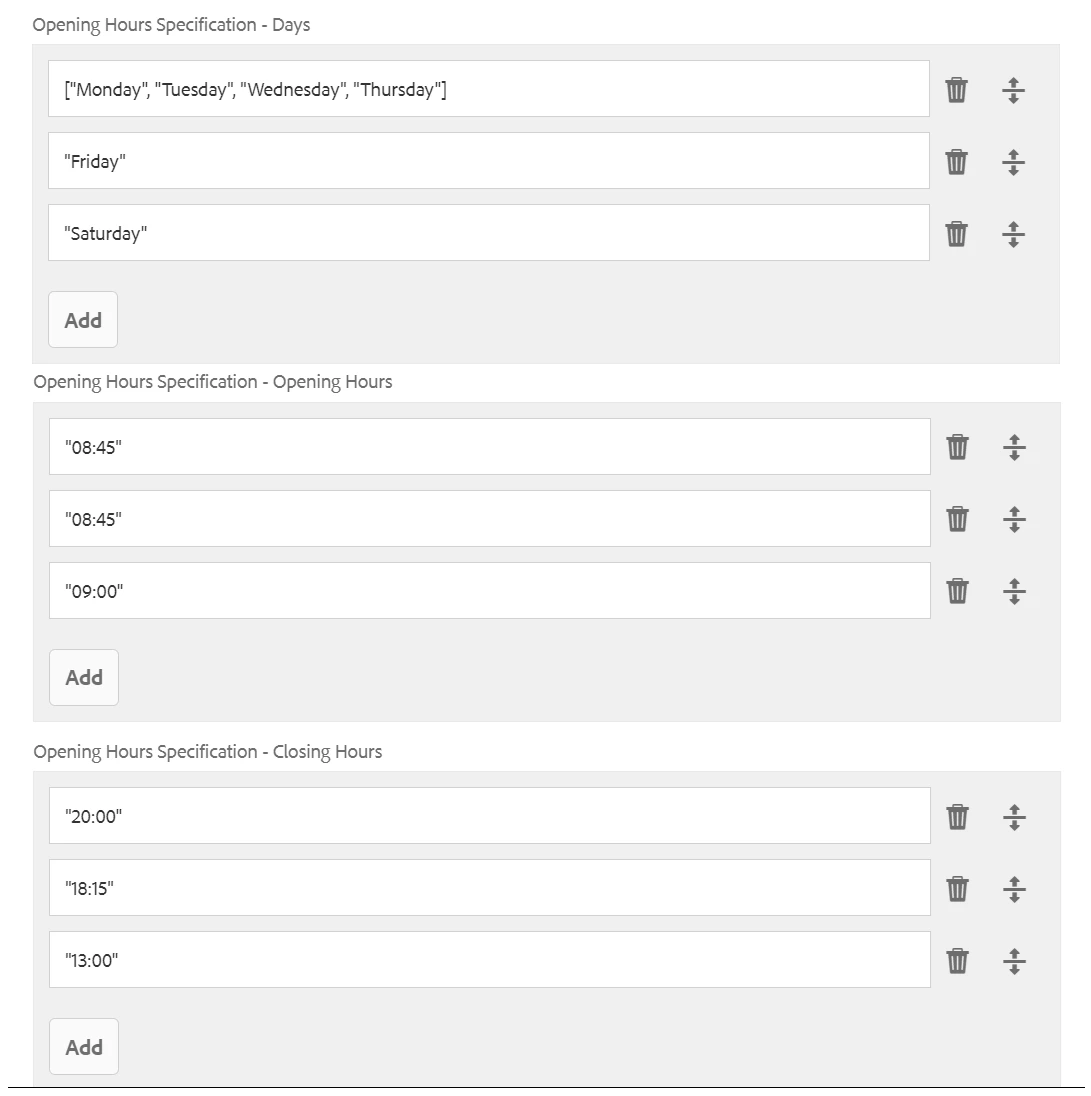
and this is what I was using in HTML :

 The backend code is (getters are used to return the data which is not part of the screenshot) :

 

Can someone help me out with the code/help articles so as to be able to meet the requirements?


Thanks!!


This post is no longer active and is closed to new replies. Need help? Start a new post to ask your question.

2 replies

Saravanan_Dharmaraj
Community Advisor
Community Advisor
April 18, 2024

@arindam6600 This would require you loop through dayofweek, opens and closes list and pick the items for the same index and create the openinghoursspecification array and return it in the model. Assuming you have equal number of items in each of dayofweek, opens and closes list. 

I woud prefer the content fragment is set to get the days, open and close as one item in the multifield and reading will be easy & straightforward in code

Level 4
April 18, 2024

also say I go with "I woud prefer the content fragment is set to get the days, open and close as one item in the multifield and reading will be easy & straightforward in code", I will fetch the data in backend just like how it is working now and then store them in an array. If you could let me know how I shall go ahead and print it accordingly in the HTML script portion?

Level 4
April 22, 2024

I've followed @saravanan_dharmaraj's approach and I have restructured the content fragment to get the data altogether. In the backend, I have split the array based on delimiter and thereafter created a JSON array with all the items in place. Now I am not able to figure out how to return the values in the HTML within the <script>.

I am getting the following error : org.apache.sling.scripting.sightly.render.ObjectModel Cannot access method splitArray on object sample.project.core.models.ContentInfoModel@57ef0ff9

private String[] openingHoursDays; public String[] splitArray; JSONObject jsonObject = new JSONObject(); JSONArray jsonArray = new JSONArray(); @PostConstruct private void initModel() { Resource fragmentResource = null; if (fragmentResource != null) { ContentFragment fragment = fragmentResource.adaptTo(ContentFragment.class); if(fragment.getElement("openingHoursDays").getContent() !=null) { openingHoursDays = fragment.getElement("openingHoursDays").getValue().getValue(String[].class); } } } public String[] getOpeningHoursDays( ) { return openingHoursDays; } public ArrayList<String> getSplitArray() { for (int i = 0; i < openingHoursDays.length; i++) { splitArray = openingHoursDays[i].split("-"); //splitting the array based on delimiter (-) try { jsonObject.put("@type:", "OpeningHoursSpecification"); //creating the JSON objects jsonObject.put("dayOfWeek", splitArray[i]); //creating the JSON objects at index 0 jsonObject.put("opens", splitArray[i+1]); //creating the JSON objects at index 1 jsonObject.put("closes", splitArray[i+2]); //creating the JSON objects at index 2 } catch (JSONException e) { LOGGER.info("Unable to create JSON object"); } jsonArray.put(jsonObject); //creating the JSON array from the JSON objects } ArrayList<String> listdata = new ArrayList<String>(); //For storing the data from JSON array in an array list if (jsonArray != null) { for (int m=0;m<jsonArray.length();m++){ try { listdata.add(jsonArray.getString(m)); //Add JSON array data to the list } catch (JSONException e) { LOGGER.info("Unable to create Array List"); } } } return listdata; }


Content Fragment :


HTML:
I am unable to get how to return these values in the script tag in html.