File vault jackrabbit plugin version downgrade from 1.3.6 to 1.1.4 | Community
Skip to main content
Level 2
January 30, 2025
Solved

File vault jackrabbit plugin version downgrade from 1.3.6 to 1.1.4

  • January 30, 2025
  • 1 reply
  • 914 views

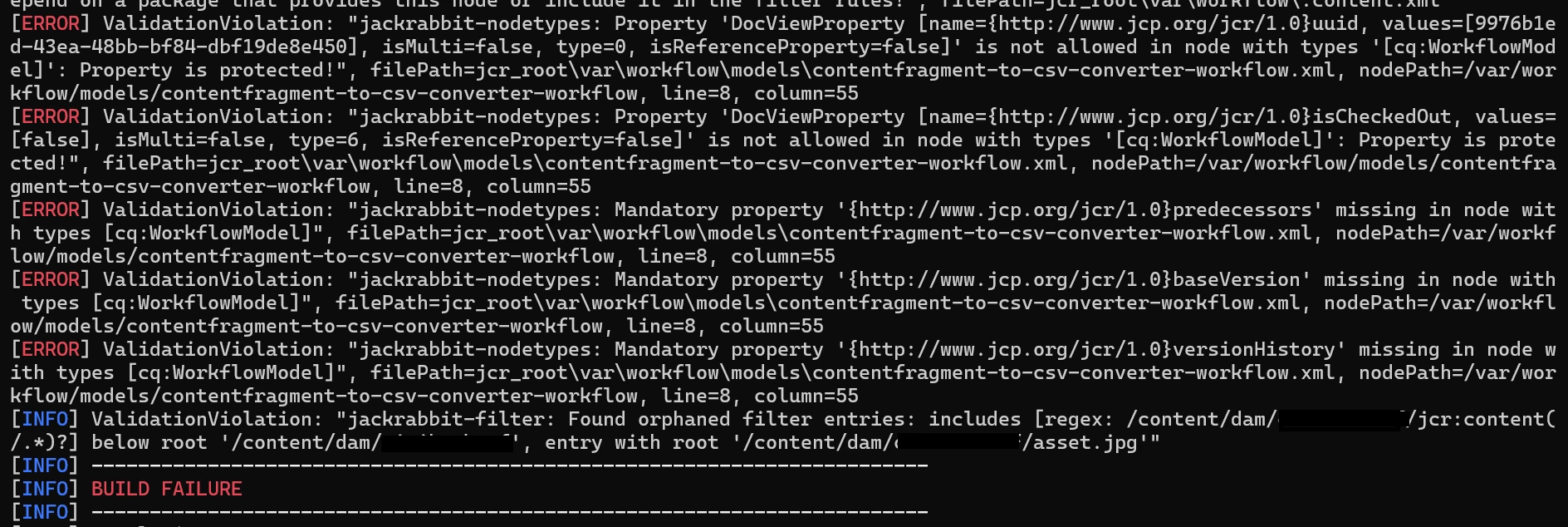
we have added workflow models in codebase under ui.content\src\main\content\jcr_root\conf\global\settings\workflow\models and ui.content\src\main\content\jcr_root\var\workflow\models. This was working fine. After downgrading file vault version from 1.3.6 to 1.1.4, getting below errors. Does anyone have a solution for this?
This post is no longer active and is closed to new replies. Need help? Start a new post to ask your question.
Best answer by TejaswiniS1

Hi @tejaswinis1 ,


Is this the POM of repository structure ? You will need to add /conf as a root path in repository structure's POM if not already done. Like this - https://experienceleaguecommunities.adobe.com/t5/adobe-experience-manager/interesting-error-with-filevault-package-maven-plugin-1-0-3/m-p/351462 


Thanks @anupampat  for helping. Issue got resolved.

It is not about the filter root mapping. Filter root mapping are properly configured. Found a workaround for this issue to get fixed by disabling nodetype validation.
<jackrabbit-nodetypes>
<isDisabled>true</isDisabled>
</jackrabbit-nodetypes>
Adding this in ui.content/pom.xml file under <validatorsSettings> fixed the plugin issue and build also getting success.

1 reply

anupampat
Community Advisor
Community Advisor
January 30, 2025
Level 2
January 30, 2025

Hi @anupampat ,


Thanks for your response. But in our repository structure, we already having filter.xml file, where roots paths of workflows are configured.
Here it is

<filter root="/conf/global/settings/workflow/models" mode="merge"/>
    <filter root="/var/workflow/models" mode="merge"/>
anupampat
Community Advisor
Community Advisor
January 30, 2025

@tejaswinis1 ,


Can you check the pom.xml of the repository structure ?