CSV Asset Importer - Import multi field items in metadata of asset | Community
Skip to main content
Level 2
March 25, 2019
Solved

CSV Asset Importer - Import multi field items in metadata of asset

  • March 25, 2019
  • 4 replies
  • 3587 views

Hi All,

I want to import asset metadata using asset importer. But few of the metadata has multifield dialouge.

Like for a multifield value we use {{Type : multi }}

But is there any way to create structure like below using csv asset importer.
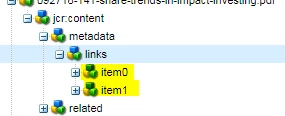
I am able to create till item 0 by writing ../metadata/links/item0 in my csv, but when I am giving one more for creating item1 i.e ../metadata/links/item1

It is overriding item 0 and creating item1.

This post is no longer active and is closed to new replies. Need help? Start a new post to ask your question.
Best answer by Hemant_arora

How many such item nodes are there under links node ? if only 2 then you have to update one by one.

first create column like this  ../jcr:content/test/item0/value {{ Long }}

upload the sheet and import.

then rename the column name to  ../jcr:content/test/item1/value {{ Long }}, update the values in rows

upload the sheet and select delta and import.

4 replies

Gaurav-Behl
Level 10
March 25, 2019

Did you try CSV Asset Importer?

Multi-values

If a row is marked as multi via propertyName {{ Type : multi }}, multi-values are delimited by default via |. The multi-value delimiter is configurable via the Web UI.

  • Since v0.0.28 CSV Asset Importer supports changing property types from Single to Multi (and vice versa). Note that the data in the CSV will replace any existing data at the defined property (This is not a Patch operation)
  • Since v0.0.28 CSV Asset Importer handles changing existing Multi properties to single value, and vice-versa. Any prior values will be removed (this is not a Patch operation, rather a remove and add).
Level 2
March 25, 2019

So you mean to say it will remove item 0 and add the node item 1 that I am trying in my case?

Hemant_arora
Hemant_aroraAccepted solution
Level 8
March 26, 2019

How many such item nodes are there under links node ? if only 2 then you have to update one by one.

first create column like this  ../jcr:content/test/item0/value {{ Long }}

upload the sheet and import.

then rename the column name to  ../jcr:content/test/item1/value {{ Long }}, update the values in rows

upload the sheet and select delta and import.

Level 2
April 3, 2019

Thank you! This approach worked