Create offer request failed - error while syncing an activity from AEM to Adobe Target | Community
Skip to main content
prashantonkar
Level 4
April 23, 2020
Solved

Create offer request failed - error while syncing an activity from AEM to Adobe Target

  • April 23, 2020
  • 3 replies
  • 10548 views

I am getting "Create Offer Request Failed!" error while pushing an activity from AEM to Adobe Target.
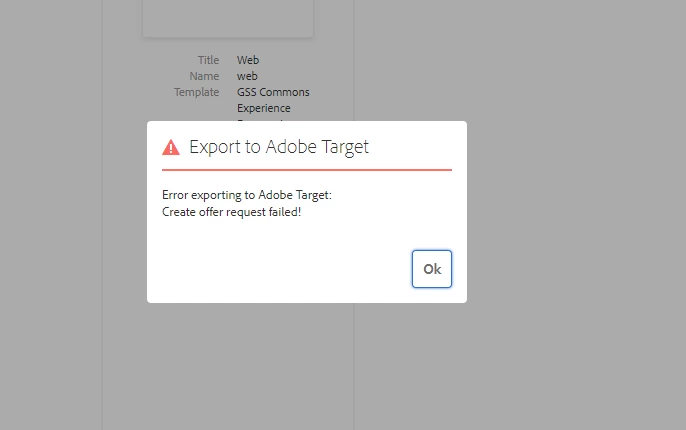
Log Entries:

{"httpStatus":403,"requestId":"qaYhfw4FXTWREsiNLNl1RBVjOSrmZ0kC","requestTime":"2020-04-16T13:25:19.697Z","errors":[{"errorCode":"Forbidden.Resource","message":"Access denied. To perform this operation, all of the following privileges are required \"[editor]\"."}]}


As mentioned in this post, I have also provided "Editor" product role to my integration. Is there any thing that I may be missing? One more thing to note here is the target workspace. When it is "Default Workspace" it works fine. If the workspace is anything other than "Default Workspace" I get the above error.


Reference: https://experienceleaguecommunities.adobe.com/t5/adobe-experience-manager/problem-when-export-experience-fragment-to-adobe-target/qaq-p/310771

This post is no longer active and is closed to new replies. Need help? Start a new post to ask your question.
Best answer by shregupt1

Thanks for your request. I am assuming you are using IMS integration. Could you confirm you AEM version?


For AEM 6.5.1, as documented in [2], the customers should follow approach as mentioned in [1]. 

AEM 6.5.2 onwards customers can choose to use [3]. It seems like you have followed [3] in your AEM 6.5.1 environment.
[1] https://docs.adobe.com/content/help/en/experience-manager-65/administering/integration/target.html

[2] https://docs.adobe.com/content/help/en/experience-manager-65/administering/integration/experience-fragments-target.html

[3] https://docs.adobe.com/content/help/en/experience-manager-65/administering/integration/integration-ims-adobe-io.html


Please confirm if you are not using Adobe I/o and what is your AEM version?

3 replies

shregupt1Adobe EmployeeAccepted solution
Adobe Employee
April 23, 2020

Thanks for your request. I am assuming you are using IMS integration. Could you confirm you AEM version?


For AEM 6.5.1, as documented in [2], the customers should follow approach as mentioned in [1]. 

AEM 6.5.2 onwards customers can choose to use [3]. It seems like you have followed [3] in your AEM 6.5.1 environment.
[1] https://docs.adobe.com/content/help/en/experience-manager-65/administering/integration/target.html

[2] https://docs.adobe.com/content/help/en/experience-manager-65/administering/integration/experience-fragments-target.html

[3] https://docs.adobe.com/content/help/en/experience-manager-65/administering/integration/integration-ims-adobe-io.html


Please confirm if you are not using Adobe I/o and what is your AEM version?

prashantonkar
Level 4
April 24, 2020

Thanks for your reply @ shreyag72517995

I upgraded my AEM to 6.5.2.


According to link [2]

Experience Fragments can be exported to either:
  • the default workspace.
  • a named workspace, specified in the Cloud Configuration.

But I am not getting any option to specify the workspace name in cloud configuration.

akhoury
Adobe Employee
Adobe Employee
April 24, 2020
Level 2
August 6, 2021

Hi all,

I have been troubleshooting this issue with all the steps mentioned in this thread.

I am currently running AEM 6.5 with SP8, have "Editor" role in the Target console and have the ability to change roles; I have currently tried swapping within Approver/Editor/Publisher roles and none of them seems to let me synchronize my local Activities to Adobe Target due to the same error described in the logs.

Is there any other workaround that I should try? The only missing thing that I have not tried yet, is to remove the target configuration from my local AEM environment, everytime that I switch roles in Adobe Target, which doesn't seems to make much sense, but would be next steps that I could try.