Always start AEM Coral UI Datepicker with Today's date irrespective of existing value. Request for help. Thanking you | Community
Skip to main content
nayeemnshaikh
Level 2
April 19, 2021
Solved

Always start AEM Coral UI Datepicker with Today's date irrespective of existing value. Request for help. Thanking you

  • April 19, 2021
  • 1 reply
  • 4587 views

We have AEM Coral UI Datepicker on page properties.
The Datepicker field may have some existing saved value. For example 2018-01-01
So when we click on Datepicker icon, the Datepicker's Calendar starts with the already existing date (2018-01-01).
The problem here is that if the user wants to change the date, as we have the min date as today, the user needs to manually click on the Calendar's right arrow several times to reach today's date which is not a good user experience.
We checked the Coral UI docs and didn't any API method to set the Datepicker's Calendar start Date or to always start the Datepicker's Calendar with today's date when we already have some existing date value in the datepicker field.
Please note stetting the min date will only disable the past dates but the calendar will start form the existing date instead of today's date.
Or can we at least add Today's button on the calendar like other date picker, on click of which will directly takes us to today's date.
Any example / reference /  sample code / demo would be for great help. Thanking you.

This post is no longer active and is closed to new replies. Need help? Start a new post to ask your question.
Best answer by Asutosh_Jena_

Hi @nayeemnshaikh 


Please create an extra clientlib which will be loaded only for this dialog(using extraClientlibs property on cq:dialog) on authoring mode and add the below peice of code:


(function ($, $document) {
$document.on("dialog-ready", function () {
var d = new Date();
$('coral-datepicker[name="./date"]').attr("value", d.getFullYear() + "-" + (d.getMonth() + 1) + "-" + d.getDate()); //set current date
});
})($, $(document));

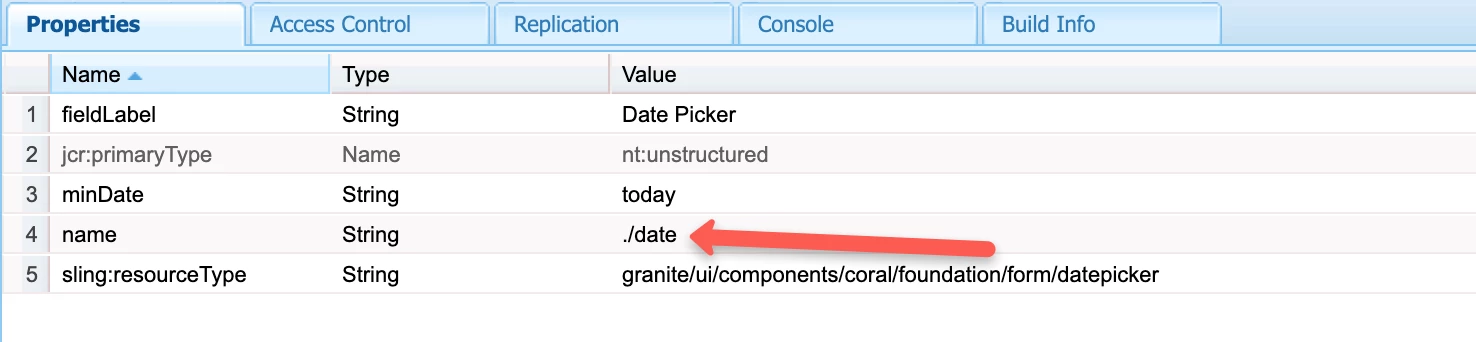
Highlighted name in the above code should exactly match with your name attribute of the field in dialog.


This will set the current date as the value in the date field when you open the dialog and the same will be used in calendar as well.


If you do not want the date field to be updated immediately when you open the dialog, and should be updated only when you click on the calendar button then use the below piece of code only:


(function ($, $document) {
$(document).on("click", "coral-datepicker ._coral-InputGroup-button", function (e) {
e.stopPropagation();
e.preventDefault();

var d = new Date();
$('coral-datepicker[name="./date"]').attr("value", d.getFullYear() + "-" + (d.getMonth() + 1) + "-" + d.getDate()); //set current date
});
})($, $(document));

For min date, you will need to use the "minDate" as "today" in dialog.


Update on 4/20:


(function ($, $document) {
$(document).on("click", "coral-datepicker ._coral-InputGroup-button", function (e) {
e.stopPropagation();
e.preventDefault();

var date = new Date();
var today = date.getFullYear() + "-" + (date.getMonth() + 1) + "-" + date.getDate();
$('coral-calendar._coral-Calendar').attr("value", today); // set the current date to datepicker overlay
});

$(document).on("click", "coral-calendar._coral-Calendar ._coral-Calendar-body .is-today", function (event) {
event.stopPropagation();
event.preventDefault();

var currentDate = $("coral-calendar._coral-Calendar ._coral-Calendar-table .is-today").attr("data-date");
$('coral-datepicker[name="./date"]').attr("value", currentDate); // set the current date to input field on click of current date within the date picker overlay.
})

})($, $(document));


Hope this helps and meets all your requirments! 🙂

Let me know if I missed anything.

Thanks

1 reply

Asutosh_Jena_
Community Advisor
Asutosh_Jena_Community AdvisorAccepted solution
Community Advisor
April 19, 2021

Hi @nayeemnshaikh 


Please create an extra clientlib which will be loaded only for this dialog(using extraClientlibs property on cq:dialog) on authoring mode and add the below peice of code:


(function ($, $document) {
$document.on("dialog-ready", function () {
var d = new Date();
$('coral-datepicker[name="./date"]').attr("value", d.getFullYear() + "-" + (d.getMonth() + 1) + "-" + d.getDate()); //set current date
});
})($, $(document));

Highlighted name in the above code should exactly match with your name attribute of the field in dialog.


This will set the current date as the value in the date field when you open the dialog and the same will be used in calendar as well.


If you do not want the date field to be updated immediately when you open the dialog, and should be updated only when you click on the calendar button then use the below piece of code only:


(function ($, $document) {
$(document).on("click", "coral-datepicker ._coral-InputGroup-button", function (e) {
e.stopPropagation();
e.preventDefault();

var d = new Date();
$('coral-datepicker[name="./date"]').attr("value", d.getFullYear() + "-" + (d.getMonth() + 1) + "-" + d.getDate()); //set current date
});
})($, $(document));

For min date, you will need to use the "minDate" as "today" in dialog.


Update on 4/20:


(function ($, $document) {
$(document).on("click", "coral-datepicker ._coral-InputGroup-button", function (e) {
e.stopPropagation();
e.preventDefault();

var date = new Date();
var today = date.getFullYear() + "-" + (date.getMonth() + 1) + "-" + date.getDate();
$('coral-calendar._coral-Calendar').attr("value", today); // set the current date to datepicker overlay
});

$(document).on("click", "coral-calendar._coral-Calendar ._coral-Calendar-body .is-today", function (event) {
event.stopPropagation();
event.preventDefault();

var currentDate = $("coral-calendar._coral-Calendar ._coral-Calendar-table .is-today").attr("data-date");
$('coral-datepicker[name="./date"]').attr("value", currentDate); // set the current date to input field on click of current date within the date picker overlay.
})

})($, $(document));


Hope this helps and meets all your requirments! 🙂

Let me know if I missed anything.

Thanks

nayeemnshaikh
Level 2
April 19, 2021

Thank you for your response. 
But this will also change the Datepicker's value to today's date when we click on Datepicker icon.
What we are trying to do is, when there is already an existing value on the Datepicker's field and when the user click's on the Datepicker icon, by default the Datepicker's Calendar starts from an existing value present on the Datepicker field.
Instead of default behavior, we want to start the Datepicker's Calendar from Today's date as we have set the min date to today.
So when the user click's on the the Datepicker's Calendar icon, the Calendar should start from Today's Date instead of default existing date value.
And the Datepicker's value should not change, unless the user select any date on the Calendar.