AEM Author sometimes showing Request Publication instead of Publish option | Community
Skip to main content
Samba_Kolusu
Level 2
May 27, 2021
Solved

AEM Author sometimes showing Request Publication instead of Publish option

  • May 27, 2021
  • 1 reply
  • 2571 views

Hi all,

our content authors are occasionally facing issues with publishing content pages.

i suspect this could be due to browsers losing permissions or cookie details because it is working after we clear browser cache, and restarting browser. some times we had to logout, clear cache, restart browser and then login again to get back the Publish page option from the menu.

is this a known bug in AEM 6.3 Author? any workarounds or patches available?

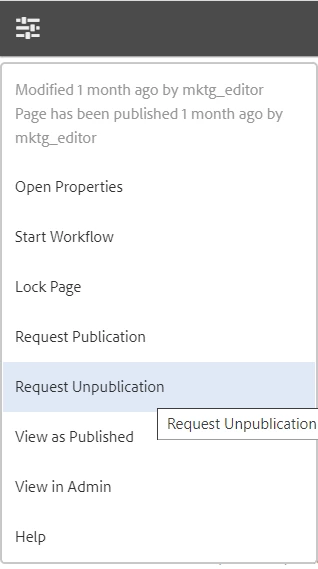
i am attaching the screenshots where we see "Request for Publication" instead of "Publish" option in the edtibar menu

any help is highly appreciated
thanks,
Samba

This post is no longer active and is closed to new replies. Need help? Start a new post to ask your question.
Best answer by MarkusBullaAdobe

Hi @samba_kolusu!


That's an issue with missing permissions of your editors.

Please double check on your permission setup and make sure that the concerned editors do have the replication rights for the according content paths. If the replication rights are missing, the system will start the "Request for publication" workflow.


Update:


In AEM the browser is not storing or handling any permissions for users. On login the user gets a session cookie for authentication but authorization (= permission handling) is completely server side. If the browser somehow loses the session/cookie or if it's expired, the user will have no access to AEM at all. This would not lead to a situation where access is still possible but only some permissions are missing. Therefore I recommend to double check on your current suspicion as to me it's very unlikely that clearing the browser cache is directly related. Usually, it's a good idea to step back and reevaluate the issue without any prejudices in a systematic manner. Are you able to reproduce the issue on a different system? If not - what are the differences between the systems?


In addition to the actual user permissions you could check the following:

  • Could this be a caching issue? Are you caching the AEM UI (e. g. the button in question) or related requests either on the dispatcher or setting HTTP headers that do advise the browser to cache things client side?
    While there are certain parts (e. g. images/icons, ClientLibs, etc.) that may be cached for optimized performance on the author environment it is discouraged to cache actual content, the UI or UI related requests as this may lead to unexpected behavior.
  • How are your permissions managed? Is it possible that they change (often) at runtime? Are you using some kind of SSO solution or external IDP?
    If you see changed permissions after logging out and back in again, this could potentially be caused because group memberships are synced through SSO on login. If group memberships have changed since the user last logged in, this may lead to different permissions after login. Please also note that the order of assigned groups may have an influence if they have overlapping (deny) rules.


Hope that helps!

1 reply

MarkusBullaAdobe
Adobe Employee
MarkusBullaAdobeAdobe EmployeeAccepted solution
Adobe Employee
May 27, 2021

Hi @samba_kolusu!


That's an issue with missing permissions of your editors.

Please double check on your permission setup and make sure that the concerned editors do have the replication rights for the according content paths. If the replication rights are missing, the system will start the "Request for publication" workflow.


Update:


In AEM the browser is not storing or handling any permissions for users. On login the user gets a session cookie for authentication but authorization (= permission handling) is completely server side. If the browser somehow loses the session/cookie or if it's expired, the user will have no access to AEM at all. This would not lead to a situation where access is still possible but only some permissions are missing. Therefore I recommend to double check on your current suspicion as to me it's very unlikely that clearing the browser cache is directly related. Usually, it's a good idea to step back and reevaluate the issue without any prejudices in a systematic manner. Are you able to reproduce the issue on a different system? If not - what are the differences between the systems?


In addition to the actual user permissions you could check the following:

  • Could this be a caching issue? Are you caching the AEM UI (e. g. the button in question) or related requests either on the dispatcher or setting HTTP headers that do advise the browser to cache things client side?
    While there are certain parts (e. g. images/icons, ClientLibs, etc.) that may be cached for optimized performance on the author environment it is discouraged to cache actual content, the UI or UI related requests as this may lead to unexpected behavior.
  • How are your permissions managed? Is it possible that they change (often) at runtime? Are you using some kind of SSO solution or external IDP?
    If you see changed permissions after logging out and back in again, this could potentially be caused because group memberships are synced through SSO on login. If group memberships have changed since the user last logged in, this may lead to different permissions after login. Please also note that the order of assigned groups may have an influence if they have overlapping (deny) rules.


Hope that helps!
Samba_Kolusu
Level 2
May 27, 2021
if it is an issue with user permissions on server, then how is it working after clearing browser cache and restarting browser?
